Snowflake AI Data Cloud Features & Architecture · Topic 6 of 17
Session Context, Variables and Parameter Hierarchy
Use context functions and session variables, and learn the Snowflake parameter hierarchy and precedence rules (account, user, session, object) for COF-C03.
- 5 min
- Includes a diagram
- Context: role, warehouse, database, schema; set with USE; read with CURRENT_ functions.
- Session variables:
SET,$name,SHOW VARIABLES,UNSET; session-scoped only. - Three parameter types: account, session, object.
What it is
Every connection to Snowflake opens a session. The session carries a context (current role, warehouse, database and schema), any session variables you set, and the effective values of parameters that control behavior such as time zone or query timeouts.
Parameters can be set at several levels. The exam tests which level wins when the same parameter is set in more than one place.
How it works
Session context and context functions
The context decides where unqualified object names resolve and which privileges apply. You change it with USE statements:
USE ROLE analyst;
USE WAREHOUSE bi_wh;
USE DATABASE sales;
USE SCHEMA sales.public;
A user's starting context comes from user properties such as DEFAULT_ROLE, DEFAULT_WAREHOUSE and DEFAULT_NAMESPACE.
Context functions return the current values:
| Function | Returns |
|---|---|
CURRENT_USER() | The logged-in user |
CURRENT_ROLE() | The primary role in use |
CURRENT_WAREHOUSE() | The warehouse in use |
CURRENT_DATABASE(), CURRENT_SCHEMA() | The current namespace |
CURRENT_ACCOUNT(), CURRENT_REGION() | The account locator and region |
CURRENT_SESSION() | The session ID |
Context functions are handy in row access policies, masking policies and views, for example returning different rows depending on CURRENT_ROLE().
Session variables
A session variable stores a value for the rest of the session. Set it with SET and read it with a $ prefix:
SET min_amount = 100;
SELECT * FROM orders WHERE amount > $min_amount;
SHOW VARIABLES;
UNSET min_amount;
Session variables exist only in the session that created them. They disappear when the session ends and are not visible to other sessions or users.
Parameter types
| Type | Set at | Example | Shown by default in SHOW PARAMETERS |
|---|---|---|---|
| Account parameters | Account only, with ALTER ACCOUNT | NETWORK_POLICY (also settable per user) | No |
| Session parameters | Account, user or session | TIMEZONE, QUERY_TAG, STATEMENT_TIMEOUT_IN_SECONDS | Yes |
| Object parameters | Account (as default) or on an object | DATA_RETENTION_TIME_IN_DAYS, MAX_CONCURRENCY_LEVEL | No |
Account parameters are set by a role with the right privilege, usually ACCOUNTADMIN.
Parameter hierarchy and precedence
!Parameter precedence: session parameters go account, user, session, with the most specific winning; object parameters are inherited from account to database to schema to table, so a schema set to 30 days gives its table 30; for the statement timeout parameters the lowest non-zero value of the session result and the warehouse value applies. The rule is simple: the most specific level wins.
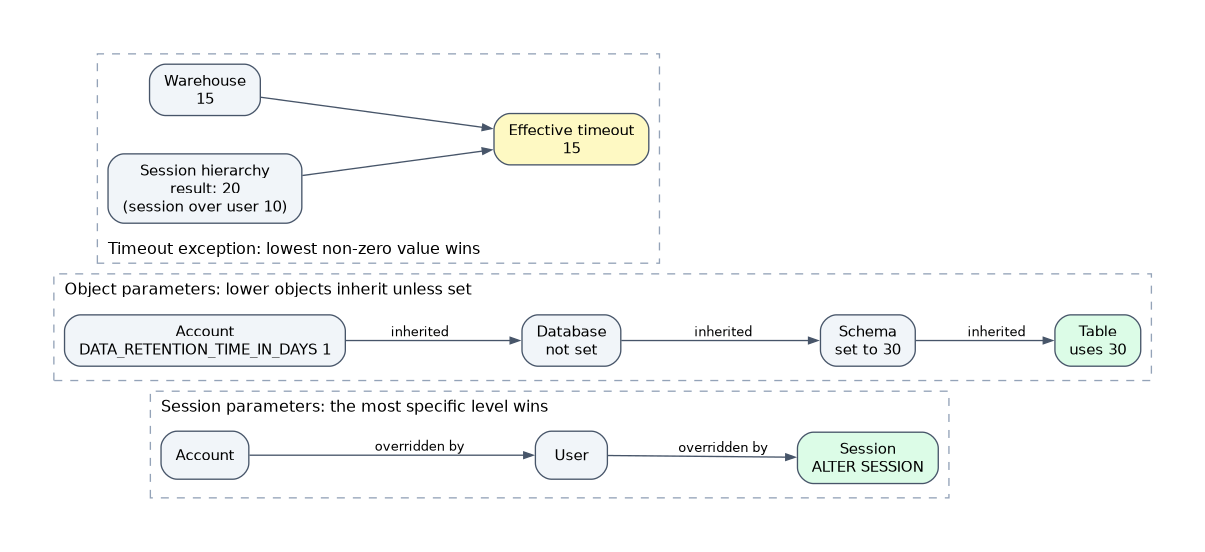
- Session parameters: session overrides user, and user overrides account.
ALTER SESSIONchanges only the current session. - Object parameters: an account value is the default for new objects; a value set on a database, schema, table or warehouse overrides it. Lower objects inherit from their container unless set themselves.
In that example the table uses 30 days because the schema setting is more specific than the account setting. If the table set its own value, that would win.
The timeout exception
STATEMENT_TIMEOUT_IN_SECONDS and STATEMENT_QUEUED_TIMEOUT_IN_SECONDS can be set both in the session hierarchy and on a warehouse. When both are set, Snowflake applies the lowest non-zero value of the two, not the more specific one.
| Setting | Value |
|---|---|
| User | 10 |
| Session | 20 (overrides user) |
| Warehouse | 15 |
| Effective timeout | 15, the lower of session 20 and warehouse 15 |
The default STATEMENT_TIMEOUT_IN_SECONDS is 172800 seconds (two days). The default STATEMENT_QUEUED_TIMEOUT_IN_SECONDS is 0, meaning no timeout while queued.
For a "which value applies" question, first resolve the session hierarchy (session over user over account). Only then, for the two timeout parameters, compare that result with the warehouse value and take the lower non-zero number.
Viewing parameters
SHOW PARAMETERS;                          -- session parameters
SHOW PARAMETERS IN ACCOUNT;               -- all parameters at account level
SHOW PARAMETERS IN WAREHOUSE bi_wh;       -- object parameters for a warehouse
SHOW PARAMETERS LIKE '%TIMEOUT%' IN SESSION;
The output shows each value, its default and the level it was set at, which tells you where an override came from.
How the exam asks about this
- "TIMEZONE is set on the account, and a user runs ALTER SESSION SET TIMEZONE" -> the session value applies for that session only.
- "A schema sets DATA_RETENTION_TIME_IN_DAYS to 30 and the account to 1. What does a new table in the schema get?" -> 30, inherited from the schema.
- "Session timeout 3600, warehouse timeout 600" -> 600, the lowest non-zero value.
Common mistakes
Assuming account settings always win. Account values are only defaults. A user, session or object setting overrides them.
Applying "most specific wins" to statement timeouts. For the two warehouse-aware timeouts, the lowest non-zero value of the session hierarchy and the warehouse applies.
Expecting session variables to persist. Variables set with SET vanish when the session ends. Use a table or parameter if a value must persist.
Missing object parameters in SHOW PARAMETERS. Plain SHOW PARAMETERS lists session parameters. Use IN ACCOUNT or IN <object> to see object parameters.
What to remember for the exam
- Context: role, warehouse, database, schema; set with USE; read with CURRENT_ functions.
- Session variables:
SET,$name,SHOW VARIABLES,UNSET; session-scoped only. - Three parameter types: account, session, object.
- Session hierarchy: account -> user -> session; the most specific wins.
- Object hierarchy: account -> database -> schema -> table (or account -> warehouse); the most specific wins.
- Statement timeouts set on both session and warehouse: lowest non-zero value applies.
SHOW PARAMETERS ... IN ACCOUNT | WAREHOUSE | DATABASEreveals levels and defaults.
Setting a parameter at the account level does not change objects or sessions that already set their own value. Check for overrides at lower levels before concluding a change "did not work".
Check yourself
A TIMEZONE is set at account, user and session level. Which one applies?
The session value, because the most specific level in the session hierarchy wins.
A session sets STATEMENT_TIMEOUT_IN_SECONDS to 3600 and its warehouse sets 600. What is enforced?
600 seconds, because for this parameter Snowflake applies the lowest non-zero value of the session and the warehouse.
How long does a variable created with SET last?
Only until the session ends; it is not visible to any other session.
Topic 6 of 17 in Snowflake AI Data Cloud Features & Architecture
Test yourself on Snowflake AI Data Cloud Features & Architecture
The full Snowflake SnowPro Core COF-C03 question bank has 845 questions, with timed practice exams and an explanation for every answer.
This study guide is independent and is not affiliated with, endorsed by, or sponsored by Snowflake. Vendor names, certification names and exam codes are trademarks of their respective owners and are used for identification only.