Account Management and Data Governance · Topic 4 of 8
Network Policies, Trust Center and Encryption Keys
Restrict sign-ins with network rules and policies, find risks with Trust Center scanners, and know Snowflake key rotation, rekeying and Tri-Secret Secure.
- 5 min
- Includes a diagram
- Network rules group identifiers; network policies allow or block them. Block wins over allow.
- Activate a policy on the account, a user or a security integration. The most specific level wins.
- One active account-level policy at a time; your own IP must be allowed when activating.
What it is
These three features harden the account itself. Network policies decide where connections may come from, the Trust Center checks the account against security best practices, and encryption key management protects data at rest.
All three work without changing any query. They sit around the data, not inside it.
How it works
Network rules and network policies
!Network policy check: the most specific active policy applies (security integration over user over account); an address in the blocked list is refused even if also allowed, an address in the allowed list is permitted, and an address not in the allowed list is refused; with no policy active all addresses are permitted. A network rule is a schema-level object that groups identifiers of one type, such as IPv4 ranges or private endpoint IDs. A rule does not allow or block anything by itself.
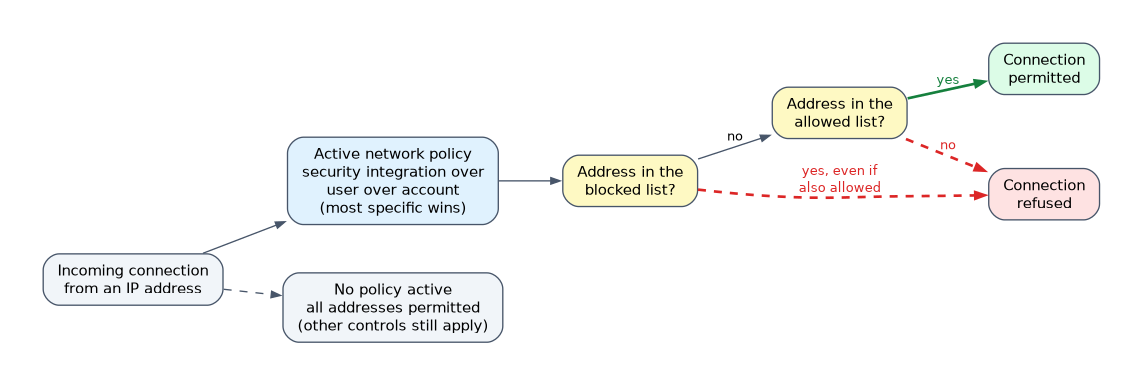
A network policy puts rules into ALLOWED_NETWORK_RULE_LIST or BLOCKED_NETWORK_RULE_LIST. Older policies list addresses directly in ALLOWED_IP_LIST and BLOCKED_IP_LIST; network rules are the recommended method for new policies.
| Rule | Behavior |
|---|---|
| Address only in the allowed list | Connection permitted |
| Address in the blocked list | Connection refused, even if also allowed |
| Allowed list set, address not in it | Connection refused |
| No policy active | All addresses permitted (other controls still apply) |
A policy does nothing until it is activated on the account, a user or a security integration. The most specific level wins: a security integration policy overrides a user policy, and a user policy overrides the account policy.
Only one network policy can be active on the account at a time, and each user can have one. Creating policies needs SECURITYADMIN or higher, or the CREATE NETWORK POLICY privilege.
When you activate a policy, your own current IP address must be allowed, or Snowflake rejects the activation. Users already signed in from a now-blocked address cannot run further queries.
Trust Center
The Trust Center in Snowsight evaluates the account with scanner packages and lists what it finds. It is part of Snowflake Horizon Catalog's security features.
| Scanner package | What it checks | Default |
|---|---|---|
| Security Essentials | Core practices such as MFA for password users and network policies | Always on; scheduled scans have no compute cost |
| CIS Benchmarks | The account against CIS Snowflake Benchmarks | Off; can incur serverless cost |
| Threat Intelligence | Risky users and sign-ins, such as password-only users or dormant users | Off; can incur serverless cost |
Findings are of two kinds. Violations are lasting configuration problems that stay listed until fixed and rescanned. Detections are one-time events, such as a sign-in from an unusual IP address, that you investigate.
Access is through application roles: an ACCOUNTADMIN grants SNOWFLAKE.TRUST_CENTER_VIEWER to view findings or SNOWFLAKE.TRUST_CENTER_ADMIN to also manage scanners and violations.
Encryption key management
All customer data is encrypted at rest with AES by default, and data in transit uses TLS. There is nothing to switch on.
Snowflake uses a hierarchical key model in which each key encrypts the keys below it. Each account has its own hierarchy, so a key protects only a small amount of data.
| Feature | What it does | Edition |
|---|---|---|
| Automatic key rotation | Snowflake-managed keys older than 30 days are retired and replaced; retired keys only decrypt | All |
| Periodic rekeying | Data protected by a retired key older than one year is re-encrypted with a new key | Enterprise or higher |
| Tri-Secret Secure | A composite master key built from a Snowflake key and a customer-managed key | Business Critical or higher |
Periodic rekeying is enabled by an ACCOUNTADMIN with ALTER ACCOUNT SET PERIODIC_DATA_REKEYING = TRUE; the default is FALSE.
With Tri-Secret Secure, the customer keeps a key in AWS KMS, Google Cloud KMS or Azure Key Vault. If the customer revokes that key, Snowflake can no longer decrypt the account's data, which gives the customer control over access.
"Rotation" and "rekeying" are different words on the exam. Rotation creates new keys for new data every 30 days; rekeying re-encrypts old data under a new key after one year.
Common mistakes
Thinking an allowed entry beats a block. If an address appears in both lists, it is blocked.
Creating a network policy and stopping there. A policy must be activated on the account, a user or an integration to take effect.
Assuming encryption needs configuring. Encryption at rest is automatic in every edition. Only rekeying and Tri-Secret Secure need extra setup.
Expecting the Trust Center to fix problems. It finds and reports risks; an administrator still makes the changes.
What to remember for the exam
- Network rules group identifiers; network policies allow or block them. Block wins over allow.
- Activate a policy on the account, a user or a security integration. The most specific level wins.
- One active account-level policy at a time; your own IP must be allowed when activating.
- Trust Center: Security Essentials always on; CIS Benchmarks and Threat Intelligence are optional and can cost credits.
- Violations persist until remediated; detections are one-time events.
- Keys rotate every 30 days; periodic rekeying after one year needs Enterprise; Tri-Secret Secure needs Business Critical.
Check yourself
An IP address appears in both the allowed and blocked lists of an active network policy. Can it connect?
No. A blocked entry always takes precedence over an allowed entry.
A user-level and an account-level network policy are both active. Which applies to that user?
The user-level policy, because the more specific level overrides the account policy.
Which feature lets a customer revoke Snowflake's ability to decrypt the account's data, and what edition does it need?
Tri-Secret Secure, which combines a customer-managed key with a Snowflake key and requires Business Critical Edition or higher.
Topic 4 of 8 in Account Management and Data Governance
Test yourself on Account Management and Data Governance
The full Snowflake SnowPro Core COF-C03 question bank has 845 questions, with timed practice exams and an explanation for every answer.
This study guide is independent and is not affiliated with, endorsed by, or sponsored by Snowflake. Vendor names, certification names and exam codes are trademarks of their respective owners and are used for identification only.