Account Management and Data Governance · Topic 5 of 8
Account Identifiers, Replication and Failover
Read Snowflake account identifiers and locators, replicate databases and account objects across regions, and plan failover groups and Client Redirect.
- 5 min
- Includes a diagram
- Preferred identifier: organization name plus account name; hyphen in URLs, period in SQL.
- Account locators are legacy, fixed at creation and may need region and cloud segments.
- Database and share replication: all editions. Account object replication, failover and Client Redirect: Business Critical or higher.
What it is
An account identifier names a Snowflake account uniquely, so clients, URLs and SQL can point at it. The identifier matters most when accounts talk to each other, as they do in replication and sharing.
Replication copies databases and account objects from a source account to accounts in other regions or clouds in the same organization. Failover promotes a replica to primary when the source is unavailable, and Client Redirect moves client connections along with it.
How it works
Account identifiers
The preferred identifier combines the organization name and the account name. The account name is chosen by the organization and is unique within it.
| Format | Example | Where it is used |
|---|---|---|
| Organization and account name, hyphen | myorg-salesprod | Snowsight, drivers, Snowflake CLI, connection URLs |
| Organization and account name, period | myorg.salesprod | SQL statements, data sharing, replication and failover commands |
| Account locator (legacy) | xy12345, or xy12345.us-east-2.aws in many regions | Older clients and scripts |
The connection URL takes the form myorg-accountname.snowflakecomputing.com. Account names may contain underscores; where a feature does not accept underscores in a URL, Snowflake also accepts the name with each underscore replaced by a hyphen.
The account locator is assigned when the account is created and cannot be changed. Depending on the region, it may need a region and cloud suffix, which is one reason the organization and account name format is preferred.
Find the values with SQL: CURRENT_ORGANIZATION_NAME() and CURRENT_ACCOUNT_NAME() give the preferred parts, and CURRENT_ACCOUNT() returns the locator.
If an answer option uses a period between organization and account, it is the SQL form; a hyphen is the URL form. Both name the same account.
What replication covers
| Capability | Edition |
|---|---|
| Database replication and share replication | All editions |
| Replication of other account objects (users, roles, warehouses, network policies, resource monitors, integrations and more) | Business Critical or higher |
| Failover and failback with failover groups | Business Critical or higher |
| Client Redirect with connection objects | Business Critical or higher |
Replication works only between accounts in the same organization, across regions and across cloud platforms. An organization administrator enables replication for the accounts involved.
Replication groups and failover groups
A replication group is a set of objects replicated together, so related databases stay consistent with each other at a point in time. A secondary copy is read-only.
A failover group is a replication group that can also fail over. In an outage, you run ALTER FAILOVER GROUP <name> PRIMARY in the secondary account, and its replicas become writable.
Refreshes run on a schedule set by REPLICATION_SCHEDULE or manually with ALTER ... REFRESH. Only changes since the last refresh are copied, and replication uses compute and data transfer that are billed to the target account.
Client Redirect
!Failover with Client Redirect: two accounts in the same organization; the primary failover group refreshes changes on a schedule to a read-only secondary in another region or cloud; after an administrator promotes the secondary failover group and connection, the application keeps its connection URL and reaches account B. Client Redirect uses a connection object with its own URL that is independent of either account. Clients connect to the connection URL.
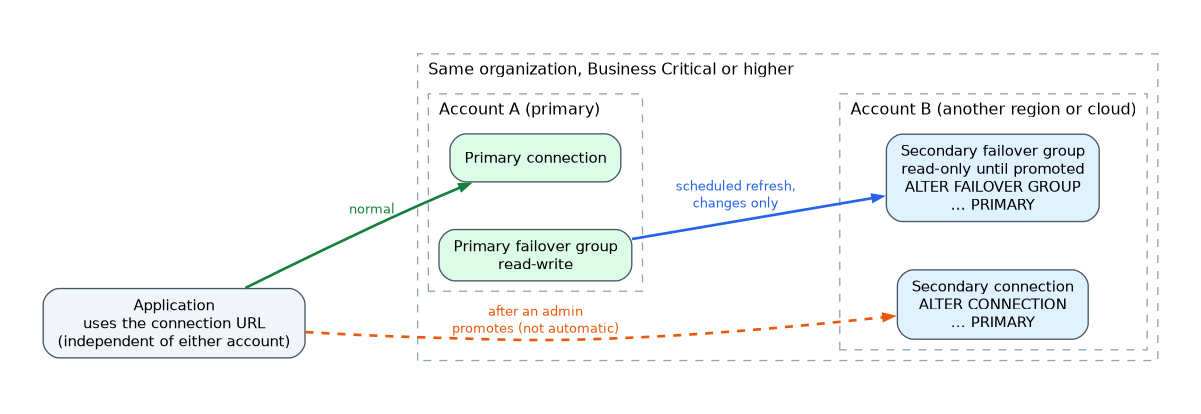
When you promote the secondary connection with ALTER CONNECTION <name> PRIMARY, the connection URL points to the new primary account. Applications keep the same URL and reconnect without configuration changes.
Failover does not happen automatically. An administrator promotes the secondary failover group and the connection, so runbooks must say who does it and when.
How the exam asks about this
- "Keep a read-only copy of a database in another region on Standard Edition" -> database replication.
- "Recover users, roles, warehouses and databases in another region and switch writes there" -> failover group, Business Critical.
- "Applications must reconnect after failover without changing their connection string" -> Client Redirect.
Common mistakes
Assuming failover is in every edition. Database replication is available to all accounts, but failover, account object replication and Client Redirect need Business Critical or higher.
Replicating across organizations. Replication is only between accounts in the same organization. Sharing data with another organization uses Secure Data Sharing or listings instead.
Writing to a secondary database. Secondaries are read-only until promoted.
Hard-coding the account locator. Locators are tied to one account and region. Use the organization and account name, or a Client Redirect connection URL.
What to remember for the exam
- Preferred identifier: organization name plus account name; hyphen in URLs, period in SQL.
- Account locators are legacy, fixed at creation and may need region and cloud segments.
- Database and share replication: all editions. Account object replication, failover and Client Redirect: Business Critical or higher.
- Replication stays inside one organization but can cross regions and clouds.
- Secondaries are read-only; promote a failover group to make it writable.
- Client Redirect keeps one connection URL across failover.
Check yourself
Which identifier format does Snowflake recommend, and how is it written in a URL?
Organization name plus account name, joined with a hyphen in URLs, such as myorg-myaccount.snowflakecomputing.com.
A Standard Edition customer wants a copy of a database in another region. Is that possible?
Yes. Database replication is available in all editions; failover of that database would need Business Critical.
What keeps application connection strings unchanged after a failover?
Client Redirect, which uses a connection object URL that is moved to the new primary account.
Topic 5 of 8 in Account Management and Data Governance
Test yourself on Account Management and Data Governance
The full Snowflake SnowPro Core COF-C03 question bank has 845 questions, with timed practice exams and an explanation for every answer.
This study guide is independent and is not affiliated with, endorsed by, or sponsored by Snowflake. Vendor names, certification names and exam codes are trademarks of their respective owners and are used for identification only.