Snowflake Architecture · Topic 17 of 18
Zero-Copy Cloning and Fail-safe
How zero-copy cloning works, what a clone copies and skips, how it combines with Time Travel, and what Fail-safe offers, costs and who can use it.
- 5 min
- Includes a diagram
- Clone is a metadata operation with copy on write; storage grows only as data changes.
- Clone with
ATorBEFOREfor a past state, within retention. - Tasks are cloned suspended; auto ingest pipes become
STOPPED_CLONED; table stages are empty; internal stages needINCLUDE INTERNAL STAGES.
What it is
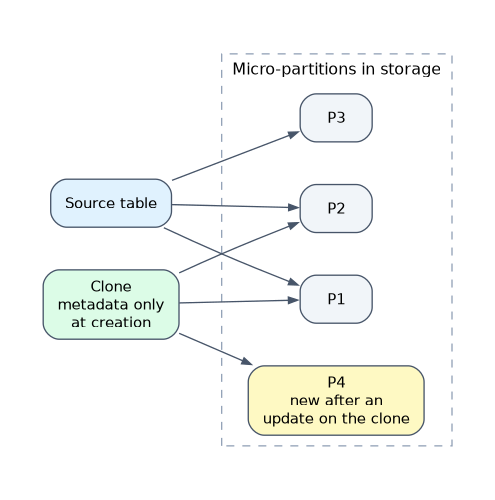
Zero copy cloning creates a new database, schema or table that points at the same stored micro partitions as the source. It copies metadata only, so a clone of a multi terabyte table is created in seconds and adds almost no storage at first.
Fail-safe is a fixed 7 day period after Time Travel ends during which Snowflake, not you, can still recover historical data of permanent objects. The exam treats the two as opposites: cloning is a tool you control daily, Fail-safe is an emergency service you cannot query.
How it works
Cloning
CREATE TABLE sales_dev CLONE sales;
CREATE SCHEMA analytics_test CLONE analytics AT (OFFSET => -86400);
CREATE DATABASE prod_copy CLONE prod;
Clones share storage until data diverges. After that, each new or changed micro partition belongs to whichever object changed it (copy on write), and only those partitions add storage. Changes to the source do not affect the clone, and the reverse.
You can clone databases, schemas and tables, plus streams, dynamic tables, external named stages and several other objects. Cloning is a metadata operation, but it still needs the privileges to read and create.
What a clone does and does not copy
| Item | In a clone |
|---|---|
| Tables, views, sequences, file formats, functions, procedures, policies in a cloned schema | Copied |
| Grants on child objects | Child objects keep the source's grants |
| Grants on the cloned container itself | Not copied; grant them manually |
| Tasks | Cloned suspended; resume them |
Pipes with AUTO_INGEST = TRUE | Cloned in the STOPPED_CLONED state; resume them |
| Pipes that reference an internal stage | Not cloned |
| External named stages | Cloned |
| Internal named stages | Only with INCLUDE INTERNAL STAGES |
| Table stages | Cloned empty |
| Unconsumed stream records | Not available in the clone; the stream starts at the clone point |
| Hybrid tables | Can block a database or schema clone; IGNORE HYBRID TABLES skips them |
Statements that support COPY GRANTS (such as CREATE TABLE) can copy privileges other than ownership onto the clone.
A temporary or transient table cannot be cloned into a permanent table. A permanent table can be cloned as transient, which is a way to make cheaper test copies.
A cloned task stays suspended and a cloned auto ingest pipe is stopped. If production tasks are cloned to a test schema and resumed, the copy may load or write into live targets. Check what each object writes to before resuming.
Cloning with Time Travel
Add AT or BEFORE to clone the state at a past moment, within retention. This gives you a recovery tool and a testing tool in one.
- The object must have existed at that point, or the statement fails.
- If any current child object has retention shorter than the requested point, the clone fails unless you add
IGNORE TABLES WITH INSUFFICIENT DATA RETENTION. - Child objects that did not exist at that time are not cloned.
- Name and structure are as of the clone point; other metadata such as comments and clustering keys is current.
Cloning and cost
A new clone costs nearly nothing. Storage grows only as data diverges. A clone also keeps the old micro partitions of the source alive: if you drop the source table or its Time Travel window passes, partitions still referenced by a clone are retained and billed. Table storage metrics show this as RETAINED_FOR_CLONE_BYTES.
Typical uses are dev and test environments from production, a safe sandbox for a migration, a point in time copy for an investigation, and a quick checkpoint before a risky change. A clone is a live copy, not a managed backup: nothing protects it from being changed or dropped, and it is not kept on a schedule.
Fail-safe
Fail-safe follows Time Travel. Total protection for a permanent table is therefore the Time Travel retention plus 7 days.
| Property | Value |
|---|---|
| Length | 7 days, not configurable |
| Starts | When the Time Travel retention ends |
| Applies to | Permanent tables, and the permanent schemas and databases containing them |
| Does not apply to | Transient and temporary tables, external tables |
| Who recovers | Only Snowflake, through a Snowflake Support request |
| Time to recover | Best effort; hours to days |
| Cost | Storage for Fail-safe bytes |
You cannot query, clone or restore Fail-safe data yourself. It is meant for extreme operational failures, not routine recovery.
Because Fail-safe adds stored bytes to every permanent table, transient tables are the standard way to avoid that cost for data you can rebuild. For transient tables the trade is simple: less storage cost, no Fail-safe, at most 1 day of Time Travel.
Common mistakes
Calling a clone a copy that duplicates storage. It is zero copy until data diverges.
Expecting grants to follow the container. Grants on child objects carry over; grants on the cloned database or schema do not.
Resuming cloned tasks or pipes without checking targets. They may write to production objects.
Treating Fail-safe as self service. Users cannot access it, and it is not a way to extend Time Travel.
Assuming transient tables have Fail-safe. They do not.
What to remember for the exam
- Clone is a metadata operation with copy on write; storage grows only as data changes.
- Clone with
ATorBEFOREfor a past state, within retention. - Tasks are cloned suspended; auto ingest pipes become
STOPPED_CLONED; table stages are empty; internal stages needINCLUDE INTERNAL STAGES. - Fail-safe is 7 days, fixed, after Time Travel, for permanent objects, recovered by Snowflake Support only.
- Dropping a source does not release storage still referenced by a clone.
Check yourself
An Architect clones a 5 TB production database for testing. How much extra storage appears at first?
Almost none, because the clone shares micro partitions; storage grows only as data diverges.
Can a user query data that is in Fail-safe?
No. Only Snowflake can recover it, by Support request, on a best effort basis.
A cloned schema contains tasks. What must happen before they run?
They must be resumed with
ALTER TASK ... RESUME, because cloned tasks are suspended.
Topic 17 of 18 in Snowflake Architecture
Test yourself on Snowflake Architecture
The full Snowflake ARA-C01 question bank has 687 questions, with timed practice exams and an explanation for every answer.
This study guide is independent and is not affiliated with, endorsed by, or sponsored by Snowflake. Vendor names, certification names and exam codes are trademarks of their respective owners and are used for identification only.