Snowflake Architecture · Topic 18 of 18
Disaster Recovery - Replication, Failover Groups and Business Continuity
Design Snowflake disaster recovery with replication and failover groups, refresh schedules, promotion and failback, plus edition rules and exclusions.
- 5 min
- Includes a diagram
- Replication is read only copies in another account, region or cloud; a failover group can be promoted to read write.
- Database and share replication: all editions. Account objects and failover groups: Business Critical or higher.
- The refresh schedule sets the RPO; promotion plus redirect sets the RTO.
What it is
Disaster recovery (DR) is the plan for keeping data and service available when a whole region, cloud platform or account becomes unavailable. Snowflake stores data redundantly inside a region, so DR protects against the loss of that region, not against a failed disk.
The tool is replication: a read only copy of chosen objects in another account, which can be in another region or on another cloud. When a copy can also take over, it is a failover group, and promoting it makes it the read write primary.
How it works
Replication building blocks
| Term | Meaning |
|---|---|
| Primary | The source object or group, read write |
| Secondary | A replica in another account, read only |
| Database replication | Replicates a single database to other accounts |
| Replication group | A defined set of objects replicated as a unit to one or more target accounts |
| Failover group | A replication group that can also fail over; the secondary becomes read write when promoted |
| Refresh | Applies changes since the previous refresh; the first refresh copies everything |
REPLICATION_SCHEDULE | Runs refreshes on a schedule, such as every 10 minutes |
Only one refresh runs at a time. The refresh interval sets your recovery point objective (RPO): with a 10 minute schedule you can lose up to about 10 minutes of changes. Your recovery time objective (RTO) depends on how fast you promote the secondary and redirect clients.
Edition requirements
| Capability | Edition |
|---|---|
| Database replication and share replication | All editions |
| Replicating account objects (users, roles, warehouses, integrations, parameters and more) | Business Critical or higher |
| Failover groups | Business Critical or higher |
Cross region and cross cloud replication incur data transfer charges, and refreshes use serverless compute. Both go on the bill, so the refresh schedule and the amount of replicated data are cost levers.
What replicates
A failover group can hold databases, shares and, on Business Critical or higher, account level objects such as users, roles and their grants, warehouses (replicated suspended), network policies, integrations, resource monitors and parameters. Replicated users and roles are read only in the target.
Not replicated, or restricted:
- Temporary tables and stages; files on user and table stages; event tables and externally managed Iceberg tables. Other types such as external and hybrid tables have restrictions, so check the replication considerations.
- Databases created from shares, and inbound shares.
- Stages and pipes under plain database replication; they replicate with replication or failover groups.
- The
REPLICATEandFAILOVERprivileges, and privileges on the groups themselves, which you grant in both accounts.
Failover and failback
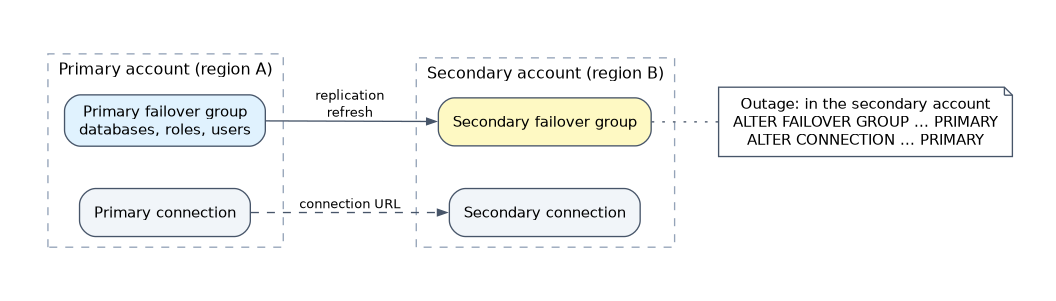
-- primary account
CREATE FAILOVER GROUP prod_fg
  OBJECT_TYPES = DATABASES, ROLES, WAREHOUSES
  ALLOWED_DATABASES = prod
  ALLOWED_ACCOUNTS = myorg.dr_account
  REPLICATION_SCHEDULE = '10 MINUTE';

-- secondary account
CREATE FAILOVER GROUP prod_fg AS REPLICA OF myorg.prod_account.prod_fg;

-- during a disaster, in the secondary account
ALTER FAILOVER GROUP prod_fg PRIMARY;
Steps in a failover:
- Detect the outage and decide to fail over.
- Promote the secondary failover group with
ALTER FAILOVER GROUP ... PRIMARY. It becomes read write. - Redirect clients to the new primary.
- Resume the work that must run there, such as tasks and pipelines that depend on external triggers.
Failback returns service to the original region after it recovers: refresh the original account from the new primary, then promote it again.
Client Redirect uses a connection URL that points to whichever account is primary, so applications do not change their connection string. After promotion, the URL follows the new primary.
Design guidance
| Goal | Design |
|---|---|
| Protect one database to another region | Database replication with a schedule |
| Full business continuity with users, roles and warehouses | Failover group with account objects (Business Critical or higher) |
| Lower RPO | Shorter refresh interval; costs more transfer and compute |
| No client changes after failover | Client Redirect with a connection URL |
| Protect against bad data as well | Add Time Travel and backups; replication copies bad data too |
| Cross cloud DR | Secondary in another cloud platform |
If the stem says "users, roles and warehouses must exist in the DR account", the answer is a failover group on Business Critical or higher, not database replication.
Plan the secondary in advance: it needs its own compute, and replicated warehouses arrive suspended. Test the failover on a schedule; an untested plan is not a plan.
Common mistakes
Using database replication when account objects must follow. Database replication moves data and schema level objects, not users, roles or warehouses.
Expecting replication on Standard or Enterprise for account objects. Failover groups and account object replication need Business Critical or higher.
Believing a secondary is writable. It is read only until promoted.
Assuming zero data loss. Data newer than the last refresh may be missing after failover.
Treating replication as protection against corruption. A faulty load is replicated like any other change.
What to remember for the exam
- Replication is read only copies in another account, region or cloud; a failover group can be promoted to read write.
- Database and share replication: all editions. Account objects and failover groups: Business Critical or higher.
- The refresh schedule sets the RPO; promotion plus redirect sets the RTO.
ALTER FAILOVER GROUP ... PRIMARYpromotes; failback means refresh back, then promote the original.- Client Redirect keeps one connection URL for applications.
- Temporary tables and databases created from shares (inbound shares) are not replicated; external, hybrid, event and externally managed Iceberg tables are excluded or restricted.
Check yourself
A company on Business Critical needs users, roles and warehouses in the DR region, and a 15 minute RPO. What is set up?
A failover group with those object types and a
REPLICATION_SCHEDULEof 15 minutes or less.What makes a secondary failover group read write?
Promoting it with
ALTER FAILOVER GROUP ... PRIMARY.Why does failover not repair a table corrupted by a bad load?
Replication copies the corrupted data; recovery needs Time Travel or a backup.
Topic 18 of 18 in Snowflake Architecture
Test yourself on Snowflake Architecture
The full Snowflake ARA-C01 question bank has 687 questions, with timed practice exams and an explanation for every answer.
This study guide is independent and is not affiliated with, endorsed by, or sponsored by Snowflake. Vendor names, certification names and exam codes are trademarks of their respective owners and are used for identification only.