Snowflake Architecture · Topic 2 of 18
Designing Data Sharing - Use Cases, Same Account, Same Region and Cross Region
Design Secure Data Sharing by use case: same account, same organization, same region, cross region and cross cloud, and between different accounts.
- 6 min
- Includes a diagram
- No data is copied: provider pays storage, consumer pays only compute.
- Direct shares work within one region (and cloud); for other regions use a listing with Cross-Cloud Auto-Fulfillment or replication.
- In one account, use roles and policies; for many accounts in an organization, use shares or organization listings.
What it is
Secure Data Sharing lets one Snowflake account (the provider) give read-only access to its data to other accounts (consumers) without copying or moving the data. The consumer creates a database from the share and queries the provider's storage through its own virtual warehouse.
The exam gives a use case and asks for the simplest correct design. The deciding questions are always the same: who is the consumer, are they in the same region and cloud, and do they need a copy or a live view.
How it works
Why organizations share
| Use case | Typical design |
|---|---|
| Business units with separate accounts | Direct share or organization listing |
| Partners, suppliers, customers | Private listing or direct share |
| Monetizing or publishing a data set | Snowflake Marketplace listing |
| Dev and test copies of production data | Replication or cloning, not sharing |
| Shared reference data to many regions | Listing with Cross-Cloud Auto-Fulfillment |
No data is copied. Providers pay for storage; consumers pay only for the compute they use to query. Consumers see changes as soon as they are committed in the provider account.
Within the same account
A share cannot be consumed in the account that owns it. Inside a single account, you control access with roles, role hierarchies, secure views, row access policies and masking policies. If different teams need separation, use separate roles or databases in one account, or move to multiple accounts and then share.
Within the same organization
Companies often run many accounts in one organization, for example one per business unit or region. Accounts in an organization can share directly with each other, or a provider can publish an organization listing so other accounts in the organization can find and request the data product. Use organization names in ALTER SHARE ... ADD ACCOUNTS (the form organization_name.account_name).
Within a cloud region
If provider and consumer are in the same cloud platform and region, a direct share works. The steps never change.
CREATE SHARE sales_share;
GRANT USAGE ON DATABASE sales_db TO SHARE sales_share;
GRANT USAGE ON SCHEMA sales_db.public TO SHARE sales_share;
GRANT SELECT ON TABLE sales_db.public.orders TO SHARE sales_share;
ALTER SHARE sales_share ADD ACCOUNTS = myorg.partner_account;
The consumer then runs CREATE DATABASE partner_sales FROM SHARE myorg.provider_account.sales_share; and grants IMPORTED PRIVILEGES on that database to the roles that need it. A direct share works only with accounts in the same region.
Across cloud regions and cloud providers
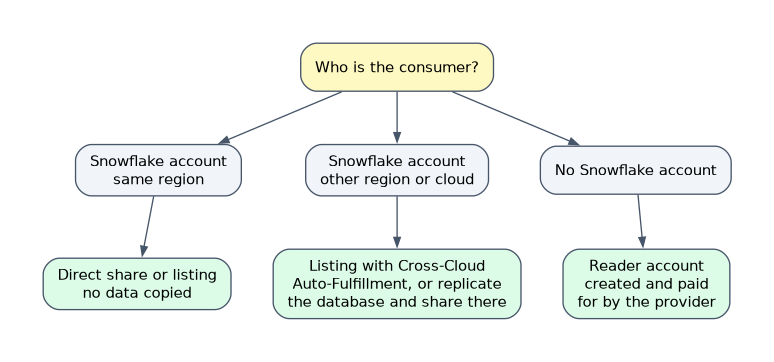 A direct share cannot reach another region or cloud. The data has to exist in the consumer's region first. There are two ways to get it there.
| Approach | How | When |
|---|---|---|
| Listing with Cross-Cloud Auto-Fulfillment | Snowflake replicates the data product to the consumer's region for you | Preferred for private and paid listings |
| Database replication | Provider enables replication of a database to an account in the target region, then shares from there | Provider wants direct control; manual refresh with REFRESH or a schedule |
With replication, the provider pays for the storage in each extra region and for data transfer and compute used by the refresh. The replicated database is a copy that must be refreshed, so consumers see changes only after a refresh.
When a question says "consumer is in another region" and asks for the least administrative effort, choose a listing with Cross-Cloud Auto-Fulfillment.
Between different Snowflake accounts
Any full account can be a provider and a consumer, so two unrelated companies on Snowflake can share in either direction. The provider adds the consumer account to the share, or sends a private listing. The consumer's queries run in the consumer's own account, on its own warehouses.
Design rules for sharing with other accounts:
- Share secure views when you must hide columns, filter rows or join tables, instead of exposing base tables.
- Use a mapping table and
CURRENT_ACCOUNT()in a secure view so one share serves many consumers, each seeing only its own rows. - Give each consumer a separate share when their data differs fully, or use database roles inside one share to segment access.
- Streams cannot be shared; consumers build their own streams on shared tables or secure views.
Common mistakes
Trying a direct share to another region. It fails by design. Use a listing with auto-fulfillment or replicate first.
Sharing standard views to protect data. Snowflake can now share non-secure views, but their definition and optimizations are not protected. When the view hides columns or filters rows for consumers, make it a secure view.
Expecting consumers to own the data. The consumer database is read-only and has no storage cost for the shared data. The consumer cannot insert, update or clone-and-modify it in place.
Forgetting grants. An empty share exposes nothing. Grant USAGE on the database and schema before SELECT on the objects, and grant IMPORTED PRIVILEGES on the consumer side.
What to remember for the exam
- No data is copied: provider pays storage, consumer pays only compute.
- Direct shares work within one region (and cloud); for other regions use a listing with Cross-Cloud Auto-Fulfillment or replication.
- In one account, use roles and policies; for many accounts in an organization, use shares or organization listings.
- Use secure views to protect shared logic (non-secure views can also be shared, but without that protection);
CURRENT_ACCOUNT()plus a mapping table gives per-consumer filtering. - Consumers create one database per share with
CREATE DATABASE ... FROM SHAREand needIMPORTED PRIVILEGESgranted.
Check yourself
Can a share be consumed inside the account that created it?
No. Within one account, use roles, secure views and policies instead.
A partner on another cloud needs live data with minimal effort from the provider. What is the best fit?
A listing with Cross-Cloud Auto-Fulfillment, which replicates the data product to the partner's region automatically.
How can one share return different rows to each consumer?
Use a secure view that filters with CURRENT_ACCOUNT() against a mapping table of accounts and their rows.
Topic 2 of 18 in Snowflake Architecture
Test yourself on Snowflake Architecture
The full Snowflake ARA-C01 question bank has 687 questions, with timed practice exams and an explanation for every answer.
This study guide is independent and is not affiliated with, endorsed by, or sponsored by Snowflake. Vendor names, certification names and exam codes are trademarks of their respective owners and are used for identification only.