Performance Monitoring and Tuning · Topic 8 of 16
Resource Monitors and Cost Dashboards
Create and manage Snowflake resource monitors from business needs, understand triggers and levels, and build a Snowsight dashboard to watch credit costs.
- 4 min
- Includes a diagram
- Only
ACCOUNTADMINcreates monitors;MONITORandMODIFYcan be granted per monitor. NOTIFYalerts,SUSPENDwaits for statements,SUSPEND_IMMEDIATEcancels them.- One account level monitor; each warehouse is in at most one warehouse level monitor.
What it is
A resource monitor watches the credits used by warehouses and can notify administrators or suspend warehouses when a limit is reached. It turns a budget rule such as "this team may spend 500 credits a month" into an enforced control.
A monitor is a guardrail for warehouse compute. It does not control serverless features such as Snowpipe, automatic clustering or materialized views; those are tracked with budgets and usage views.
How it works
Creating a monitor
Only ACCOUNTADMIN can create a resource monitor. Other roles can be given MONITOR or MODIFY on a specific monitor to view or change it through SQL, while Snowsight management is for account administrators.
A monitor is defined by these properties.
| Property | Meaning |
|---|---|
CREDIT_QUOTA | Credits allowed in each interval |
FREQUENCY | DAILY, WEEKLY, MONTHLY, YEARLY or NEVER |
START_TIMESTAMP | When counting begins; immediate or in the future |
END_TIMESTAMP | When assigned warehouses are suspended, even if no threshold was reached |
NOTIFY_USERS | Users who receive notifications |
TRIGGERS | Actions at percentages of the quota |
Used credits reset to 0 at the start of each interval. The quota counts warehouse credits including the cloud services credits that support those warehouses.
USE ROLE ACCOUNTADMIN;
CREATE RESOURCE MONITOR marketing_rm
  WITH CREDIT_QUOTA = 500
       FREQUENCY = MONTHLY
       START_TIMESTAMP = IMMEDIATELY
       NOTIFY_USERS = (ana, ben)
  TRIGGERS ON 75 PERCENT DO NOTIFY
           ON 90 PERCENT DO SUSPEND
           ON 100 PERCENT DO SUSPEND_IMMEDIATE;
ALTER WAREHOUSE marketing_wh SET RESOURCE_MONITOR = marketing_rm;
Triggers
| Action | Behavior |
|---|---|
NOTIFY | Sends an alert only; warehouses keep running |
SUSPEND | Lets running statements finish, then suspends the warehouses |
SUSPEND_IMMEDIATE | Cancels running statements and suspends at once |
Each monitor allows up to five NOTIFY actions, one SUSPEND and one SUSPEND_IMMEDIATE. Thresholds can be set above 100 percent. Suspension is not instant, so a warehouse can overshoot; setting a suspend threshold below 100 percent, such as 90, gives a buffer.
Notifications are off by default. Each user must have a verified email address and enable resource monitor notifications in their profile, and non administrators can be notified only for warehouse level monitors.
Account level versus warehouse level
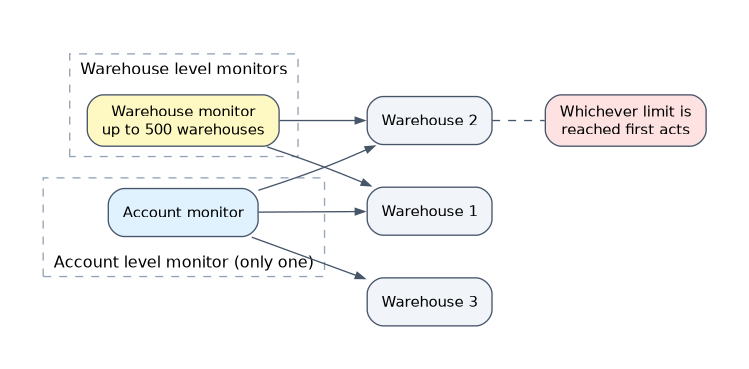
| Level | Scope | Rule |
|---|---|---|
| Account | All warehouses in the account | One account level monitor |
| Warehouse | One or more named warehouses | A warehouse belongs to only one warehouse level monitor; one monitor can cover up to 500 warehouses |
A warehouse can be under both an account monitor and a warehouse monitor, and whichever limit is reached first acts. Use SHOW RESOURCE MONITORS to see the LEVEL, quota, used credits and remaining credits.
Matching monitors to use cases
| Requirement | Design |
|---|---|
| Hard cap for a development team | Warehouse monitor, monthly quota, SUSPEND at 90 and SUSPEND_IMMEDIATE at 100 |
| Early warning to finance only | NOTIFY triggers at 50, 75 and 90 percent |
| Company wide ceiling | Account level monitor |
| Budget ends at a fixed date | Set END_TIMESTAMP |
| Serverless feature spend | Use a budget, not a resource monitor |
Dashboard to monitor costs
Build a Snowsight dashboard whose tiles run SQL against the usage views, and share it with the people who watch spend. Typical tiles:
- Credits by warehouse over time from
WAREHOUSE_METERING_HISTORY. - Daily credits by service type from
METERING_DAILY_HISTORY. - Storage trend from
STORAGE_USAGEorDATABASE_STORAGE_USAGE_HISTORY. - Top users or queries by cost from
QUERY_HISTORY.
Access to the SNOWFLAKE database views comes from granting the needed database roles, such as USAGE_VIEWER, or imported privileges, to the dashboard owner's role. Snowsight also has built in cost management pages for consumption, which is often the quickest start.
Common mistakes
Expecting a monitor to cap serverless features. Resource monitors act on warehouses.
Using only NOTIFY and calling it a cap. Nothing stops spending without a suspend trigger.
Setting suspend at 100 percent and expecting exactness. Suspension has a delay, so credits can run over.
Creating the monitor with a non ACCOUNTADMIN role. Creation needs ACCOUNTADMIN.
What to remember for the exam
- Only
ACCOUNTADMINcreates monitors;MONITORandMODIFYcan be granted per monitor. NOTIFYalerts,SUSPENDwaits for statements,SUSPEND_IMMEDIATEcancels them.- One account level monitor; each warehouse is in at most one warehouse level monitor.
- Monitors do not control serverless spend; use budgets for that.
- Dashboards in Snowsight are built from usage views such as
WAREHOUSE_METERING_HISTORY.
Check yourself
Which trigger action stops running queries at once?
SUSPEND_IMMEDIATE.Who may create a resource monitor?
Only
ACCOUNTADMIN.Does a resource monitor limit Snowpipe credits?
No; serverless features are tracked with budgets and usage views.
Topic 8 of 16 in Performance Monitoring and Tuning
Test yourself on Performance Monitoring and Tuning
The full Snowflake ADA-C02 question bank has 814 questions, with timed practice exams and an explanation for every answer.
This study guide is independent and is not affiliated with, endorsed by, or sponsored by Snowflake. Vendor names, certification names and exam codes are trademarks of their respective owners and are used for identification only.