Performance Monitoring and Tuning · Topic 9 of 16
Event Tables - Logging, Metrics and Tracing Setup
Enable logging and tracing with Snowflake event tables: default versus custom tables, setup, and the LOG_LEVEL, METRIC_LEVEL and TRACE_LEVEL settings.
- 4 min
- Includes a diagram
- Event tables store logs, metrics and traces in a predefined column layout.
SNOWFLAKE.TELEMETRY.EVENTSis the default and active unless you set another; read it throughEVENTS_VIEW.ALTER ACCOUNT SET EVENT_TABLEorALTER DATABASE ... SET EVENT_TABLEassociates a custom table; the database setting wins for its objects.
What it is
An event table is a special table with a fixed set of columns that stores telemetry emitted by Snowflake and by your own code: logs (messages), metrics and traces (spans). Stored procedures, user defined functions and other supported objects write to it when their levels allow.
The administrator decides which event table is active, who may read it, and how much telemetry to collect, since more telemetry means more storage and cost.
How it works
Default system event table versus custom tables
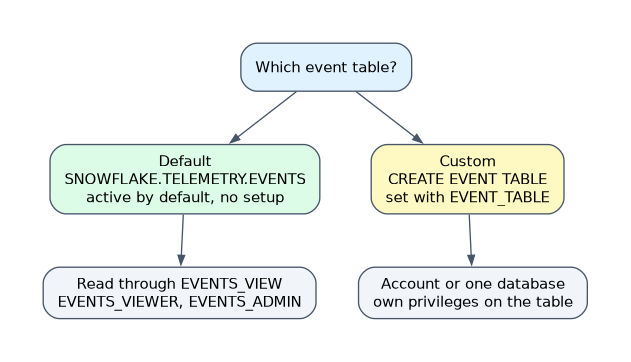
| Aspect | Default SNOWFLAKE.TELEMETRY.EVENTS | Custom event table |
|---|---|---|
| Creation | Exists in the SNOWFLAKE database | You run CREATE EVENT TABLE |
| Active by default | Yes, if you set no other event table | No; you set it with EVENT_TABLE |
| Columns | Predefined | Predefined; you do not define them |
| Access | SNOWFLAKE.TELEMETRY.EVENTS_VIEW, with EVENTS_VIEWER and EVENTS_ADMIN application roles | Normal privileges on the table you own |
| Row access policy | Attach to the view (Enterprise Edition) | Possible on your own table design |
| Scope | Account | Account or a single database |
| DDL | Supports only a subset of commands | Full table style control by its owner |
Pick the default when you want telemetry with no setup and controlled access through the view. Pick a custom table when you need per database separation, your own retention handling, or tighter ownership.
Event tables in primary databases are not replicated.
Configure event tables
Creating and associating a custom table takes three steps.
CREATE EVENT TABLE my_db.logs.app_events;
ALTER ACCOUNT SET EVENT_TABLE = my_db.logs.app_events;
-- or for one database (Enterprise Edition):
ALTER DATABASE sales SET EVENT_TABLE = my_db.logs.sales_events;
SHOW PARAMETERS LIKE 'event_table' IN ACCOUNT;- You need the
CREATE EVENT TABLEprivilege to create it. - Account association needs
ACCOUNTADMIN(or the account level privilege) plusOWNERSHIPorINSERTon the table. - A database level event table takes precedence over the account table for objects in that database.
ALTER ACCOUNT UNSET EVENT_TABLEremoves the association.
To read the default table safely, grant EVENTS_VIEWER to roles instead of users.
Set levels for logs, metrics and tracing
Three parameters decide what is captured. They can be set on the account, a database, a schema, or a specific function or procedure, and the most specific setting wins. If a level is also set for the session, the more verbose of the session and object values applies.
| Parameter | Values | Default |
|---|---|---|
LOG_LEVEL | TRACE, DEBUG, INFO, WARN, ERROR, FATAL, OFF | OFF |
METRIC_LEVEL | ALL, NONE | NONE |
TRACE_LEVEL | ALWAYS, ON_EVENT, OFF | OFF |
A level lets through messages at that severity and worse. LOG_LEVEL = WARN keeps WARN, ERROR and FATAL and drops the rest. TRACE_LEVEL = ALWAYS records spans for every execution, while ON_EVENT records them only when the code adds a trace event.
ALTER ACCOUNT SET LOG_LEVEL = WARN;
ALTER DATABASE sales SET LOG_LEVEL = INFO;
ALTER FUNCTION my_udf(INT) SET LOG_LEVEL = DEBUG, TRACE_LEVEL = ALWAYS;With the defaults of OFF and NONE, no telemetry is captured even when an event table is active. Both an active table and a permissive level are needed.
Manage logging and tracing over time
- Telemetry collection and storage have costs, so raise levels for investigation and lower them afterward.
- Control who can read the table, because logs may contain sensitive values.
- Clean up with
DELETEorTRUNCATEwhere you own the table; for the default table,EVENTS_ADMINcarries those rights.
Common mistakes
Setting an event table but leaving levels at default. Nothing is collected until levels allow it.
Granting the default table to users directly. Grant the application roles to roles, and use the view for access control.
Setting LOG_LEVEL = DEBUG account wide and forgetting it. It floods storage and raises cost.
Defining your own columns. Event table columns are fixed.
What to remember for the exam
- Event tables store logs, metrics and traces in a predefined column layout.
SNOWFLAKE.TELEMETRY.EVENTSis the default and active unless you set another; read it throughEVENTS_VIEW.ALTER ACCOUNT SET EVENT_TABLEorALTER DATABASE ... SET EVENT_TABLEassociates a custom table; the database setting wins for its objects.- Defaults:
LOG_LEVELOFF,METRIC_LEVELNONE,TRACE_LEVELOFF. - More telemetry means more cost; keep levels as low as the use case allows.
Check yourself
Which parameter and value turn on trace capture for every execution?
TRACE_LEVEL = ALWAYS.An event table is active but no logs appear. Why might that be?
LOG_LEVELis still at its default ofOFFfor those objects.When would you choose a custom event table over the default?
For per database separation, your own retention handling or tighter ownership.
Topic 9 of 16 in Performance Monitoring and Tuning
Test yourself on Performance Monitoring and Tuning
The full Snowflake ADA-C02 question bank has 814 questions, with timed practice exams and an explanation for every answer.
This study guide is independent and is not affiliated with, endorsed by, or sponsored by Snowflake. Vendor names, certification names and exam codes are trademarks of their respective owners and are used for identification only.