CSM Foundational Data Model · Topic 2 of 3
Product Models, Sold Products and Install Base
CIS-CSM product data: product models, sold products, install base items and installed products, the Install Base plugin, and how cases use them.
- 6 min
- Includes a diagram
- Product model = what is offered; sold product = what was bought; install base item = what is deployed.
- Installed products link one sold product to one or more install base items.
- Sold products can be hierarchical and can be linked to contracts and entitlements.
What it is
CSM needs to know what the customer owns before an agent can help. Product data answers three questions: what the company offers, what a customer bought, and where that purchase is actually running.
These map to three record types. A product model is the catalog entry, a sold product is the purchase, and an install base item is the deployed instance at the customer. An installed product record ties a sold product to the install base items where it runs.
How it works
Product models
A product model describes something the organization offers, such as hardware, software, a service or a consumable. Models are shared with asset and configuration management, so CSM reuses the same catalog instead of keeping its own list.
Product models must exist before the install base is set up. They are created or imported first, and sold products then reference them. A model can also link to service offerings.
Sold products
A sold product records a product or service sold to an account or a consumer. It is stored in the Sold Product [sn_install_base_sold_product] table.
Sold products support a hierarchy, so a bundle can contain component products. They can be linked to contracts and entitlements, which is how CSM knows what support the customer bought with the product.
Install base items
An install base item tracks an instance of a product provisioned for an account or consumer. It is stored in the Install Base Item [sn_install_base_item] table.
An install base item can be any configuration item that has been made accessible to customers. For Software as a Service products, it refers to an application service configuration item. Agents and field technicians use it during issue resolution, because it points at the exact thing that is broken.
Installed products
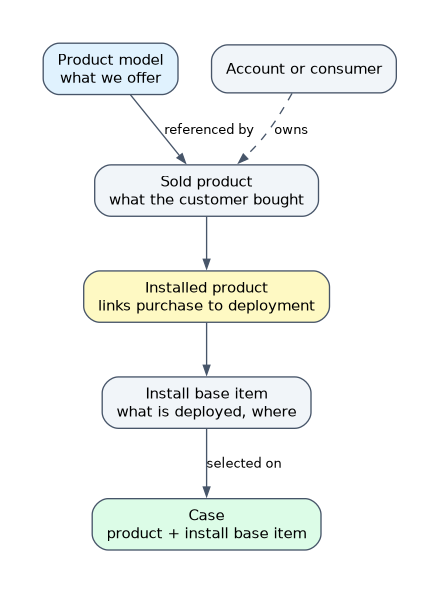 An installed product record links a sold product to an install base item. One sold product can have several installed product records, for example the same license deployed at three customer sites.
| Record | Question it answers | Example |
|---|---|---|
| Product model | What do we offer? | Router X200 |
| Sold product | What did this customer buy? | 50 Router X200 units for Acme |
| Install base item | What is deployed, and where? | Router at the Acme Madrid office |
| Installed product | Which purchase covers this deployment? | Acme order linked to the Madrid router |
Installing and loading the data
Install base management comes from the Customer Service Install Base Management plugin (com.snc.install_base), installed from the ServiceNow Store. An admin runs the setup.
The data is loaded through Customer Service > Administration > Guided Setup, under the Foundation Data category. Its tasks are Import Sold Products, Import Install Base Items and Import Installed Products. Records can also be created one by one or from an Account or Consumer record.
How cases use product data
When an agent opens a case, they can identify the affected sold product or install base item. That tells everyone which customer asset is involved and lets the platform check the right entitlement.
Agents see install base information in the workspace. Customers see their own install base and sold products on the Customer Service Portal, so they can raise a case against the exact item.
| Requirement | Record to use |
|---|---|
| Record what a customer purchased under an order | Sold product |
| Track the specific deployed unit or service a case is about | Install base item |
| Show one license deployed in several places | One sold product with several installed products |
| Define a new product line the company sells | Product model |
Install base and the CMDB
Install base items sit on top of the configuration data the organization already has. Because an install base item can be a configuration item made available to customers, the CMDB and CSM describe the same thing from two sides.
The CMDB view serves internal teams who maintain the item. The install base view shows the customer what they own and lets them raise a case against it.
How the exam asks about this
- "Customers must open cases against the exact device installed at their site." Use install base items, shown to customers on the portal, and select the item on the case.
- "One software subscription is deployed in three regional offices." One sold product linked to three install base items through installed product records.
- "Which plugin adds sold products and install base items?" Customer Service Install Base Management (com.snc.install_base).
What to remember for the exam
- Product model = what is offered; sold product = what was bought; install base item = what is deployed.
- Installed products link one sold product to one or more install base items.
- Sold products can be hierarchical and can be linked to contracts and entitlements.
- An install base item can be any configuration item made accessible to customers; for SaaS it is an application service.
- The Customer Service Install Base Management plugin provides these tables.
- Guided Setup's Foundation Data tasks import sold products, install base items and installed products.
Create or import product models before loading sold products and install base items. Sold products reference the models, so the catalog has to be in place first.
Common mistakes
Using a product model as the customer's asset. A product model is a catalog entry shared by every customer. What one customer owns belongs in a sold product or install base item.
Confusing sold product and install base item. The sold product is the commercial purchase. The install base item is the running instance, and that is what a technician fixes.
Building a custom table for customer equipment. Install base items already link to configuration items, accounts, consumers and cases. A custom table repeats that work and loses the portal and entitlement links.
Check yourself
What is the difference between a sold product and an install base item?
A sold product records what the customer purchased. An install base item records the instance that is actually deployed or provisioned for the customer.
How is one purchase shown as deployed in several locations?
Create installed product records that link the single sold product to each install base item. One sold product can have several installed products.
What must exist before sold products are imported?
Product models. Sold products reference the product models, so the models are created or imported first.
Topic 2 of 3 in CSM Foundational Data Model
Test yourself on CSM Foundational Data Model
The full ServiceNow CIS-CSM question bank has 590 questions, with timed practice exams and an explanation for every answer.
This study guide is independent and is not affiliated with, endorsed by, or sponsored by ServiceNow. Vendor names, certification names and exam codes are trademarks of their respective owners and are used for identification only.