Case Management · Topic 1 of 3
Case State Flows, Actions, Tasks and Escalations
CIS-CSM case lifecycle: base case states, state flows, agent and customer actions, case tasks, and case and account escalations with templates.
- 5 min
- Includes a diagram
- Documented states: New, Open, Awaiting Info, Resolved, Closed; Closed is final, and Canceled is an extra State choice.
- Resolved means a proposed solution; the customer accepts (Closed) or rejects (back to Open).
- The case table extends Task.
What it is
A case is the record of a customer issue. It lives in the Case [sn_customerservice_case] table, which extends Task, so it inherits assignment, work notes, approvals and SLAs.
The case state flow is the path a case follows from creation to closure. Agents and customers move the case along it with actions, split work out with case tasks, and raise attention with escalations.
How it works
The base case states
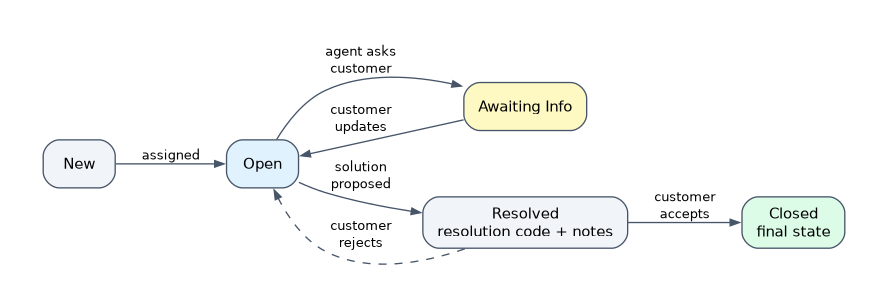
| State | Meaning |
|---|---|
| New | Created from any channel: portal, email, chat, phone or the Customer Service application |
| Open | Assigned to an agent and being worked |
| Awaiting Info | The agent asked the customer for more information |
| Resolved | The agent proposed a solution; the customer accepts or rejects it |
| Closed | The final state |
| Canceled | A State choice for a case that is no longer needed; not one of the documented lifecycle states |
A customer update on an Awaiting Info case moves it back to Open, so the agent sees the reply. When the customer rejects a proposed solution, the case returns from Resolved to Open.
From Resolved, Closed is reached when the customer accepts the solution, and acceptance can trigger a survey. A case can be closed directly from any other state, and proposing a solution requires a resolution code and resolution notes.
Who can do what
| Action | Agent | Customer |
|---|---|---|
| Request information | Yes | No |
| Update the case | Yes | Yes; from Awaiting Info it returns the case to Open |
| Propose a solution | Yes | No |
| Accept or reject the solution | No | Yes |
| Close the case | Yes | Yes |
These actions appear as buttons and form actions in the CSM Configurable Workspace and on the portal. They are the normal way to change state, rather than editing the State field directly.
State flows
A state flow customizes the transitions between states on any table that uses states. A record can have a starting state and an ending state, or only an ending state to run logic whenever that state is reached.
A state flow can control field behavior during a transition, making fields visible, mandatory or read only. It can also fire a registered event, for example to trigger a notification. The admin role creates state flows.
From a state flow the platform generates the supporting objects: client scripts that limit the State choices to valid transitions, business rules for events and mandatory fields, and UI actions for manual transitions. Removing the state flow removes them too.
Case tasks
When part of the work belongs to another team, the agent creates a case task instead of reassigning the whole case. The case stays with its owner, while the task goes to the group that does that piece.
The sn_customerservice.case_task_agent role lets a user work the case tasks assigned to or created by them, updating status and adding notes. Case task types can be offered through service definitions, so agents create the right kind of task from the case or from a playbook stage.
Escalations
An escalation marks a case or a whole account for special attention. A user with the sn_customerservice.escalation_requester role selects Escalate Case or Escalate Account and fills in a reason (Inactivity, Lack of Progress or Customer Imposed Deadline), the escalation template and a justification.
Escalation templates set the escalation type, whether approval is needed and who is notified. Without approval the request is approved automatically. With approval, approvers accept or reject it; once approved the escalation record is linked to the case or account and the customer is notified.
| Case escalation | Account escalation | |
|---|---|---|
| Scope | One case | The account, often across many cases |
| Template | Case escalation template | Account escalation template |
| Approver | Can add the manager of the case assignment group | Does not add that manager automatically |
When the cause is fixed, a user with sn_customerservice.deescalation_requester de-escalates the case or account.
How the exam asks about this
- "The customer replied to an agent's question but the case still looks idle." A customer update on an Awaiting Info case moves it back to Open.
- "Billing must check an invoice while support keeps ownership of the case." Create a case task for the billing group.
- "A key customer is unhappy across all of its open cases." Use an account escalation, not a separate case escalation on each case.
What to remember for the exam
- Documented states: New, Open, Awaiting Info, Resolved, Closed; Closed is final, and Canceled is an extra State choice.
- Resolved means a proposed solution; the customer accepts (Closed) or rejects (back to Open).
- The case table extends Task.
- State flows set valid transitions and field behavior and generate the client scripts, business rules and UI actions.
- Case tasks hand part of the work to another group while the case keeps its owner.
- Escalation templates decide approval and notifications; case and account escalations differ in scope.
Do not add a new case state for every kind of wait. Use Awaiting Info and the existing actions, and change transitions with a state flow, so reports, SLAs and the portal keep working.
Common mistakes
Treating Resolved as the end. Resolved only means a solution was proposed. The case reaches Closed when the customer accepts it.
Reassigning the case to get help. Moving the case to another group hides it from the owner. A case task brings in the other team and keeps one owner.
Escalating each case one by one. When the whole relationship is at risk, an account escalation covers all of the account's cases.
Check yourself
What is the final state of a case?
Closed. A case reaches it when the customer accepts the proposed solution, or when it is closed directly.
What happens when a customer rejects a proposed solution?
The case goes from Resolved back to Open, so the agent can keep working it.
Which role lets a user request an escalation on a case or account?
The sn_customerservice.escalation_requester role. The escalation template then decides whether approval is needed and who is notified.
Topic 1 of 3 in Case Management
Test yourself on Case Management
The full ServiceNow CIS-CSM question bank has 590 questions, with timed practice exams and an explanation for every answer.
This study guide is independent and is not affiliated with, endorsed by, or sponsored by ServiceNow. Vendor names, certification names and exam codes are trademarks of their respective owners and are used for identification only.