Security and Restricting Access · Topic 2 of 4
Creating, Testing and Debugging Access Controls
ServiceNow CAD access controls: automatic table ACLs, manual ACLs, Deny-Unless and Allow-If, table then field order, and Debug Security Rules.
- 5 min
- Includes a diagram
- Create access controls on a new table generates read, write, create and delete ACLs for the chosen role.
- Editing ACLs needs
security_admin, elevated for the session. - Within one ACL: roles, then condition, then script; all filled requirements must pass.
What it is
An access control (ACL) is a server side rule that decides whether a user may perform an operation, such as read or write, on a table, a field or another resource. ACLs apply wherever the data is reached: forms, lists, reports and web services.
ACLs are created automatically when you build a table with Create access controls selected, and manually when you need a specific rule. Both kinds are tested by impersonating users and debugged with the security debugging tools.
How it works
Automatic ACLs
When you create a table in an application, the Controls section has Create access controls and a User role field. The platform creates read, write, create and delete ACLs for the table that require that role.
These generated rules are a starting point. Add rules when, for example, only the record's owner may edit it, or only managers may delete it.
Building an ACL manually
Creating or changing ACLs needs the security_admin role, which an admin elevates to for the session. A record ACL has these main parts:
| Part | Meaning |
|---|---|
| Type | What is protected: record, REST_Endpoint, client_callable_script_include, ui_page and others |
| Decision type | Allow If or Deny Unless |
| Operation | read, write, create, delete (execute for scripts and endpoints) |
| Name | Table, or table and field, such as x_acme_travel_request.cost |
| Requires role | User must hold at least one listed role |
| Condition | Record must match the condition builder filter |
| Script | Sets answer to true or false |
| Admin overrides | When selected, users with admin pass the rule |
Within one rule, every requirement that is filled in must pass. The platform checks them in order: roles, then security attributes, then condition, then script. An empty requirement is not checked.
Evaluation order
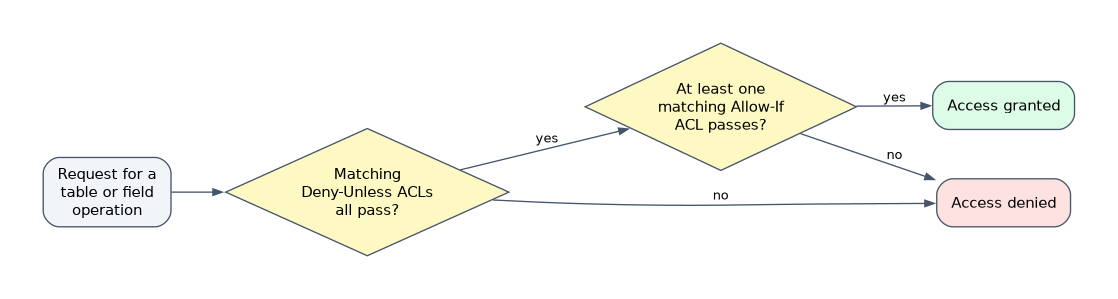 Deny-Unless rules are evaluated before Allow-If rules. If a matching Deny-Unless rule fails, access is denied and no Allow-If rule can rescue it. If all Deny-Unless rules pass, at least one matching Allow-If rule must pass.
Table ACLs are checked before field ACLs, and both must pass. Failing the table check denies the whole record. Failing a field check affects only that field: it becomes read-only or hidden while the rest of the form still works.
For names, the platform matches from the most specific rule to the most general. For a field it tries table.field first, then the same field on a parent table, then the wildcard *.field. If no rule matches at all, access is denied.
Testing and debugging
Test as the user who reports the problem. Impersonate User shows exactly what that user sees and can do, without their password.
Turn on System Security > Debugging > Debug Security Rules. Forms and lists then show the ACL checks at the bottom of the page, with each rule's path and pass or fail result. A bug icon appears beside fields that have ACLs; clicking it lists the rules that applied to that field and how each evaluated.
| Symptom | Likely cause |
|---|---|
| Whole record missing or denied | Table ACL fails, or a Deny-Unless rule fails |
| One field read-only | That field's write ACL fails |
| Role is correct but still denied | Condition or script in the same rule returns false |
| Everyone denied after a new rule | New Deny-Unless rule with too narrow a condition |
How the exam asks about this
- "Only the requester may edit their own request." Add a write ACL with a condition or script comparing the requester field to the current user.
- "Users see the record but the Cost field is read-only." The field-level write ACL fails; the table rule passes.
- "Find which rule blocks a user." Impersonate the user and turn on Debug Security Rules.
What to remember for the exam
- Create access controls on a new table generates read, write, create and delete ACLs for the chosen role.
- Editing ACLs needs
security_admin, elevated for the session. - Within one ACL: roles, then condition, then script; all filled requirements must pass.
- Deny-Unless rules run first; one failure denies regardless of Allow-If rules.
- Table ACLs before field ACLs, both must pass; a failing field rule affects only that field.
- No matching rule means access is denied.
A role in the ACL is not enough on its own if the rule also has a condition or script. A user who holds the role can still fail the rule because the condition does not match the record.
Common mistakes
Expecting Allow-If to override Deny-Unless. The deny rule is evaluated first. If it fails, no allow rule changes the result.
Writing a field rule when the table rule fails. If the table check denies, field rules are never relevant. Fix the table rule first.
Testing as admin. Admins pass most rules, especially with Admin overrides selected. Impersonate a real user instead.
Check yourself
Which runs first, Deny-Unless or Allow-If rules?
Deny-Unless rules. If one of them fails, access is denied even when an Allow-If rule would pass.
A user passes the table read ACL but fails the read ACL on one field. What do they see?
The record, with only that field hidden; the rest of the form is unaffected.
What does Create access controls do when a table is created?
It generates read, write, create and delete ACLs for the table that require the selected user role.
Topic 2 of 4 in Security and Restricting Access
Test yourself on Security and Restricting Access
The full ServiceNow CAD question bank has 600 questions, with timed practice exams and an explanation for every answer.
This study guide is independent and is not affiliated with, endorsed by, or sponsored by ServiceNow. Vendor names, certification names and exam codes are trademarks of their respective owners and are used for identification only.