Testing, Debugging, and Deployment · Topic 4 of 4
Deployment Environments, Requirements and Process
Deploying Apex and metadata: sandboxes and scratch orgs, change sets, CLI and packages, test levels, 75% coverage, validation and quick deploy.
- 4 min
- Includes a diagram
- Apex is never edited in production; deploy it with tests.
- 75% overall coverage, every trigger covered, all tests passing.
- RunLocalTests is the default production test level when Apex is deployed.
What it is
Apex cannot be written directly in a production org. Code is built in a development environment, tested, and deployed to production with a tool that runs Apex tests and checks coverage.
The exam asks which environment to use, which tool moves the change, and what a production deployment requires.
How it works
Environments
| Environment | Contents | Refresh interval | Typical use |
|---|---|---|---|
| Developer Edition | Free separate org | Not refreshed | Learning, packaging |
| Scratch org | Built from source; empty data | Created new; expires in up to 30 days | Feature development with Salesforce DX |
| Developer sandbox | Production metadata, no data | 1 day | Development |
| Developer Pro sandbox | Metadata, no data, more storage | 1 day | Development and integration |
| Partial Copy sandbox | Metadata and a sample of data from a template | 5 days | Testing and QA |
| Full sandbox | Metadata and all data | 29 days | Performance testing, UAT, staging |
Deployment tools
| Tool | When to use |
|---|---|
| Change sets | Point-and-click between orgs connected to the same production org; needs deployment connections |
| Salesforce CLI / Metadata API | Scripted deployments, CI/CD, source-driven projects; destructiveChanges.xml deletes metadata |
| DevOps Center | Work items and pipelines over Git with clicks |
| Unlocked packages | Versioned modules for your own orgs |
| Managed packages | Distribution to other companies, such as on AgentExchange |
Production deployment requirements
- At least 75% of all Apex code covered by tests.
- Every trigger has some test coverage.
- All tests that run must pass.
- Coverage counts executable lines only.
Test levels
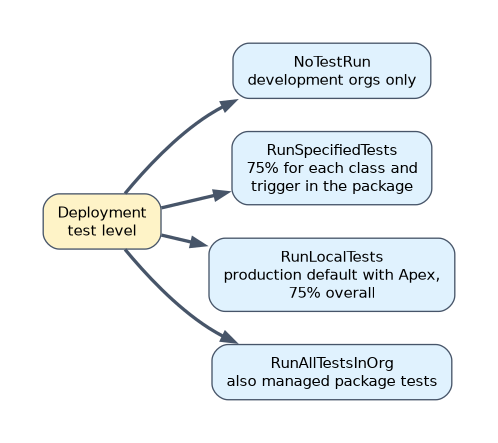
| Test level | What runs |
|---|---|
NoTestRun | No tests; development environments such as sandboxes only, where it is the default |
RunSpecifiedTests | Only the named tests; each class and trigger in the deployment needs 75% coverage from them |
RunLocalTests | All tests in the org except those from installed managed and unlocked packages; the default for production when the deployment includes Apex |
RunAllTestsInOrg | All tests, including tests from installed packages |
sf project deploy start --source-dir force-app --target-org prod --test-level RunLocalTests --dry-run
sf project deploy quick --job-id 0Af...
A validation (a check-only deploy, --dry-run) runs the tests without saving changes. A successful validation can be quick deployed later without running the tests again, within a limited window and if nothing changed in the org.
A worked example
A team must deploy a new trigger, two classes and a Lightning page to production on Saturday night with minimal downtime. On Thursday they validate the deployment with RunSpecifiedTests naming the tests for the changed classes, and fix the one class that falls under 75%. On Saturday they run a quick deploy from the validated job. The tests already passed, so the release takes seconds.
When the requirement is "deploy faster without skipping tests", look for validation followed by quick deploy, or RunSpecifiedTests.
How the exam asks about this
- "Test with production-like data volumes." A Full sandbox.
- "Move metadata between related orgs without code." Change sets.
- "Coverage required to deploy Apex to production." 75% overall, with every trigger covered.
What to remember for the exam
- Apex is never edited in production; deploy it with tests.
- 75% overall coverage, every trigger covered, all tests passing.
- RunLocalTests is the default production test level when Apex is deployed.
- RunSpecifiedTests needs 75% coverage on each class and trigger in the deployment.
- Developer sandboxes refresh daily, Partial Copy every 5 days, Full every 29 days.
Change sets cannot delete metadata from the target org. Remove components manually or deploy a destructive change with the Metadata API or CLI.
Common mistakes
Choosing a Developer sandbox for performance testing. It has no production data; use Full.
Thinking 75% per class is required with RunLocalTests. The rule is 75% overall; per-class 75% applies to RunSpecifiedTests.
Sending change sets to an unrelated org. Change sets work only between orgs connected to the same production org.
Check yourself
What coverage does a production deployment of Apex require?
At least 75% overall, some coverage on every trigger, and all tests passing.
Which sandbox type includes all production data?
A Full sandbox.
What does a validated deployment allow you to do later?
Quick deploy it without running the tests again, within the allowed window.
Topic 4 of 4 in Testing, Debugging, and Deployment
Test yourself on Testing, Debugging, and Deployment
The full Salesforce Platform Developer question bank has 645 questions, with timed practice exams and an explanation for every answer.
This study guide is independent and is not affiliated with, endorsed by, or sponsored by Salesforce. Vendor names, certification names and exam codes are trademarks of their respective owners and are used for identification only.