Testing, Debugging, and Deployment · Topic 3 of 4
Debugging Flows, Performance and Asynchronous Jobs
Debugging on Salesforce: debug logs, trace flags, log levels, flow debugging and fault paths, performance, and monitoring queueable and batch jobs.
- 5 min
- Includes a diagram
- Logs need an active trace flag on the right user; class trace flags only change levels.
- Platform event triggers run as the Automated Process user.
- Flow debugging: Debug button, fault paths, error emails, Paused and Failed Flow Interviews.
What it is
When code or automation fails, developers find the cause with debug logs, the flow debugger and the job monitoring pages in Setup. Performance problems show up as CPU, query and heap usage in the same logs.
Asynchronous Apex (future methods, Queueable, Batch and Scheduled Apex) runs later in its own transaction, so it is monitored separately, through Apex Jobs and the AsyncApexJob object.
How it works
Debug logs and trace flags
A debug log is recorded only when a trace flag is active for the entity that runs the code.
| Traced entity | Use |
|---|---|
| A user | Logs everything that user runs |
| Automated Process user | Logs platform event triggers and work they start, plus some system processes |
| An Apex class or trigger | Overrides log levels for that code; does not create logs by itself |
Log levels are set per category: Apex Code, Apex Profiling, Database, Workflow, Validation, Callout, System, Visualforce and others, from NONE to FINEST. Higher levels capture more but fill the log faster; a log is truncated at its size limit. The end of a log shows cumulative governor limit usage.
System.debug() writes to the log. In VS Code the Apex Replay Debugger steps through a saved log with breakpoints.
Debugging flows
| Tool | Use |
|---|---|
| Debug in Flow Builder | Run a flow with test inputs and see each element's result; can roll back changes |
| Fault paths | Handle errors from data elements and actions inside the flow |
| Flow error emails | Sent when an interview fails, to the user who last modified the flow or to the Apex exception email recipients, as set in Process Automation Settings |
| Paused and Failed Flow Interviews | Setup page listing interviews that are waiting or failed |
Performance
| Symptom | Check |
|---|---|
Apex CPU time limit exceeded | Nested loops; index with a Map, move work to async |
Non-selective query against large object type in a trigger | Filter on an indexed field such as Id, Name, CreatedDate, an External ID or a lookup |
| Slow query | Query Plan tool in the Developer Console |
| Heap size | Large collections; use SOQL for loops or Batch Apex |
Asynchronous Apex
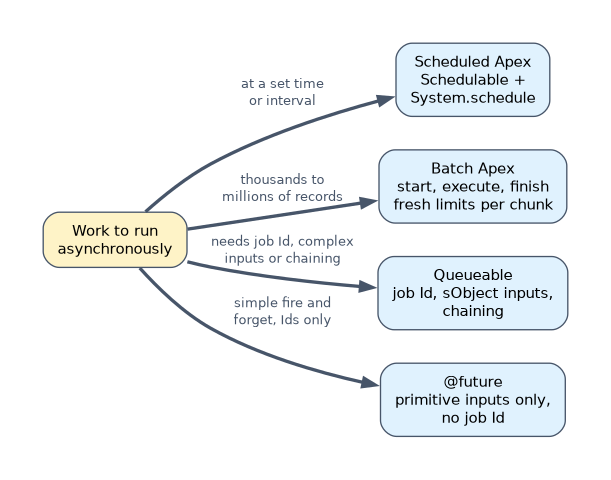
| Type | Key facts |
|---|---|
@future | Static void method; primitive parameters only; callout=true for callouts; no job Id returned |
| Queueable | System.enqueueJob() returns a job Id; accepts sObjects and objects; can chain one job from another |
| Batch Apex | start, execute, finish; default scope 200 and maximum 2,000 with a QueryLocator; each execute is its own transaction; Database.Stateful keeps values across executes |
| Scheduled Apex | Schedulable with System.schedule(name, cronExpression, job) |
Monitoring jobs
| Where | What you see |
|---|---|
| Apex Jobs (Setup) | Status, total batches, batches processed and failures for each job |
| Apex Flex Queue | Batch jobs waiting (Holding) to run; reorder them |
| Scheduled Jobs | Scheduled Apex and its next run time |
AsyncApexJob (SOQL) | Query job status, NumberOfErrors and ExtendedStatus in code |
BatchApexErrorEvent | Platform event published when a batch execute throws an unhandled exception, for classes implementing Database.RaisesPlatformEvents |
Failures in a batch job are counted per chunk: a chunk that throws rolls back only its own changes, and the other chunks stay committed.
A worked example
A Queueable job enqueued from a platform event trigger fails once a week, but a trace flag on the developer's own user captures nothing. Platform event triggers run as the Automated Process user, and so does the job they enqueue. The developer adds a trace flag for the Automated Process user in Setup's Debug Logs page, and the next failure is logged. A trace flag on the Queueable class alone would not create a log.
"No log was captured" usually means the trace flag is on the wrong entity. Ask which user the code really runs as.
How the exam asks about this
- "Return a job Id and pass an sObject to async code." Queueable.
- "Process millions of records." Batch Apex.
- "Find out how many batches failed." The Apex Jobs page or
AsyncApexJob.
What to remember for the exam
- Logs need an active trace flag on the right user; class trace flags only change levels.
- Platform event triggers run as the Automated Process user.
- Flow debugging: Debug button, fault paths, error emails, Paused and Failed Flow Interviews.
- Future: primitives only, no job Id. Queueable: job Id, chaining. Batch: chunks with their own limits.
- Monitor async work in Apex Jobs, the Flex Queue, Scheduled Jobs and
AsyncApexJob.
Passing sObjects to an @future method does not compile. Pass Ids and query inside the method, or use Queueable.
Common mistakes
Setting log levels to FINEST everywhere. Logs fill up and truncate; raise only the categories you need.
Expecting a batch failure to roll back the whole job. Only the failing chunk rolls back.
Using @future when the caller needs a job Id. Use Queueable.
Check yourself
Why might a trace flag on your own user not capture a platform event trigger's log?
Platform event triggers run as the Automated Process user, which needs its own trace flag.
Which asynchronous type returns a job Id and accepts sObject parameters?
Queueable Apex.
Where can an admin see paused or failed flow interviews?
The Paused and Failed Flow Interviews page in Setup.
Topic 3 of 4 in Testing, Debugging, and Deployment
Test yourself on Testing, Debugging, and Deployment
The full Salesforce Platform Developer question bank has 645 questions, with timed practice exams and an explanation for every answer.
This study guide is independent and is not affiliated with, endorsed by, or sponsored by Salesforce. Vendor names, certification names and exam codes are trademarks of their respective owners and are used for identification only.