Data Modeling and Management · Topic 1 of 3
Choosing a Data Model and Relationship Types
Salesforce data modeling: custom objects, lookup, master-detail, many-to-many junction, hierarchical and external relationships and their effects.
- 4 min
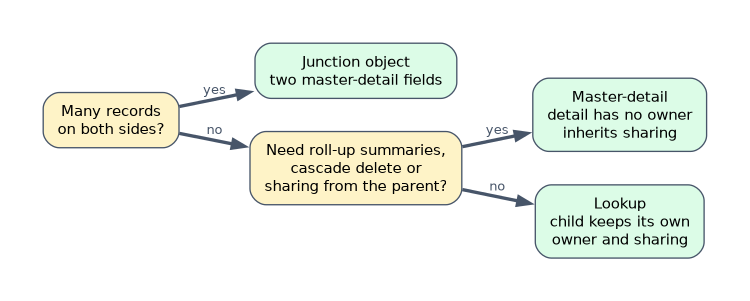
- Includes a diagram
- Use standard objects when they fit; create custom objects for the rest.
- Master-detail: detail has no owner, inherits sharing, cascade deletes, supports roll-ups.
- Lookup: independent records, optional link, no roll-up summary fields.
What it is
A data model is the set of objects, fields and relationships that store an app's data. Building a good one starts by checking whether a standard object already fits, such as Account, Contact or Case, before creating custom objects.
The relationship type you choose between objects affects ownership, sharing, deletion, roll-up summaries, page layouts and reporting. Many exam questions turn on that choice.
How it works
Relationship types
| Type | Key behaviour |
|---|---|
| Lookup | Loosely links two objects; the child keeps its own owner and sharing; the field can be optional |
| Master-detail | Tightly links a detail to its master; the detail has no owner, inherits sharing, and is deleted with its master |
| Many-to-many | Two master-detail relationships on a junction object |
| Hierarchical | A special lookup on the User object to another user, such as a manager |
| External lookup | Links an object to an external object using the external object's External ID |
| Indirect lookup | Links an external object to a Salesforce object using a unique External ID field on the Salesforce object |
Lookup versus master-detail
| Behaviour | Lookup | Master-detail |
|---|---|---|
| Child record owner | Its own owner | None; follows the master |
| Sharing | Its own | Controlled by parent |
| Field required | Optional or required | Always required |
| Deleting the parent | Clears the field or blocks deletion | Deletes the detail records too |
| Roll-up summary fields on parent | Not available | Available |
| Reparenting | Allowed | Only if "allow reparenting" is selected |
An object can be the detail in up to two master-detail relationships. Standard objects cannot be the detail side of a master-detail relationship.
Converting relationships
You can convert a lookup to master-detail only when every existing record has a value in the lookup field. Converting master-detail to lookup is possible only when no roll-up summary fields depend on the relationship.
Junction objects for many-to-many
When one record can relate to many records of another object, and the reverse is also true, create a junction object with two master-detail fields. For example, a Job Application object can link many candidates to many positions.
- The first master-detail field created is the primary relationship. The junction record's look and feel and its Owner value come from the primary master. To see a junction record, a user needs read access to both master records.
- Report types built from a junction object can include either master.
Effects on the user interface and reporting
- Master and lookup parents show the child in a related list on their page layout.
- Master-detail lets the master show roll-up summary fields, such as the count or total of its details.
- Standard report types are created for relationships, such as Positions with Job Applications.
A worked example: a training company tracks courses and students. A student can take many courses, and a course has many students. The builder creates an Enrollment__c junction object with master-detail fields to Course__c and Student__c, so each course can show a roll-up count of enrollments, and deleting a course removes its enrollments.
When the requirement mentions roll-up summaries, cascade delete or the child having no owner of its own, the answer is master-detail.
How the exam asks about this
- "Child records must keep their own owner and sharing." A lookup relationship.
- "The parent must show the total of its children's amounts." Master-detail with a roll-up summary.
- "Many records on each side." A junction object with two master-detail fields.
What to remember for the exam
- Use standard objects when they fit; create custom objects for the rest.
- Master-detail: detail has no owner, inherits sharing, cascade deletes, supports roll-ups.
- Lookup: independent records, optional link, no roll-up summary fields.
- Many-to-many needs a junction object with two master-detail fields; the first is primary.
- Hierarchical relationships exist only on the User object.
Deleting a master record deletes all of its detail records. If records must survive when the parent is deleted, use a lookup.
Common mistakes
Using a lookup when roll-up summaries are needed. Roll-up summary fields need master-detail.
Trying to make a standard object the detail. Standard objects cannot be on the detail side.
Converting to master-detail while some records have blank lookups. Fill every value first.
Check yourself
Which relationship lets the parent show a roll-up summary of its children?
A master-detail relationship.
How is a many-to-many relationship built in Salesforce?
With a junction object that has two master-detail relationship fields.
What must be true before converting a lookup to master-detail?
Every existing child record must have a value in the lookup field.
Topic 1 of 3 in Data Modeling and Management
Test yourself on Data Modeling and Management
The full Salesforce Platform App Builder question bank has 648 questions, with timed practice exams and an explanation for every answer.
This study guide is independent and is not affiliated with, endorsed by, or sponsored by Salesforce. Vendor names, certification names and exam codes are trademarks of their respective owners and are used for identification only.