Sales and Marketing Applications · Topic 2 of 2
Lead Automation and Campaign Management
Salesforce leads and campaigns: lead conversion, lead assignment rules, web-to-lead, campaigns, campaign members, statuses and campaign hierarchy.
- 3 min
- Includes a diagram
- One active lead assignment rule; entries evaluated in order; first match wins.
- Web-to-lead creates leads from web forms; queues hold unassigned leads.
- Conversion creates or links an account and contact, and optionally an opportunity.
What it is
Leads are prospects who are not yet qualified. Administrators automate how leads are captured and routed with web-to-lead and lead assignment rules, and help marketing measure results with campaigns. When a lead is qualified, it is converted into business records.
How it works
Capturing and routing leads
| Feature | What it does |
|---|---|
| Web-to-lead | A web form that creates leads in Salesforce |
| Lead assignment rules | Route new leads to users or queues by criteria; one active rule per org, with many ordered entries |
| Lead queues | Hold leads until a member takes ownership |
| Lead process | Defines the lead status values available, by record type |
| Lead auto-response rules | Send an email reply to the lead |
Converting leads
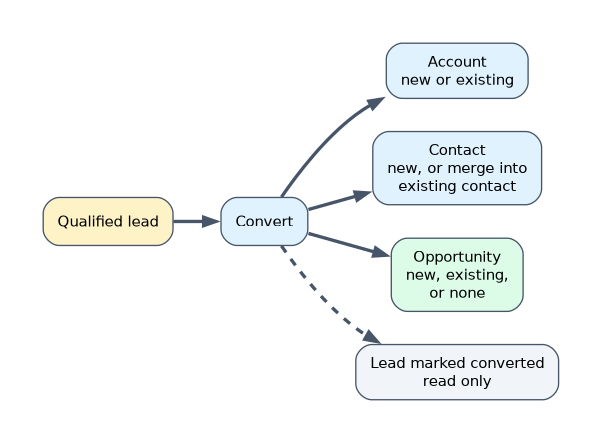 When a rep converts a qualified lead:
- an account is created, or the lead is linked to an existing account,
- a contact is created, or the lead is merged into an existing contact,
- an opportunity can be created, linked to an existing opportunity on the chosen existing account, or skipped,
- the lead is marked converted and is no longer editable.
Lead field mapping decides which custom lead fields carry over to account, contact and opportunity fields.
Campaigns
| Concept | Meaning |
|---|---|
| Campaign | A marketing activity, such as an event or email |
| Campaign members | Leads and contacts linked to the campaign, each with a member status such as Sent or Responded |
| Campaign hierarchy | Parent and child campaigns that roll up statistics |
| Campaign influence | Links campaigns to opportunities to show their effect on revenue |
Users need the Marketing User feature license checkbox, plus object permissions, to create and edit campaigns.
A worked example: leads from the website in Germany must go to the DACH sales queue, and others to a general queue. Create one lead assignment rule with two entries: first Country = Germany routes to the DACH queue, then a catch-all entry routes to the general queue.
Assignment rule entries are evaluated in order, and the first match wins. Put the most specific entries first.
How the exam asks about this
- "Route web leads by country." A lead assignment rule with ordered entries.
- "Track which leads responded to a trade-show invitation." Campaign member statuses.
- "Custom lead fields must appear on the contact after conversion." Map the lead fields.
What to remember for the exam
- One active lead assignment rule; entries evaluated in order; first match wins.
- Web-to-lead creates leads from web forms; queues hold unassigned leads.
- Conversion creates or links an account and contact, and optionally an opportunity.
- Map custom lead fields for conversion.
- Campaign members have statuses; campaign hierarchy rolls up results; Marketing User is required.
Values in unmapped custom lead fields aren't copied to the account, contact or opportunity at conversion. Map them before reps start converting.
Common mistakes
Creating several active assignment rules. Only one can be active; add entries instead.
Putting a catch-all entry first. It will match everything.
Forgetting the Marketing User checkbox. Users can't manage campaigns without it.
Check yourself
How many lead assignment rules can be active at once?
One, though it can contain many entries evaluated in order.
What records can lead conversion create?
An account and a contact, or links to existing ones, and optionally an opportunity.
What does a campaign member status record?
How each lead or contact responded to the campaign, such as Sent or Responded.
Topic 2 of 2 in Sales and Marketing Applications
Test yourself on Sales and Marketing Applications
The full Salesforce Platform Administrator question bank has 650 questions, with timed practice exams and an explanation for every answer.
This study guide is independent and is not affiliated with, endorsed by, or sponsored by Salesforce. Vendor names, certification names and exam codes are trademarks of their respective owners and are used for identification only.