Object Manager and Lightning App Builder · Topic 1 of 2
Objects and Relationships
Salesforce data model: standard and custom objects, lookup, master-detail and junction relationships, record types and Schema Builder for admins.
- 4 min
- Includes a diagram
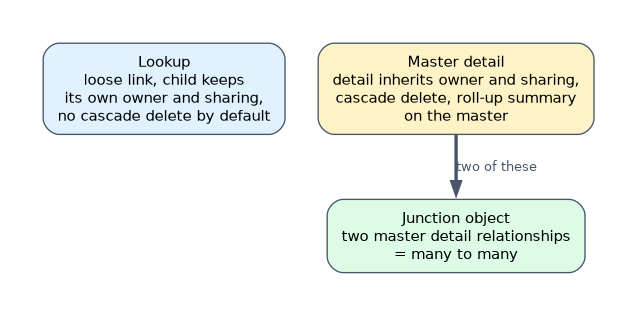
- Lookup: loose, child has its own owner, deleting the parent doesn't delete children by default.
- Master-detail: tight, detail inherits owner and sharing, cascade delete, roll-up summaries.
- Junction object: two master-detail relationships for many-to-many.
What it is
Salesforce stores data in objects, which work like database tables. Standard objects such as Account, Contact, Opportunity, Lead and Case come with Salesforce; custom objects are ones you create. Relationships link records together so users can see related data and so you can build roll-ups, reports and automation across objects.
How it works
Relationship types
| Type | Behavior |
|---|---|
| Lookup | Loosely links two records. The child can exist without a parent (unless the field is required), keeps its own owner and sharing, and deleting the parent does not delete the child by default |
| Master-detail | Tightly links child (detail) to parent (master). The detail has no owner of its own; its sharing and owner come from the master. Deleting the master deletes the details. The master field is required. Supports roll-up summary fields on the master |
| Many-to-many (junction object) | A custom object with two master-detail relationships, linking two objects many-to-many, such as Job Applications between Candidates and Positions |
| Hierarchical | A special lookup on the User object, for example to a user's manager |
A custom object can have up to two master-detail relationships (and up to 40 relationships in total). A standard object can be the master, but it can't be on the detail side of a master-detail relationship.
Roll-up summary fields
On the master side of a master-detail relationship, a roll-up summary field can COUNT detail records, or SUM, MIN or MAX a field on them, optionally with filter criteria. For custom lookup relationships, roll-ups need another tool, such as a flow. A few standard relationships also support roll-up summaries, such as Account rolling up related opportunities.
Record types and business processes
- Record types let one object offer different picklist values, page layouts and business processes to different users.
- Business processes apply to certain standard objects: sales processes (opportunity stages), support processes (case statuses) and lead processes (lead statuses).
- Users get access to record types through their profile or permission sets.
Schema Builder
Schema Builder shows objects, fields and relationships as a diagram, and lets you create objects and fields by drag and drop.
A worked example: a company tracks which products are used at which customer sites, and each site can use many products while each product is used at many sites. Create a junction object, "Site Product", with master-detail relationships to Site and Product. Each site can then roll up the count of products in use.
"When the parent is deleted, the children must be deleted too, and the parent must show a total of the children" points to master-detail with a roll-up summary.
How the exam asks about this
- "Child records must have their own owner and sharing." Lookup relationship.
- "Show the total amount of related expense items on a trip record." Master-detail and a roll-up summary.
- "Link students and courses many-to-many." A junction object with two master-detail relationships.
What to remember for the exam
- Lookup: loose, child has its own owner, deleting the parent doesn't delete children by default.
- Master-detail: tight, detail inherits owner and sharing, cascade delete, roll-up summaries.
- Junction object: two master-detail relationships for many-to-many.
- Record types offer different picklists, layouts and business processes.
- Schema Builder visualizes and edits the data model.
Converting a lookup to master-detail requires every existing child record to have a parent value. Fill the lookup field first.
Common mistakes
Using a lookup when a roll-up summary is needed. Roll-up summary fields need master-detail.
Expecting detail records to have their own owner. They inherit from the master.
Thinking record types change security. They change process and layout, not access to records.
Check yourself
What does a roll-up summary field require?
A master-detail relationship, with the roll-up field on the master object.
How do you model a many-to-many relationship?
Create a junction object with two master-detail relationships.
What does a record type control?
Which picklist values, page layout and business process users see for records of that type.
Topic 1 of 2 in Object Manager and Lightning App Builder
Test yourself on Object Manager and Lightning App Builder
The full Salesforce Platform Administrator question bank has 650 questions, with timed practice exams and an explanation for every answer.
This study guide is independent and is not affiliated with, endorsed by, or sponsored by Salesforce. Vendor names, certification names and exam codes are trademarks of their respective owners and are used for identification only.