Wireless Security · Topic 2 of 4
RADIUS and Wireless Authentication
Learn how RouterOS wireless authentication works with security profiles, pre shared keys, MAC authentication and RADIUS, and how to add the RADIUS client.
- 5 min
- Includes a diagram
- Authentication settings live in a security profile.
authentication-typesselects methods such aswpa2-pskandwpa2-eap.mode=dynamic-keysnegotiates fresh keys for each session.
What it is
Authentication proves who a client is before it may use the wireless network, and RADIUS lets a central server decide.
On a small network the access point can hold the secret itself. On a larger network, it is better to keep users and devices in one place, so that a change is made once.
RADIUS is the protocol for that. The access point asks a RADIUS server whether the client may join, and the server answers.
How it works
A security profile holds the authentication choices, and RADIUS adds a central decision.
The security profile
Authentication settings live in a security profile, which an interface then uses:
/interface wireless security-profiles add name=staff mode=dynamic-keys authentication-types=wpa2-psk unicast-ciphers=aes-ccm group-ciphers=aes-ccm wpa2-pre-shared-key=ChangeThisKey
/interface wireless set wlan1 security-profile=staff| Property | Purpose |
|---|---|
mode | Whether keys are static, optional or dynamic |
authentication-types | The methods allowed, such as wpa2-psk or wpa2-eap |
unicast-ciphers and group-ciphers | The encryption used |
wpa2-pre-shared-key | The shared key for PSK networks |
With mode=dynamic-keys, the access point and client negotiate fresh keys for each session, which is the modern approach.
Pre shared key authentication
With PSK, every client uses the same passphrase. It is simple, and it suits small networks. The weakness is that anyone who knows the key can join, and changing it means changing every client.
A private key per client, set in the access list, reduces that problem.
MAC authentication with RADIUS
An access point can ask a RADIUS server about the MAC address of each client:
/interface wireless security-profiles set staff radius-mac-authentication=yes radius-mac-format=XX:XX:XX:XX:XX:XXThe properties involved are these:
| Property | Purpose |
|---|---|
radius-mac-authentication | Ask the RADIUS server about the client MAC address |
radius-mac-format | How the MAC address is written in the request |
radius-mac-mode | Whether the MAC is sent as the user name, or as both user name and password |
radius-mac-accounting | Send accounting records for the client |
The local access list and the RADIUS server can both take part in the decision about a client, so test the combined result on a lab device.
The RADIUS client
For any RADIUS use, the router needs the server defined:
/radius add service=wireless address=192.168.88.10 secret=SharedSecretservice=wirelesssays the server is used for wireless clients.addressis the server.secretis the shared secret that both sides use to protect messages.
The server must also list the router as a client with the same secret. If the secrets differ, requests are dropped.
What the server can send back
A RADIUS reply can include extra information that RouterOS understands. Examples are attributes that give a client its own key, or turn forwarding on or off for a client. This gives central control over per client behaviour.
Accounting
RADIUS also supports accounting, which means records of when each client connected, how long it stayed and how much data it sent. You can turn it on for MAC authenticated clients and for EAP clients. Accounting is useful for billing and for audit logs.
Authentication flow
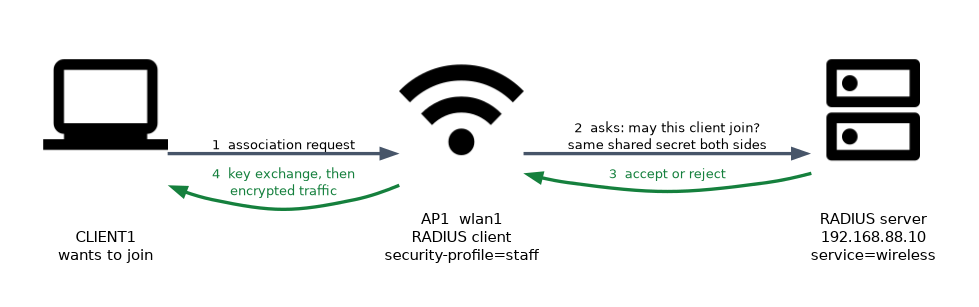 The order of events is:
- A client sends an association request.
- The access point checks its access list, and asks the RADIUS server too if MAC authentication is on.
- The client and access point run the key exchange, or the EAP exchange.
- Encrypted traffic starts.
Testing
Check the logs and the registration table when something fails:
/log print where topics~"radius"
/interface wireless registration-table print
The log shows whether the router could reach the server and whether a request was rejected.
When RADIUS seems to fail, check the shared secret and the client entry on the server first. These are the most common causes.
What to remember for the exam
Six facts cover this topic.
- Authentication settings live in a security profile.
authentication-typesselects methods such aswpa2-pskandwpa2-eap.mode=dynamic-keysnegotiates fresh keys for each session.radius-mac-authentication=yessends the client MAC address to the RADIUS server.- The RADIUS client is added with
/radius add service=wireless. - The shared secret must be the same on the router and the server.
A weak pre shared key defeats the encryption. Use a long passphrase and change it when staff leave.
Common mistakes
Four errors are typical.
Different secrets. The router and the server must use the same one, or requests are dropped.
Wrong MAC format. The server rejects entries when the format does not match what it expects.
Missing service. Without service=wireless the server is not used for wireless clients.
Sharing one PSK for ever. Anyone who once knew it can join, so rotate it.
Check yourself
Work through these three questions.
What does a RADIUS server do for a wireless network?
It decides centrally whether a client may join. The access point asks the server and applies the answer.
Which command adds a RADIUS server for wireless clients?
/radius add service=wireless address=... secret=...defines it. The shared secret must match the one on the server.Why is
mode=dynamic-keysbetter than static keys?It negotiates fresh keys for each session. Static keys stay the same and are easier to attack.
Topic 2 of 4 in Wireless Security
Test yourself on Wireless Security
The full MikroTik MTCWE question bank has 447 questions, with timed practice exams and an explanation for every answer.
This study guide is independent and is not affiliated with, endorsed by, or sponsored by MikroTik. Vendor names, certification names and exam codes are trademarks of their respective owners and are used for identification only.