Wireless Security · Topic 1 of 4
Wireless Access Management with Access List and Connect List
Learn how the RouterOS wireless access list controls which clients an access point accepts, how the connect list guides a station, and the defaults.
- 5 min
- Includes a diagram
- The access list is on the access point, and the connect list is on the station.
- Both are checked from the top, and the first match decides.
default-authenticationdecides what happens to clients with no matching rule.
What it is
Access management decides which wireless devices may join a network, and the access list and connect list are the two RouterOS tools for it.
The access list works on an access point, where it decides whether to accept each client that tries to join.
The connect list works on a station. It decides which access points the station may join.
They are the first line of control, before encryption and RADIUS come into play.
How it works
Each list is a table of rules checked from top to bottom, and the first matching rule decides.
The default behaviour
Before any list is used, the interface has default settings:
/interface wireless set wlan1 default-authentication=yes default-forwarding=yesdefault-authenticationsays whether clients that match no access list rule are accepted.default-forwardingsays whether clients on the interface may send frames to each other.
If default-authentication=no, only clients that have a matching access list entry can join. This is the base of a closed network.
The access list
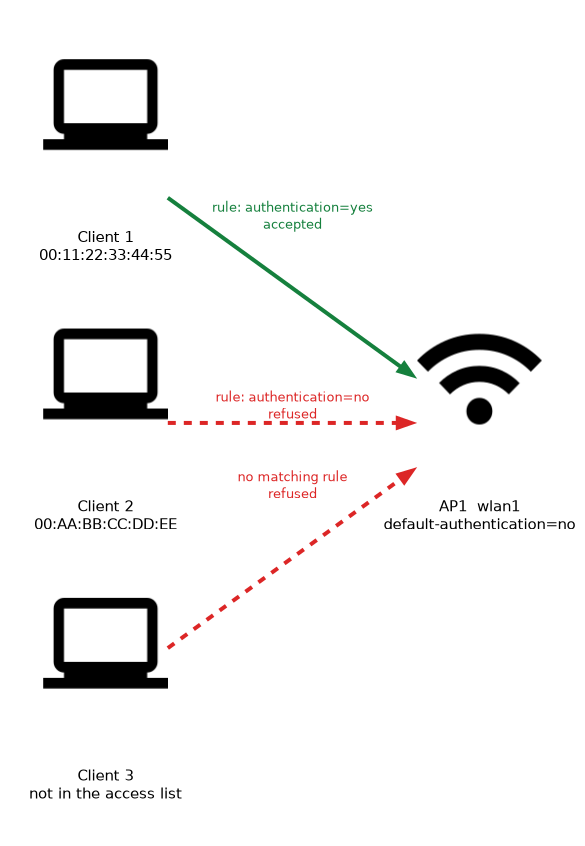 Rules are added to the access list of the access point:
/interface wireless access-list add mac-address=00:11:22:33:44:55 interface=wlan1 authentication=yes
/interface wireless access-list add mac-address=00:AA:BB:CC:DD:EE interface=wlan1 authentication=no| Property | Purpose |
|---|---|
mac-address | The client the rule applies to |
interface | The interface the rule applies to |
authentication | Whether the client is accepted |
forwarding | Whether the client may talk to other clients |
signal-range | The range of signal strength that the rule accepts |
time | The times of day and week when the rule is active |
ap-tx-limit and client-tx-limit | Rate limits for traffic to and from the client |
A rule with no MAC address matches every client, which is useful for a general rule at the end of the list.
Signal range and time
The signal-range property lets the access point accept a client only when its signal is within a range. This keeps very weak clients from joining and wasting airtime. The time property limits access to certain hours.
Rules can also hold a private pre shared key for one client. That gives each client its own key, and the client uses it instead of the shared key of the security profile.
Order of rules
The list is processed from the top, and the first rule that matches the client is applied.
The rest are ignored, which is why the order matters. Put specific rules first and general rules last.
A MAC address can be copied by an attacker. Treat MAC based control as a convenience and not as strong security, and always use encryption as well.
The connect list
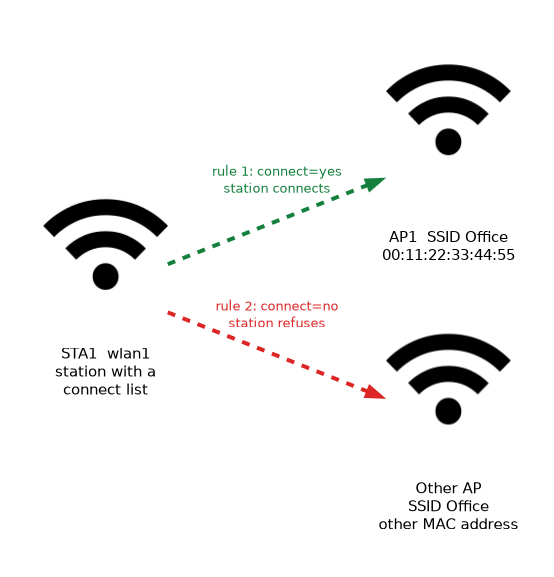 The connect list belongs to a station. It decides which access points the station will join:
/interface wireless connect-list add interface=wlan1 ssid=Office mac-address=00:11:22:33:44:55 connect=yes
/interface wireless connect-list add interface=wlan1 ssid=Office connect=no| Property | Purpose |
|---|---|
ssid | The network name that the rule matches |
mac-address | A specific access point |
connect | yes to allow a connection, no to forbid it |
signal-strength-range | The signal range that the rule matches |
security-profile | The security profile used for this access point |
The first rule that matches an access point decides what the station does. With the example above, the station connects to the access point with the listed address, and refuses other access points with the same SSID.
A station with several access points of the same SSID can use the connect list to pick one by its MAC address or signal range.
Other measures
A few more measures help, though none is strong alone:
- Hide SSID: the name is left out of beacons, but it still appears when clients connect, so it only deters casual users.
- Encryption: the next pages cover it, and it is the real protection.
- Forwarding off:
default-forwarding=nostops clients from talking to each other directly, which is useful for guests.
Checking the result
/interface wireless access-list print
/interface wireless connect-list print
/interface wireless registration-table print
The registration table shows which clients joined, so you can confirm that the rules work as planned.
Test a new closed network from a second device before you set default-authentication=no, so that you do not lock yourself out.
What to remember for the exam
Six facts cover this topic.
- The access list is on the access point, and the connect list is on the station.
- Both are checked from the top, and the first match decides.
default-authenticationdecides what happens to clients with no matching rule.default-forwardingcontrols client to client traffic.signal-rangeandtimecan limit when a client may join.- MAC based control is not strong security, because addresses can be copied.
Common mistakes
Four errors are typical.
Wrong rule order. A general rule placed first hides the specific rules below it.
Trusting MAC filtering alone. Addresses can be copied, so add encryption.
Locking yourself out. Setting default-authentication=no before your own device has an entry cuts you off.
Confusing the two lists. The access list is for the access point, and the connect list is for the station.
Check yourself
Work through these three questions.
Which device uses the access list, and which uses the connect list?
The access point uses the access list to accept or refuse clients. A station uses the connect list to choose which access points it joins.
What does
default-authentication=nodo?It refuses clients that match no access list rule, so only listed clients can join. Add your own device first, or you can lock yourself out.
Why does rule order matter in these lists?
The first matching rule decides, and later rules are ignored. A general rule placed first would hide more specific rules below it.
Topic 1 of 4 in Wireless Security
Test yourself on Wireless Security
The full MikroTik MTCWE question bank has 447 questions, with timed practice exams and an explanation for every answer.
This study guide is independent and is not affiliated with, endorsed by, or sponsored by MikroTik. Vendor names, certification names and exam codes are trademarks of their respective owners and are used for identification only.