802.11n · Topic 2 of 3
Channel Bonding and Frame Aggregation
Learn how 802.11n channel bonding builds a 40 MHz channel with a control and extension channel, and how A-MSDU and A-MPDU frame aggregation cut overhead.
- 5 min
- Includes a diagram
- Channel bonding joins a control channel and an extension channel into 40 MHz.
20/40mhz-Ceputs the extension above,20/40mhz-eCputs it below, andXXchooses automatically.- A 40 MHz channel has fewer places to fit and collects more noise.
What it is
Channel bonding makes a channel wider, and frame aggregation makes each transmission carry more data.
Both ideas raise throughput, and both have a price. A wider channel uses more spectrum and picks up more noise. Larger aggregated frames save overhead, but a lost frame costs more to repeat.
They are the two main ways in which 802.11n gets more from the same air.
How it works
Bonding joins a control channel and an extension channel, and aggregation packs several frames into one transmission.
Channel bonding
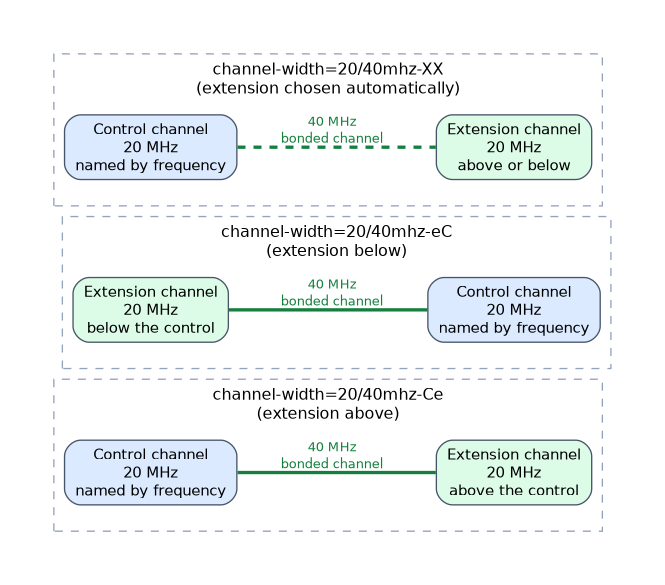 A normal channel is 20 MHz wide, but 802.11n can join two neighbouring channels into one 40 MHz channel.
The first is the control channel, which carries management and the legacy parts. The second is the extension channel.
The frequency setting names the control channel. The extension channel lies either above or below it. You tell RouterOS which with the channel width value:
/interface wireless set wlan1 channel-width=20/40mhz-Ce
/interface wireless set wlan1 channel-width=20/40mhz-eC
/interface wireless set wlan1 channel-width=20/40mhz-XX| Value | Meaning |
|---|---|
20/40mhz-Ce | The extension channel is above the control channel |
20/40mhz-eC | The extension channel is below the control channel |
20/40mhz-XX | The extension channel can be either above or below, chosen automatically |
Think of the letters in order of frequency. In Ce the control channel comes first, then the extension. In eC the extension comes first.
The 20 in the value shows that a 20 MHz fallback exists. If the extension channel is busy, the link can use 20 MHz.
Bonding and the spectrum
Two things follow from bonding. First, a 40 MHz channel uses the room of two 20 MHz channels, so there are fewer places to put it. Second, a wider channel collects more noise, so the signal to noise margin is smaller.
| Band | Advice |
|---|---|
| 2.4 GHz | Avoid 40 MHz, because there is little room and many neighbours |
| 5 GHz | Use 40 MHz where the spectrum is quiet |
A 40 MHz channel in a crowded 2.4 GHz band often gives worse results than 20 MHz, because of interference from neighbours.
Both ends must agree
A station uses the width that the access point offers, within what it supports. On a point to point link between RouterOS devices, set the same channel width and extension on both sides. If the extension channel is noisy, check it with the frequency tools, or move the control channel.
Frame aggregation
Every Wi-Fi frame has fixed overhead, such as headers, waiting times and acknowledgements. When frames are small, the overhead is a large part of the airtime. Aggregation joins several frames so that the overhead is paid once.
802.11n has two methods:
| Method | How it works |
|---|---|
| A-MSDU | Several payloads are joined into one frame with one header |
| A-MPDU | Several frames are sent one after another and acknowledged together |
With A-MSDU, one lost bit means that the whole large frame is lost and must be repeated. With A-MPDU, each frame is protected on its own, so a loss costs less. A-MPDU is usually the more robust choice.
Aggregation settings
RouterOS gives some control over aggregation:
/interface wireless set wlan1 ht-ampdu-priorities=0,1,2,3
/interface wireless print detail where name=wlan1
The first command allows A-MPDU for the listed priorities. The second shows the aggregation settings that are in force.
ht-amsdu-limitis the largest A-MSDU that the interface may build.ht-amsdu-thresholdis the largest frame that may be placed into an A-MSDU. Larger frames are not aggregated.ht-ampdu-prioritieslists the packet priorities for which A-MPDU may be used.
The priorities are the same priorities that WMM uses, so the aggregation choice connects with traffic marking.
When aggregation helps
Aggregation helps most with a steady stream of data, such as a large download. It helps less with small, sparse packets, such as voice, because there is nothing to join and joining would add delay.
On a link with many errors, large aggregated frames can hurt. Each loss costs more airtime. If a noisy link performs badly with aggregation, test with smaller limits.
Change the aggregation limits only with a test in hand, and compare throughput and retries before and after.
What to remember for the exam
Seven facts cover this topic.
- Channel bonding joins a control channel and an extension channel into 40 MHz.
20/40mhz-Ceputs the extension above,20/40mhz-eCputs it below, andXXchooses automatically.- A 40 MHz channel has fewer places to fit and collects more noise.
- Avoid 40 MHz in a crowded 2.4 GHz band.
- Aggregation sends more data with less overhead per frame.
- A-MSDU joins payloads into one frame, and A-MPDU sends several frames with one block acknowledgement.
ht-amsdu-limit,ht-amsdu-thresholdandht-ampdu-prioritiescontrol aggregation.
Common mistakes
Four errors are typical.
Bonding in a busy 2.4 GHz band. The wide channel overlaps with many neighbours.
Different widths at the two ends. The link may not form or may run poorly.
Aggregating voice. Small, sparse packets gain nothing and may see more delay.
Large A-MSDU on a noisy link. One loss costs a large frame.
Check yourself
Work through these three questions.
What are the control channel and the extension channel?
They are the two 20 MHz halves of a 40 MHz channel. The control channel carries management traffic, and the extension channel adds the extra width.
What is the difference between
20/40mhz-Ceand20/40mhz-eC?In
Cethe extension channel is above the control channel. IneCit is below.Why is A-MPDU usually more robust than A-MSDU?
In A-MPDU each frame is protected on its own, so one loss costs less. In A-MSDU one loss means the whole large frame must be repeated.
Topic 2 of 3 in 802.11n
Test yourself on 802.11n
The full MikroTik MTCWE question bank has 447 questions, with timed practice exams and an explanation for every answer.
This study guide is independent and is not affiliated with, endorsed by, or sponsored by MikroTik. Vendor names, certification names and exam codes are trademarks of their respective owners and are used for identification only.