RADIUS · Topic 3 of 3
RADIUS Incoming Requests
Learn how RADIUS incoming lets a server disconnect users or change live sessions on RouterOS, using Disconnect and CoA messages on UDP port 3799 safely.
- 4 min
- Includes a diagram
- RADIUS incoming lets the server act on a live session.
- It carries Disconnect Requests and Change of Authorization messages.
- It is enabled with
/radius incoming set accept=yes.
What it is
RADIUS incoming lets the server send a message to the router to end or change a session that is already running.
Normal RADIUS works the other way round. The router asks, and the server answers. Incoming reverses the direction, so the server can act on a live session without waiting for the user to log in again.
It is used to disconnect a user whose credit has run out, or to change a limit during a session.
How it works
You allow incoming messages on the router, and the server then sends them to the right session.
The two message types
| Message | What it does |
|---|---|
| Disconnect Request | Asks the router to end a session. |
| Change of Authorization | Asks the router to change a session, such as a rate limit. |
The router answers each message with an acknowledgement or a refusal. A refusal is returned when the session cannot be found or the request is not valid.
Enabling incoming
/radius incoming set accept=yes port=3799| Setting | What it does |
|---|---|
accept | Allows the router to receive these messages. |
port | The UDP port to listen on. |
The standard port is UDP 3799. The server must send to the same port. Incoming is not accepted until accept is set to yes.
Which servers are trusted
The router accepts incoming messages only from addresses that are defined as RADIUS servers in /radius. A message from any other address is ignored.
So the same entry that you used for the client is also what lets the server send incoming requests. The shared secret protects the message.
Which sessions it affects
Incoming is meant for sessions that were authenticated through RADIUS. This includes PPP sessions and HotSpot users. The server cannot be relied on to control a session that uses a local user.
A worked example
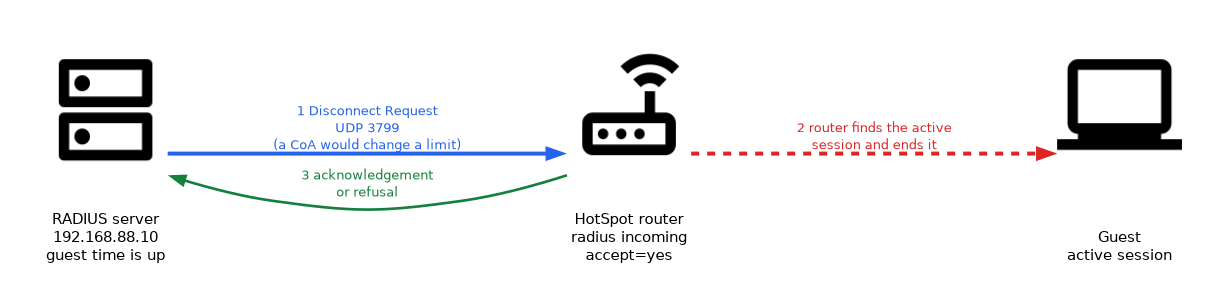 A hotel runs a HotSpot with User Manager on a central server. A guest buys a day of access. When the day ends, the server needs the guest off at once.
- The server notices that the time is up.
- It sends a Disconnect Request to the router on UDP 3799.
- The router finds the active session and ends it.
- The guest must buy more time to log in again.
Without incoming, the guest would stay online until the session ended by some other rule.
Changing a live session
With a Change of Authorization, the server can alter an active session. A common change is a new rate limit, for example when a user upgrades a package.
The user does not need to log in again. The new limit applies to the running session.
Firewall
The router must accept UDP 3799 from the server in its input chain.
/ip firewall filter add chain=input protocol=udp src-address=192.168.88.10 dst-port=3799 action=acceptLimiting the source address to the server keeps strangers from sending disconnect messages.
Monitoring
/radius incoming print
/system logging add topics=radius action=memory
The print command shows whether accept is on and which port is used. The radius logging topic helps to confirm that the server's requests arrive.
If requests do not arrive, check accept, the port, the firewall and the server address in /radius.
What to remember for the exam
Seven facts cover most incoming questions.
- RADIUS incoming lets the server act on a live session.
- It carries Disconnect Requests and Change of Authorization messages.
- It is enabled with
/radius incoming set accept=yes. - The standard port is UDP 3799.
- The router accepts messages only from servers defined in
/radius. - It is meant for RADIUS authenticated sessions, such as PPP and HotSpot.
- The firewall must allow UDP 3799 from the server.
To stop a user the moment their credit ends, enable incoming and let the server send a Disconnect Request.
Common mistakes
These four errors appear again and again.
Leaving accept at no. The router ignores every incoming message.
Blocking UDP 3799. The messages never reach the router, so sessions stay up.
The server is not in the /radius list. Messages from an unlisted address are ignored.
Expecting it to control local users. Incoming is meant for sessions that came through RADIUS.
Do not open UDP 3799 to the whole internet. Accept it only from the address of your RADIUS server.
Check yourself
Work through these three questions.
What does RADIUS incoming allow a server to do?
It lets the server send a Disconnect Request or a Change of Authorization to act on a live session.
Which setting and which port enable and carry these messages?
/radius incoming set accept=yesenables them, and the standard port is UDP 3799.From which servers does the router accept incoming messages?
Only from addresses that are defined as RADIUS servers in
/radius.
Topic 3 of 3 in RADIUS
Test yourself on RADIUS
The full MikroTik MTCUME question bank has 482 questions, with timed practice exams and an explanation for every answer.
This study guide is independent and is not affiliated with, endorsed by, or sponsored by MikroTik. Vendor names, certification names and exam codes are trademarks of their respective owners and are used for identification only.