RADIUS · Topic 1 of 3
RADIUS Client
Configure the RouterOS RADIUS client: add a server with service, address and secret, enable RADIUS for PPP, HotSpot and login, and monitor requests.
- 4 min
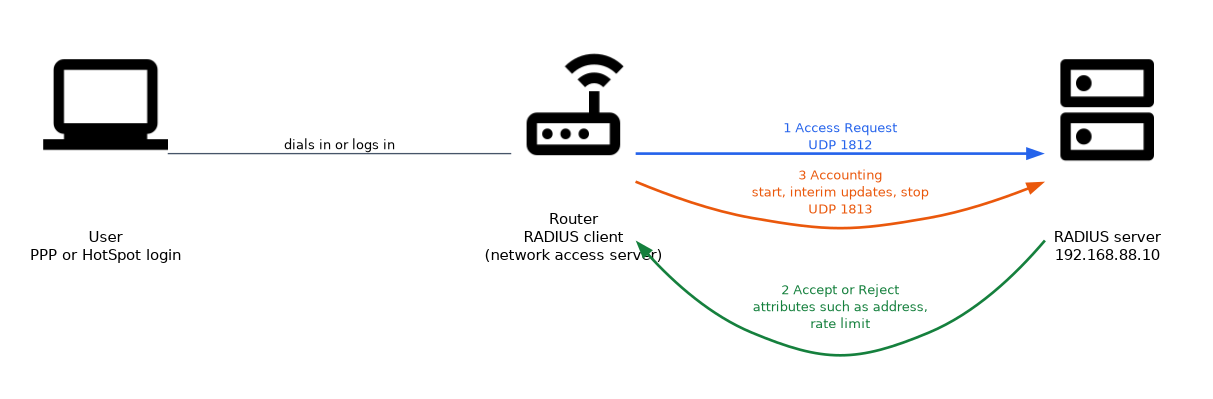
- Includes a diagram
- The router is the RADIUS client, and
/radius adddefines the server. servicelists which functions use the server.- The shared
secretmust match on both sides.
What it is
The RADIUS client lets a RouterOS device send authentication and accounting requests to a central RADIUS server.
In RADIUS terms, the router is the client, which is also called a network access server. It asks the server whether a user may log in, and it reports what the user did afterwards.
This keeps all user accounts in one place, instead of in the local list of every router.
How it works
You define the server once, and then tell each service on the router to use it.
Adding a server
/radius add service=ppp,hotspot address=192.168.88.10 secret=RadiusKey1 authentication-port=1812 accounting-port=1813| Setting | What it does |
|---|---|
service | The services that use this server. |
address | The address of the RADIUS server. |
secret | The shared secret that both sides must hold. |
authentication-port | UDP port for login requests. |
accounting-port | UDP port for accounting messages. |
timeout | How long to wait for an answer. |
src-address | The source address the router uses. |
realm and domain | Optional name parts used to select a server. |
The standard RADIUS ports are UDP 1812 for authentication and 1813 for accounting. Some older servers use 1645 and 1646, so match the port on the server.
The service list
The service value says which functions use the server. Values include ppp, login, hotspot, wireless, dhcp, ipsec and dot1x. You can list several in one entry, or add one entry for each.
Only services in that list send requests to this server. A HotSpot that is set to use RADIUS, but has no entry with hotspot in its service list, has nothing to send to.
Turning RADIUS on for each service
The /radius entry is not enough on its own. Each service has its own switch.
/ppp aaa set use-radius=yes accounting=yes interim-update=5m
/ip hotspot profile set hsprof1 use-radius=yes
/user aaa set use-radius=yes| Service | Where the switch is |
|---|---|
| PPP | /ppp aaa |
| HotSpot | The use-radius setting of the server profile |
| Router login | /user aaa |
Accounting
Accounting records the start, the end and, optionally, interim updates of each session. The server uses these records to count time and data.
The accounting setting turns it on. The interim-update setting sets how often the router reports a running session.
What the server sends back
A server can reply with more than accept or reject. It can send attributes, such as the address to give a PPP client, or a rate limit for a session. MikroTik defines its own attributes for features such as rate limits.
The shared secret
The secret must be identical on the router and on the server. If it differs, the server drops the request, and the router sees only a timeout.
Testing and monitoring
/radius monitor 0
/system logging add topics=radius action=memory
/radius monitor 0 shows counters for the first server entry, such as requests, accepts, rejects and timeouts. The radius logging topic shows each request and the reply.
A rising timeout counter means the server does not answer. A rising reject counter means it answers and refuses the user.
Firewall
If a firewall sits between the router and the server, UDP 1812 and 1813 must be open.
What to remember for the exam
Seven facts cover most RADIUS client questions.
- The router is the RADIUS client, and
/radius adddefines the server. servicelists which functions use the server.- The shared
secretmust match on both sides. - Standard ports are UDP 1812 for authentication and 1813 for accounting.
- Each service has its own
use-radiusswitch. - Accounting reports session start, stop and interim updates.
/radius monitor 0shows request counters.
A timeout counter that rises means the server is silent. Check the secret, the address and the firewall.
Common mistakes
These four errors appear again and again.
Adding the server but not enabling it. The service keeps using local users until use-radius=yes is set.
A different shared secret. The server drops requests, and the router sees timeouts.
The wrong service value. A server entry for ppp is not used by the HotSpot.
Blocked UDP ports. Requests never arrive, so every login fails.
Turning on RADIUS for router login without a working server can lock you out of the router. Keep a local administrator account and test first.
Check yourself
Work through these three questions.
What does the
servicesetting of a RADIUS entry do?It lists which functions, such as
ppporhotspot, send requests to this server.Which ports does standard RADIUS use?
UDP 1812 for authentication and UDP 1813 for accounting.
What does a rising timeout counter in
/radius monitor 0suggest?The server is not answering, so check the shared secret, the address and the firewall.
Topic 1 of 3 in RADIUS
Test yourself on RADIUS
The full MikroTik MTCUME question bank has 482 questions, with timed practice exams and an explanation for every answer.
This study guide is independent and is not affiliated with, endorsed by, or sponsored by MikroTik. Vendor names, certification names and exam codes are trademarks of their respective owners and are used for identification only.