PPTP and L2TP · Topic 2 of 3
PPTP Client and Server Configuration
Configure a PPTP server and client on RouterOS: enable the server, create a secret, set up the client interface, add routes and verify the tunnel.
- 5 min
- Includes a diagram
- The server is enabled with
/interface pptp-server server set enabled=yes. - The client is
/interface pptp-client addwithconnect-to,userandpassword. - The user and password must match a
/ppp secretwithservice=pptporany.
What it is
A PPTP setup has a server router that accepts connections and a client router that dials in.
The server needs a PPP secret, a profile and an enabled PPTP server. The client needs a PPTP client interface with the server address and the credentials.
Once the link is up, both routers have a point to point interface and an address on each end.
How it works
You prepare the server, create the client, and then make sure routes point into the tunnel.
Server side
First create a profile and a secret, then turn on the server.
/ppp profile add name=pptp-prof local-address=10.99.0.1 remote-address=10.99.0.2 use-encryption=yes
/ppp secret add name=branch1 password=Str0ng service=pptp profile=pptp-prof
/interface pptp-server server set enabled=yes default-profile=pptp-prof authentication=mschap2
The enabled setting turns the server on, so it must be set before any client can connect. The authentication setting lists the methods the server accepts. MPPE needs mschap1 or mschap2.
Allow the traffic in the firewall, as covered on the theory page: TCP port 1723 and GRE.
Client side
/interface pptp-client add name=pptp-out1 connect-to=203.0.113.1 user=branch1 password=Str0ng profile=default-encryption disabled=no| Setting | What it does |
|---|---|
connect-to | Address of the PPTP server. |
user and password | Credentials that match a secret on the server. |
profile | PPP profile for the client side of the link. |
add-default-route | Installs a default route through the tunnel when set to yes. |
allow | Authentication methods the client may use. |
dial-on-demand | Connects only when traffic needs the tunnel. |
keepalive-timeout | Time before a silent link is treated as down. |
Take care with add-default-route. When it is yes, all traffic goes into the tunnel, and the client can lose its normal internet path.
Server binding
A secret normally creates a dynamic interface when the client connects. For a site to site link you can create a static server interface bound to one user.
/interface pptp-server add name=pptp-branch1 user=branch1A static interface keeps a stable name. That helps with firewall rules, routes and monitoring.
Routing across the tunnel
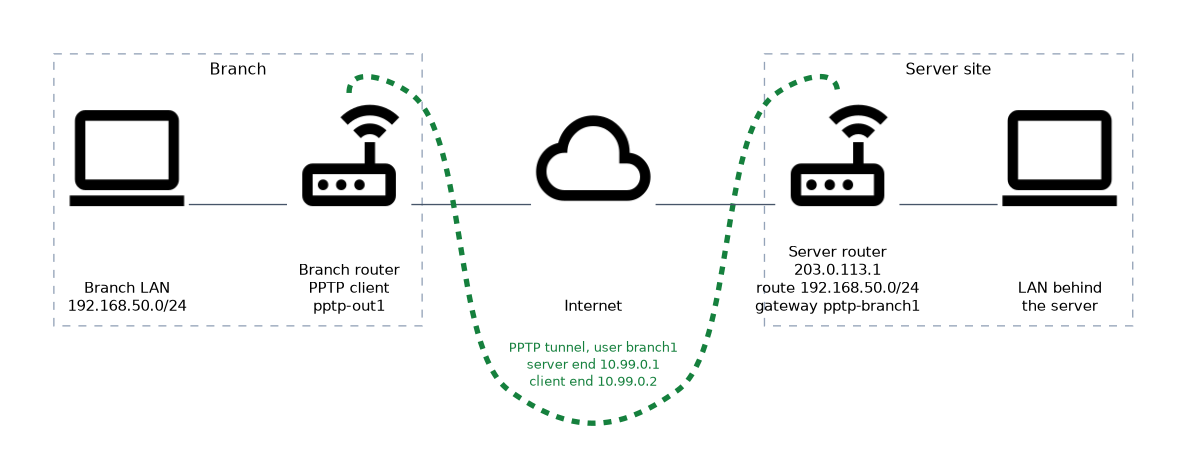 The tunnel gives each end an address. It does not by itself reach the LAN behind the far router.
/ip route add dst-address=192.168.50.0/24 gateway=pptp-branch1This route on the server sends the branch LAN into the tunnel. The client needs a matching route toward the server LAN. A routes entry in the secret can add the server side route automatically while the user is connected.
Verification
/interface pptp-client print
/ppp active print
/ip address print
A running client interface shows the flag R. /ppp active print lists the session on the server. The dynamic interface and its addresses appear in the interface and address lists.
If the client stays down, check the log, the credentials, the authentication method and the firewall for GRE.
Version note
The PPTP client and server menus exist in RouterOS v6 and v7. Routing syntax in the /ip route examples is the same in both versions for a simple static route.
What to remember for the exam
Seven facts cover most PPTP configuration questions.
- The server is enabled with
/interface pptp-server server set enabled=yes. - The client is
/interface pptp-client addwithconnect-to,userandpassword. - The user and password must match a
/ppp secretwithservice=pptporany. - MPPE needs
mschap1ormschap2and the profileuse-encryptionsetting. add-default-route=yessends all client traffic into the tunnel.- A static server interface can be bound to one user.
- Reaching a remote LAN needs a route into the tunnel.
Test the tunnel by pinging the far tunnel address first, and then the far LAN.
Common mistakes
These four errors appear again and again.
Forgetting to enable the server. The PPTP server is off until you set enabled=yes, so the client times out.
Blocking GRE. The TCP connection on port 1723 opens, but the tunnel never carries data.
Mismatched authentication. A client that offers only methods the server does not accept is refused.
No route to the remote LAN. The tunnel is up and the tunnel addresses reply, but LAN hosts cannot be reached.
Setting add-default-route=yes on a branch router can cut off its local internet access if the tunnel is its only way out.
Check yourself
Work through these three questions.
What must be done on the server before a PPTP client can connect?
Create a secret with
service=pptporany, and enable the server with/interface pptp-server server set enabled=yes.What does
add-default-route=yesdo on a PPTP client?It installs a default route through the tunnel, so all client traffic goes into the tunnel.
Why can a PPTP tunnel be up while the remote LAN is unreachable?
The tunnel only gives each end an address. A route toward the remote LAN must point into the tunnel.
Topic 2 of 3 in PPTP and L2TP
Test yourself on PPTP and L2TP
The full MikroTik MTCUME question bank has 482 questions, with timed practice exams and an explanation for every answer.
This study guide is independent and is not affiliated with, endorsed by, or sponsored by MikroTik. Vendor names, certification names and exam codes are trademarks of their respective owners and are used for identification only.