PPPoE · Topic 4 of 4
PPPoE Encryption and Interface ECMP
Learn how MPPE encryption protects a PPPoE session through the PPP profile, and how interface ECMP shares traffic across several PPPoE uplinks on RouterOS.
- 5 min
- Includes a diagram
- PPPoE itself does not encrypt. MPPE is enabled by
use-encryptionin the PPP profile. use-encryption=requiredrefuses sessions that cannot negotiate encryption.- MPPE needs
mschap1ormschap2authentication.
What it is
This page covers two separate topics: encrypting a PPPoE session, and sharing traffic across several PPPoE links.
PPPoE has no encryption of its own, but RouterOS can use MPPE through the PPP profile. ECMP, or equal cost multi path, lets the router use two or more equal routes at the same time.
Interface ECMP applies this to routes whose gateways are PPPoE interfaces.
How it works
Encryption comes from the profile and the authentication method, and ECMP comes from routes that share one distance.
PPPoE encryption with MPPE
MPPE encrypts the PPP payload. It is switched on with the use-encryption setting of the PPP profile, which accepts yes, no, default or required.
| Value | Meaning |
|---|---|
no | Encryption is not requested. |
yes | Encryption is requested and used if the other end agrees. |
required | The session is refused unless encryption is negotiated. |
default | The default behaviour of the service applies. |
MPPE keys are derived from MS-CHAP authentication. So the server must accept mschap1 or mschap2, and the client must be allowed to use them. PAP and CHAP cannot supply the keys.
/ppp profile add name=pppoe-enc use-encryption=required local-address=172.16.0.1 remote-address=pppoe-pool
/interface pppoe-server server set [find service-name=isp] default-profile=pppoe-enc authentication=mschap2
/interface pppoe-client set pppoe-out1 profile=default-encryption allow=mschap2
The built in profile default-encryption is a ready made profile with encryption on. Use required on the server when you must refuse unencrypted clients.
What encryption does not cover
MPPE protects the PPP data only. Discovery frames are not encrypted, and the protection is considered modest. Encryption also costs processing power, which matters on a busy server.
What interface ECMP means
A normal default route has one gateway. With ECMP, a route can have several gateways, and the router spreads traffic over them.
PPPoE links make this natural, because the provider address on each link is dynamic. The gateway is therefore the PPPoE interface itself, and not an IP address.
Building it
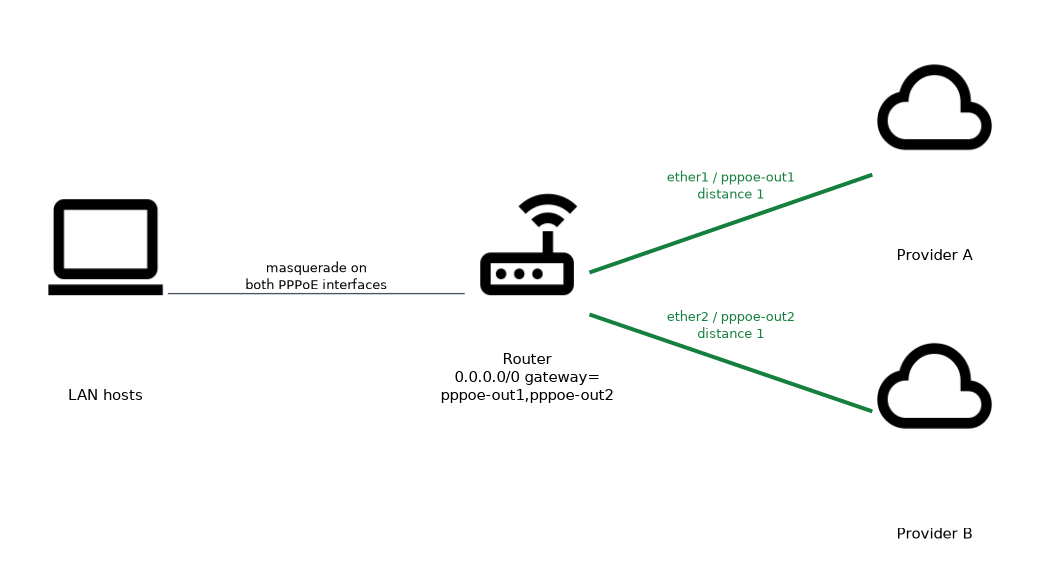 First make both clients install their default routes at the same distance.
/interface pppoe-client add name=pppoe-out1 interface=ether1 user=u1 password=p1 add-default-route=yes default-route-distance=1
/interface pppoe-client add name=pppoe-out2 interface=ether2 user=u2 password=p2 add-default-route=yes default-route-distance=1
With equal distances, the two default routes form an ECMP group. You can also write one static route that lists both interfaces.
/ip route add dst-address=0.0.0.0/0 gateway=pppoe-out1,pppoe-out2How traffic is shared
The router shares load between connections, not between packets. One connection stays on one link, while different connections can use different links.
The link is chosen from the addresses of the traffic, so one client talking to one server always uses the same link. This keeps each connection consistent, so replies return along the path the request used. Sharing is roughly even, not exact, and it does not weigh the links by speed.
NAT and failover
Each uplink has its own address, so masquerade must cover both interfaces.
/ip firewall nat add chain=srcnat out-interface=pppoe-out1 action=masquerade
/ip firewall nat add chain=srcnat out-interface=pppoe-out2 action=masquerade
If one link drops, its route disappears. The remaining link then carries all traffic until the first one returns.
Verification
/ip route print where dst-address=0.0.0.0/0
/interface pppoe-client print
An ECMP default route shows two gateways, or two routes with the same distance. Both PPPoE interfaces should show the flag R.
What to remember for the exam
Seven facts cover most questions on this page.
- PPPoE itself does not encrypt. MPPE is enabled by
use-encryptionin the PPP profile. use-encryption=requiredrefuses sessions that cannot negotiate encryption.- MPPE needs
mschap1ormschap2authentication. - The profile
default-encryptionhas encryption turned on. - Interface ECMP uses PPPoE interfaces as gateways of equal routes.
- Equal distance on the default routes makes them an ECMP group.
- Load is shared per connection, not per packet.
When two uplinks should share load, give both default routes the same distance. When one should be a backup, give it a higher distance.
Common mistakes
These four errors appear again and again.
Using PAP or CHAP with MPPE. The keys cannot be derived, so encryption fails or is refused.
Treating MPPE as strong protection. It is modest, and it does not cover discovery.
Different distances on the two default routes. The lower distance wins and the other link sits idle, so there is no load sharing.
Masquerading on one uplink only. Traffic that leaves the other link keeps a private source address and gets no replies.
Setting use-encryption=required on the server locks out clients that cannot do MPPE, so check each client first.
Check yourself
Work through these three questions.
Which setting turns on MPPE for a PPPoE session, and which authentication does it need?
use-encryptionin the PPP profile turns it on. It needsmschap1ormschap2, because the keys come from MS-CHAP.How do two PPPoE default routes become an interface ECMP group?
Both routes use the same distance, with the PPPoE interfaces as their gateways.
How does ECMP share traffic between the links?
It shares per connection, not per packet, so each connection stays on one link.
Topic 4 of 4 in PPPoE
Test yourself on PPPoE
The full MikroTik MTCUME question bank has 482 questions, with timed practice exams and an explanation for every answer.
This study guide is independent and is not affiliated with, endorsed by, or sponsored by MikroTik. Vendor names, certification names and exam codes are trademarks of their respective owners and are used for identification only.