IPsec · Topic 1 of 4
IPsec Introduction
Understand IPsec on RouterOS: AH and ESP, tunnel and transport mode, the two IKE phases, and how profile, peer, identity, proposal and policy fit together.
- 5 min
- Includes a diagram
- ESP is IP protocol 50 and encrypts. AH is protocol 51 and only authenticates.
- Tunnel mode wraps the whole packet and suits site to site links.
- IKE uses UDP 500, and UDP 4500 for NAT traversal.
What it is
IPsec is a set of protocols that authenticates and encrypts IP traffic between two devices.
It works at the IP layer, so it protects any traffic that runs over it, whatever the application. It is the standard way to build a secure site to site link or to protect an L2TP tunnel.
RouterOS builds IPsec from a few objects under /ip ipsec. This page explains the ideas, and the next pages configure each object.
How it works
IKE negotiates the keys in two phases, and then the data is protected by ESP or AH.
The two protocols
| Protocol | IP protocol number | What it gives |
|---|---|---|
| ESP | 50 | Encryption and authentication of the payload |
| AH | 51 | Authentication only, no encryption |
ESP is the common choice because it encrypts. AH does not hide the payload, and it does not survive NAT, because it protects the IP header.
Tunnel and transport mode
In transport mode, the original IP header stays, and only the payload is protected. It suits traffic between two hosts or an L2TP tunnel.
In tunnel mode, the whole original packet is protected and wrapped in a new IP header. It suits site to site links between two LANs. A RouterOS policy uses the setting tunnel=yes for this.
The two phases of IKE
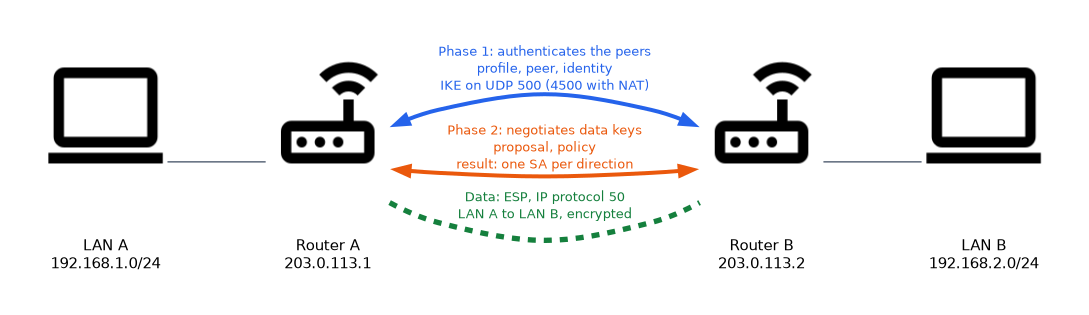 IKE is the protocol that sets up the keys. It runs on UDP port 500, and on UDP port 4500 when NAT is detected.
- Phase 1 authenticates the two peers and builds a protected channel. In RouterOS this uses the profile, the peer and the identity.
- Phase 2 negotiates the keys for the actual data. In RouterOS this uses the proposal and the policy.
The result of phase 2 is a pair of security associations, one for each direction. They appear in installed-sa.
RouterOS objects
| Object | Menu | Role |
|---|---|---|
| Profile | /ip ipsec profile | Phase 1 algorithms, DH group and lifetime |
| Peer | /ip ipsec peer | Who the remote router is and how to reach it |
| Identity | /ip ipsec identity | How the peer authenticates, for example a pre shared key |
| Proposal | /ip ipsec proposal | Phase 2 algorithms |
| Policy | /ip ipsec policy | Which traffic is protected and how |
The profile and identity objects exist from RouterOS v6.43 and in v7. Before v6.43, phase 1 settings were part of the peer. This guide uses the newer layout.
Setup order
A sensible order is profile, peer, identity, proposal and then policy. Each later object refers to an earlier one by name.
/ip ipsec profile add name=p1 hash-algorithm=sha256 enc-algorithm=aes-256 dh-group=modp2048
/ip ipsec peer add name=peer1 address=203.0.113.2/32 profile=p1
/ip ipsec identity add peer=peer1 auth-method=pre-shared-key secret=SharedKey1
/ip ipsec proposal add name=prop1 auth-algorithms=sha256 enc-algorithms=aes-256-cbc
/ip ipsec policy add src-address=192.168.1.0/24 dst-address=192.168.2.0/24 tunnel=yes peer=peer1 proposal=prop1
Both ends must agree
The two routers must agree on the phase 1 algorithms, the authentication secret, and the phase 2 algorithms. The policies must mirror one another, so one router's source is the other's destination.
If any of these differ, the negotiation fails. The log with the ipsec topic shows which step failed.
Perfect forward secrecy
PFS makes phase 2 use a fresh key exchange, so a later key leak does not expose earlier traffic. It is controlled by a group setting in the proposal, and both ends must use the same setting.
Where IPsec is used on RouterOS
- site to site links between two LANs
- protection for L2TP, with
use-ipsec - remote access for roaming clients
What to remember for the exam
Seven facts cover most introductory IPsec questions.
- ESP is IP protocol 50 and encrypts. AH is protocol 51 and only authenticates.
- Tunnel mode wraps the whole packet and suits site to site links.
- IKE uses UDP 500, and UDP 4500 for NAT traversal.
- Phase 1 builds the protected channel. Phase 2 negotiates the data keys.
- Phase 2 produces two security associations, one for each direction.
- RouterOS objects are profile, peer, identity, proposal and policy.
- Both ends must agree on algorithms and secret, and the policies must mirror.
To remember the objects, think of phase 1 as profile, peer and identity, and phase 2 as proposal and policy.
Common mistakes
These four errors appear again and again.
Mismatched algorithms. One side offers algorithms that the other does not accept, so negotiation fails.
Policies that do not mirror. The source and destination must be swapped on the other router.
Using AH through NAT. AH protects the IP header, so NAT breaks it.
Forgetting tunnel=yes. A site to site policy without it protects traffic as transport mode, which is the wrong shape for LAN to LAN.
A wrong pre shared key looks like a network fault, because phase 1 simply never completes. Check the log before the cabling.
Check yourself
Work through these three questions.
What is the difference between ESP and AH?
ESP is protocol 50 and encrypts and authenticates the payload. AH is protocol 51 and only authenticates.
What do phase 1 and phase 2 do?
Phase 1 authenticates the peers and builds a protected channel. Phase 2 negotiates the keys that protect the data.
Which UDP ports does IKE use?
UDP 500, and UDP 4500 when NAT is detected.
Topic 1 of 4 in IPsec
Test yourself on IPsec
The full MikroTik MTCUME question bank has 482 questions, with timed practice exams and an explanation for every answer.
This study guide is independent and is not affiliated with, endorsed by, or sponsored by MikroTik. Vendor names, certification names and exam codes are trademarks of their respective owners and are used for identification only.