IPsec · Topic 4 of 4
Installed SAs and IPsec with NAT
Read the IPsec installed SA table on RouterOS for counters and keys, and handle NAT with an accept rule, NAT traversal and the right firewall ports.
- 5 min
- Includes a diagram
/ip ipsec installed-sa printlists live associations, with SPI, addresses and counters.- Associations are one way, so there is one for each direction.
current-bytesrising in one direction only means traffic does not return.
What it is
Installed SAs are the live security associations that protect traffic, and NAT is the main thing that breaks them.
After phase 2 succeeds, RouterOS lists the associations under installed-sa. Reading that table tells you whether keys exist and whether traffic is flowing in both directions.
NAT changes addresses, so it can stop packets matching a policy or hide a peer. Both problems have standard fixes.
How it works
You check the associations first, and then make NAT leave the protected traffic alone.
The installed SA table
/ip ipsec installed-sa print| Field | What it tells you |
|---|---|
spi | Security parameter index that names the association. |
src-address and dst-address | The two router addresses for that direction. |
state | Shows mature when the association is ready for use. |
auth-algorithm and enc-algorithm | Algorithms in use. |
current-bytes | Bytes protected by this association. |
add-lifetime | The lifetime that triggers renewal. |
Two associations for each tunnel
Security associations are one way. A working tunnel therefore has at least one outgoing association and one incoming association, each with its own SPI.
The counters give a simple test. If current-bytes rises on the outgoing association but not on the incoming one, traffic leaves but nothing returns. That points at the far router, a firewall or a routing fault.
Clearing and renewing
/ip ipsec installed-sa flushThe flush command removes the associations. New ones are negotiated when traffic next matches the policy. Use it after a change to a proposal, so the new settings take effect.
Why NAT breaks IPsec
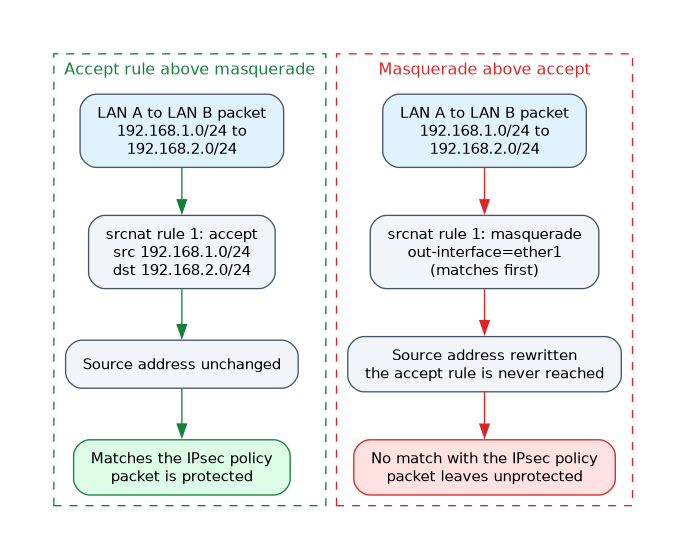 A masquerade rule rewrites the source address of packets that leave through the public interface. If protected traffic is rewritten, it no longer matches the policy, and it leaves unprotected.
The fix is an accept rule in the srcnat chain, placed above the masquerade rule, that exempts the protected traffic.
/ip firewall nat add chain=srcnat src-address=192.168.1.0/24 dst-address=192.168.2.0/24 action=accept place-before=0
/ip firewall nat add chain=srcnat out-interface=ether1 action=masquerade
NAT rules are checked from the top, so the accept rule wins for LAN to LAN traffic, and everything else is masqueraded. The same rule exists on the other router with the addresses swapped.
A peer behind NAT
Sometimes one router sits behind a NAT device and has a private address. The other router sees a different source address.
NAT traversal solves this. IKE detects the NAT, and the ESP packets are wrapped in UDP and sent on port 4500, which NAT devices can track. In RouterOS this is the nat-traversal setting of the profile.
The identity may also need my-id or remote-id, because the address that the peer sees is no longer the real one.
Firewall input rules
The router that receives the negotiation must allow it.
/ip firewall filter add chain=input protocol=udp dst-port=500,4500 action=accept
/ip firewall filter add chain=input protocol=ipsec-esp action=accept
If these rules are missing, phase 1 never starts, or it starts and the data stops.
Forward rules
Traffic that was decrypted comes out of the tunnel with the LAN addresses. If the forward chain drops unknown traffic, add accept rules for the protected subnets.
/ip firewall filter add chain=forward src-address=192.168.2.0/24 dst-address=192.168.1.0/24 action=acceptA firewall rule can also match IPsec traffic with the ipsec-policy setting. This helps to accept only traffic that came through a tunnel.
What to remember for the exam
Seven facts cover most questions on this page.
/ip ipsec installed-sa printlists live associations, with SPI, addresses and counters.- Associations are one way, so there is one for each direction.
current-bytesrising in one direction only means traffic does not return./ip ipsec installed-sa flushforces new negotiation on the next matching traffic.- Masquerade breaks IPsec, so an accept rule must come first in
srcnat. - NAT traversal wraps ESP in UDP port 4500.
- The firewall must allow UDP 500, UDP 4500 and ESP.
If the policy never matches, look at the NAT rule order before you touch the IPsec settings.
Common mistakes
These four errors appear again and again.
Accept rule below the masquerade rule. NAT rules run top down, so masquerade matches first and the accept rule never fires.
Blocking UDP 4500. A peer behind NAT cannot send its data, even though phase 1 may look fine.
Reading only one counter. Check both directions before blaming the policy.
Forgetting the forward chain. Decrypted traffic is dropped by a strict forward rule set.
Using AH with NAT does not work, because AH covers the IP header that NAT rewrites. Use ESP.
Check yourself
Work through these three questions.
What does a rising counter on only one installed SA suggest?
Traffic leaves in one direction but nothing returns, which points at the far router, a firewall or routing.
Why does masquerade break an IPsec tunnel, and what is the fix?
It rewrites the source address, so packets no longer match the policy. Add an accept rule above the masquerade rule in
srcnat.How does NAT traversal let a peer behind NAT work?
IKE detects the NAT, and ESP is wrapped in UDP and sent on port 4500.
Topic 4 of 4 in IPsec
Test yourself on IPsec
The full MikroTik MTCUME question bank has 482 questions, with timed practice exams and an explanation for every answer.
This study guide is independent and is not affiliated with, endorsed by, or sponsored by MikroTik. Vendor names, certification names and exam codes are trademarks of their respective owners and are used for identification only.