HotSpot · Topic 5 of 5
Bypassing and Customising the HotSpot
Let devices skip HotSpot login with IP bindings and walled garden rules, and customise the login pages with a copied HTML directory and page variables.
- 6 min
- Includes a diagram
- An IP binding of type
bypassedlets a device skip login. - The binding types are
regular,bypassedandblocked. - The walled garden allows destinations before login.
What it is
Bypass lets chosen devices or sites skip the login, and customising changes how the login pages look.
Some devices cannot log in, such as printers and servers. Some sites must be reachable before login, such as a payment page. RouterOS handles both with IP bindings and the walled garden.
The login pages are plain files on the router, so you can edit them to match your own brand.
How it works
IP bindings handle devices, the walled garden handles destinations, and the HTML directory handles the look.
IP bindings
An IP binding is a rule that matches a device by address or MAC address and gives it a type.
/ip hotspot ip-binding add mac-address=AA:BB:CC:DD:EE:FF type=bypassed comment=printer| Type | Effect |
|---|---|
regular | The device goes through the normal login. |
bypassed | The device skips login and is forwarded at once. |
blocked | The device is denied and cannot use the HotSpot. |
An IP binding can match on address, on mac-address, or on both. It can also name a server, so it applies to one HotSpot only. A binding can also map a device to a fixed address with to-address.
Walled garden
The walled garden lists destinations that any client can reach without logging in. It is used for pages such as a hotel site or a payment provider.
/ip hotspot walled-garden add dst-host=pay.example.com action=allow
/ip hotspot walled-garden ip add dst-address=198.51.100.10 action=accept| Menu | Matches on | Works for |
|---|---|---|
walled-garden | A host name | Web traffic by name |
walled-garden ip | An address, protocol or port | Any protocol |
Use the host name form for web sites. Use the IP form when you need a protocol other than web, or a specific port.
Bypass compared with walled garden
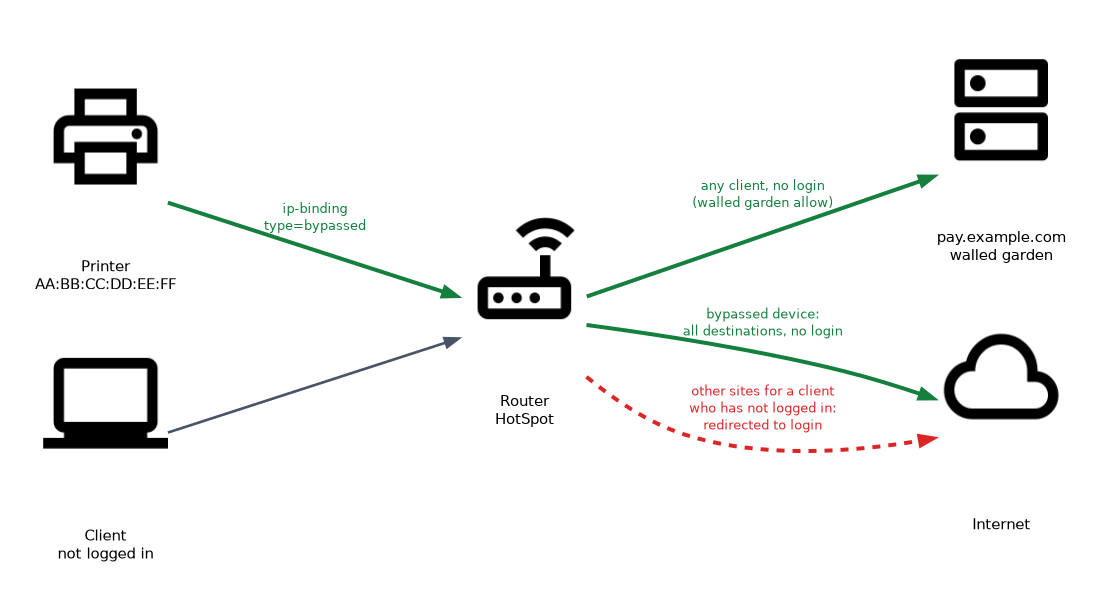 The IP binding exempts a device from login for all destinations. The walled garden exempts a destination from login for all devices. Pick the one that matches what you want to allow.
Seeing bypassed hosts
/ip hotspot host printA bypassed device appears in the host list with a flag that marks it as bypassed. If a device you bound does not show that flag, the binding did not match.
Customising the pages
The login pages are files in a folder on the router. The folder is named by html-directory in the server profile.
The main files include:
login.html, the login formlogout.html, shown after logoutstatus.html, the status page for a logged in usererror.html, shown when something failsredirect.html, used to send the user on to the original page
HotSpot advertisement
The HotSpot can pop up an advertisement page in front of logged in users from time to time. It is set per user profile.
/ip hotspot user profile set day-pass advertise=yes advertise-url=http://ads.example.com/promo.html advertise-interval=30m advertise-timeout=1m| Setting | What it does |
|---|---|
advertise | Turns the popup on. |
advertise-url | The page that is shown. It can be a list of pages. |
advertise-interval | How long to wait between popups. |
advertise-timeout | How long the advertisement is shown before network access is blocked for the client. The default is 1m. |
The advertised site must be reachable before the user has responded, so add it to the walled garden.
/ip hotspot walled-garden add dst-host=ads.example.com action=allowA safe workflow
- Copy the default folder to a new name, using the files list or an FTP session.
- Edit the files in the copy.
- Point the profile at the copy.
/ip hotspot profile set hsprof1 html-directory=hotspot-customThe original stays untouched, so you can switch back at once if something goes wrong.
Page variables
The pages are HTML with variables that the router replaces when it serves the page.
| Variable | What it holds |
|---|---|
$(username) | The name of the user. |
$(ip) | The address of the client. |
$(mac) | The MAC address of the client. |
$(error) | The error text, when a login fails. |
$(link-login) | The link to the login page. |
$(link-orig) | The page the user first asked for. |
Keep the form field names and the variables that the login needs. Changing the look is safe. Removing the form fields breaks the login.
Checking the result
Open the login page from a test client after each change. Test a failed login too, because the error page is a separate file.
What to remember for the exam
Seven facts cover most bypass and customising questions.
- An IP binding of type
bypassedlets a device skip login. - The binding types are
regular,bypassedandblocked. - The walled garden allows destinations before login.
walled-gardenmatches host names andwalled-garden ipmatches addresses.- The login pages are files in the folder named by
html-directory. - Copy the default folder before editing, and point the profile at the copy.
- Page variables such as
$(username)and$(error)are filled in by the router.
A device that cannot show a web page, such as a printer, belongs in an IP binding of type bypassed.
Common mistakes
These four errors appear again and again.
Using a binding when a walled garden fits. A binding exempts a device, not a destination.
Editing the default pages in place. You lose the original, and a mistake breaks the login.
Removing form fields from the login page. The router cannot read the login, so every attempt fails.
Forgetting the DNS and address of an allowed site. A walled garden entry by host name needs the router to resolve that name, and some sites use many addresses.
A bypassed device is open to the network with no login. Bind by MAC and address only for devices you trust.
Check yourself
Work through these three questions.
How do you let a printer skip the HotSpot login?
Add an IP binding for its MAC address or address with
type=bypassed.What is the difference between an IP binding and the walled garden?
An IP binding exempts a device from login. The walled garden exempts a destination from login.
How do you change the login page safely?
Copy the default HTML folder, edit the copy, and set
html-directoryin the profile to the copy.
Topic 5 of 5 in HotSpot
Test yourself on HotSpot
The full MikroTik MTCUME question bank has 482 questions, with timed practice exams and an explanation for every answer.
This study guide is independent and is not affiliated with, endorsed by, or sponsored by MikroTik. Vendor names, certification names and exam codes are trademarks of their respective owners and are used for identification only.