Quality of Service · Topic 3 of 4
Queue Types
Learn the RouterOS queue types FIFO, SFQ, RED and PCQ, how each handles packets inside a leaf queue, and how queue size affects delay and packet loss.
- 5 min
- Includes a diagram
- A queue type decides how packets wait inside a leaf queue.
- FIFO serves packets in arrival order and drops new packets when full.
- pfifo counts packets and bfifo counts bytes.
What it is
A queue type decides how packets wait and are released inside a queue.
HTB decides how much a queue may send. The queue type decides which packet goes next and what happens when the buffer is full. Each leaf queue uses one queue type, which you choose with the queue parameter.
The types are defined in /queue type. RouterOS ships with several default types, and you can add your own with chosen settings.
How it works
Four main kinds cover most exam questions: FIFO, SFQ, RED and PCQ.
FIFO
First in, first out is the simplest type. Packets leave in the order they arrived.
When the buffer is full, new packets are dropped. This is called tail drop.
There are two forms. pfifo counts the buffer size in packets, and bfifo counts it in bytes.
/queue type add name=small-fifo kind=pfifo pfifo-limit=20FIFO needs the least CPU. It does not treat flows fairly, so one heavy download can fill the buffer and delay everyone else.
SFQ
Stochastic fairness queueing shares a queue between flows. It hashes each flow into one of many sub queues and serves them in turn, so one flow cannot starve the rest.
SFQ has two main settings. perturb is the time between changes of the hash, which stops unlucky flows from sharing a sub queue for long. allot is how many bytes a sub queue may send in each turn.
/queue type add name=fair kind=sfq sfq-perturb=5 sfq-allot=1514SFQ is fair per flow, not per user. A user with many connections still gets more than a user with one.
RED
Random early detection drops packets at random before the buffer is full, with a higher chance as the queue grows. Dropping early tells TCP senders to slow down before a long queue builds up.
RED uses a minimum and a maximum threshold. Below the minimum, nothing is dropped.
Between the two, a growing share is dropped. Above the maximum, all packets are dropped.
RED suits fast links with many TCP flows and a busy buffer. It is not intended for traffic that does not slow down on loss.
PCQ
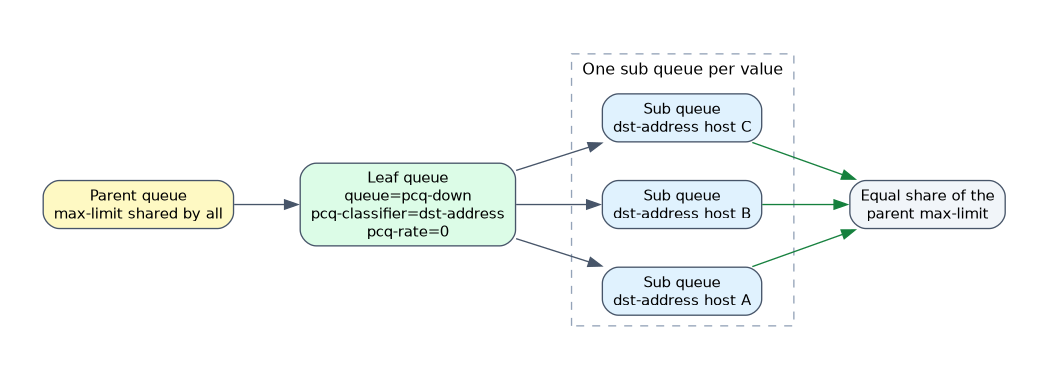 Per connection queueing is the most used type for shaping many users. It makes one sub queue per classifier value, such as each source address, and shares the rate equally between them.
| Setting | Meaning |
|---|---|
| pcq-classifier | The fields that split flows, such as src-address or dst-address |
| pcq-rate | The rate limit for each sub queue |
| pcq-limit | The size of each sub queue |
| pcq-total-limit | The size of all sub queues together |
/queue type add name=pcq-down kind=pcq pcq-classifier=dst-address pcq-rate=0
/queue type add name=pcq-up kind=pcq pcq-classifier=src-address pcq-rate=0
For download, the classifier is usually dst-address, because every user is a different destination. For upload it is src-address. With pcq-rate=0, there is no fixed per user limit, and all users share the parent queue maximum equally.
When some users do not need their share, the others can use it. A fixed pcq-rate caps each user at that rate instead.
Queue size
Every queue has a buffer, and its size matters.
| Buffer | Effect |
|---|---|
| Too small | Bursts overflow it, so packets are dropped and throughput suffers |
| Too large | Packets wait a long time, so delay and jitter grow |
A larger buffer absorbs short bursts, but a full large buffer adds delay. The right size depends on the link speed and the traffic. FIFO sets it with pfifo-limit or bfifo-limit, RED with its thresholds and PCQ with pcq-limit.
Use PCQ to share a link fairly between many users, and keep queues small for delay sensitive traffic such as voice.
What to remember for the exam
Eight facts cover most questions on this topic.
- A queue type decides how packets wait inside a leaf queue.
- FIFO serves packets in arrival order and drops new packets when full.
- pfifo counts packets and bfifo counts bytes.
- SFQ shares fairly between flows, using the
perturbandallotsettings. - RED drops packets at random before the buffer is full.
- PCQ creates a sub queue for each classifier value and shares the rate equally.
- Use
dst-addressfor download andsrc-addressfor upload with PCQ. - A small queue loses packets in bursts, and a large queue adds delay.
SFQ is fair per flow, not per user. Use PCQ with an address classifier when fairness per user matters.
Common mistakes
These four mistakes appear often.
Using FIFO for many users. One heavy flow can fill the buffer and slow everyone down.
Using the wrong PCQ classifier. A source classifier on download traffic does not split users properly.
Making the buffer very large. The result is long delay, even though fewer packets are dropped.
Expecting SFQ to give each user an equal share. It balances flows, so a user with many connections gets more.
Check yourself
Work through these three questions.
Which queue type creates one sub queue for each address?
PCQ, using a classifier such as
src-addressordst-address.How does RED differ from FIFO tail drop?
RED drops packets at random before the buffer is full, while FIFO drops only after it is full.
What is the effect of a very large queue?
Fewer packets are dropped in bursts, but packets wait longer, so delay grows.
Topic 3 of 4 in Quality of Service
Test yourself on Quality of Service
The full MikroTik MTCTCE question bank has 479 questions, with timed practice exams and an explanation for every answer.
This study guide is independent and is not affiliated with, endorsed by, or sponsored by MikroTik. Vendor names, certification names and exam codes are trademarks of their respective owners and are used for identification only.