VLANs · Topic 6 of 6
QinQ with Bridge VLAN Filtering and VLAN Interfaces
Configure QinQ on RouterOS with 802.1ad service tags, using the bridge ether-type with VLAN filtering or stacked VLAN interfaces with use-service-tag.
- 5 min
- Includes a diagram
- QinQ adds an outer service tag to frames that may already carry a customer tag.
- The service tag type is
0x88a8, and the customer tag type is0x8100. - With bridge VLAN filtering, set
ether-type=0x88a8on the bridge.
What it is
QinQ stacks a second VLAN tag on a frame, so a provider can carry the customer VLANs without changing them.
The customer sends frames that may already have 802.1Q tags. The provider adds an outer tag, called the service tag, at the edge and removes it at the other edge. Between the edges, the provider switches on the outer tag only.
The standard is IEEE 802.1ad. The outer tag uses the type value 0x88a8, and the inner customer tag uses 0x8100.
How it works
RouterOS offers two ways to add and remove the service tag.
Why use it
QinQ keeps customers separate and avoids VLAN ID clashes.
Two customers can both use VLAN 10 inside, because the provider tag keeps them apart. The provider only manages one VLAN ID per customer. The cost is four extra bytes per frame, so the L2MTU on every provider port must allow for them.
Method one: bridge VLAN filtering
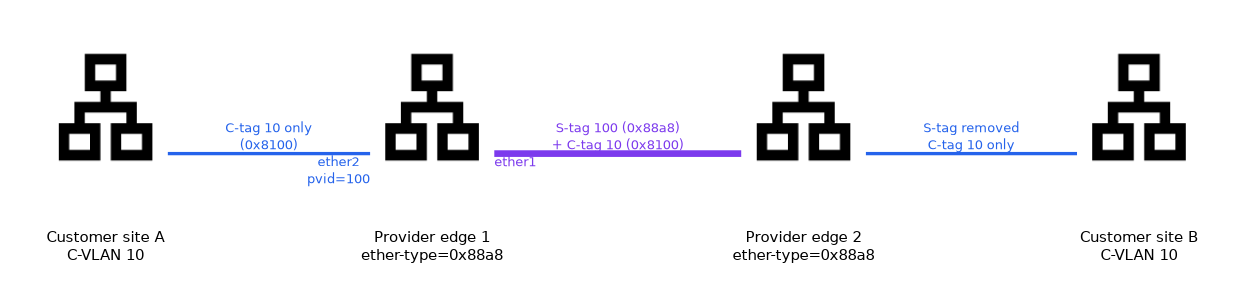 Set the bridge to use the service tag type, then treat customer frames as untagged.
/interface bridge add name=bridge1 vlan-filtering=no ether-type=0x88a8
/interface bridge port add bridge=bridge1 interface=ether2 pvid=100
/interface bridge port add bridge=bridge1 interface=ether1 frame-types=admit-only-vlan-tagged
/interface bridge vlan add bridge=bridge1 vlan-ids=100 tagged=ether1 untagged=ether2
/interface bridge set bridge1 vlan-filtering=yes
With ether-type=0x88a8, the bridge treats only frames with that outer type as tagged. A customer frame with an ordinary 0x8100 tag looks untagged to it. The pvid=100 on ether2 therefore adds the service tag 100 to every customer frame, and the inner tag is kept as payload.
On the other side the process is reversed. The service tag is removed when the frame leaves through the untagged port, and the customer sees its own tags again.
The ether-type is a property of the whole bridge. You cannot use the same bridge for ordinary 802.1Q VLANs and for service tags at the same time.
Method two: VLAN interfaces
Create a VLAN interface that uses the service tag, and bridge it with the customer port.
/interface vlan add name=svlan100 interface=ether1 vlan-id=100 use-service-tag=yes
/interface bridge add name=bridge-cust1
/interface bridge port add bridge=bridge-cust1 interface=svlan100
/interface bridge port add bridge=bridge-cust1 interface=ether2
Customer frames come in on ether2, with any inner tags, and cross the bridge to svlan100. That interface adds the outer tag 100 with the 0x88a8 type as the frame leaves ether1. In the other direction it removes the service tag.
If you need to look inside, create a normal VLAN interface on top of the service VLAN interface.
/interface vlan add name=cvlan10 interface=svlan100 vlan-id=10Comparing the two methods
| Aspect | Bridge VLAN filtering | VLAN interfaces |
|---|---|---|
| Bridges needed | One for the provider edge | One per customer |
| Hardware offload | Possible where the chip supports it | Not possible |
| Mixed 802.1Q and 802.1ad | Not on one bridge | Possible, as interfaces are separate |
| Setup effort | Low for many customers | Grows with each customer |
Verification and sizing
Check the frame size and the tag values.
/interface vlan print detail
/interface bridge vlan print
The port that faces the provider core needs room for two tags. Compare the L2MTU on every link, because one small port breaks all customers behind it.
What to remember for the exam
Seven facts cover most questions on this topic.
- QinQ adds an outer service tag to frames that may already carry a customer tag.
- The service tag type is
0x88a8, and the customer tag type is0x8100. - With bridge VLAN filtering, set
ether-type=0x88a8on the bridge. - The customer port uses
pvidequal to the service VLAN, and it is untagged in the table. - With VLAN interfaces, set
use-service-tag=yesand bridge the interface with the customer port. - The service tag adds four bytes, so check the L2MTU.
- VLAN interfaces are handled by the CPU and are not offloaded.
The ether type on the bridge applies to the whole bridge, so plan a separate bridge for the provider edge.
Common mistakes
These four mistakes appear often.
Forgetting the extra four bytes. Full size customer frames are dropped on a port with no spare room.
Mixing 802.1Q and 802.1ad on one filtering bridge. The bridge uses one ether type for all VLANs.
Not setting use-service-tag. The interface then adds a normal 0x8100 tag, and the provider core does not see a service tag.
Bridging the parent interface by mistake. Customer frames then bypass the service VLAN.
Check yourself
Work through these three questions.
Which type value does the 802.1ad service tag use?
0x88a8, while the inner customer tag uses0x8100.How do you add a service tag with bridge VLAN filtering?
Set
ether-type=0x88a8on the bridge and give the customer port apvidequal to the service VLAN ID.Which setting makes a VLAN interface use a service tag?
use-service-tag=yes.
Topic 6 of 6 in VLANs
Test yourself on VLANs
The full MikroTik MTCSWE question bank has 484 questions, with timed practice exams and an explanation for every answer.
This study guide is independent and is not affiliated with, endorsed by, or sponsored by MikroTik. Vendor names, certification names and exam codes are trademarks of their respective owners and are used for identification only.