VLANs · Topic 4 of 6
VLANs in Bridge Interfaces with VLAN Filtering
Configure port based VLANs with RouterOS bridge VLAN filtering using pvid, frame types, the bridge VLAN table, and a tagged bridge for management access.
- 5 min
- Includes a diagram
- Bridge VLAN filtering starts in RouterOS v6.41, and is enabled with
vlan-filtering=yeson the bridge. pvidgives untagged frames their VLAN.frame-typeslimits which frames a port accepts.
What it is
Bridge VLAN filtering makes one bridge VLAN aware, so a single bridge can serve many VLANs.
You list ports and VLANs inside the bridge, and the bridge keeps the networks apart. On devices whose chip supports it, the work is offloaded to hardware. This is the recommended method on current RouterOS for most devices.
Bridge VLAN filtering is available from RouterOS v6.41. The same ideas apply in v7, which adds more features and wider hardware offload. CRS1xx and CRS2xx devices do not offload bridge VLAN filtering, so they use the switch menu method.
How it works
Port settings classify frames on the way in, and the bridge VLAN table decides how they leave.
Port settings
Each bridge port has a PVID and a frame type.
| Setting | Meaning |
|---|---|
pvid | The VLAN ID given to untagged frames received on the port |
frame-types | Which frames the port accepts |
ingress-filtering | Drops tagged frames for VLANs the port does not belong to |
The frame-types values are:
admit-allaccepts tagged and untagged frames.admit-only-untagged-and-priority-taggedis for access ports.admit-only-vlan-taggedis for trunk ports.
The bridge VLAN table
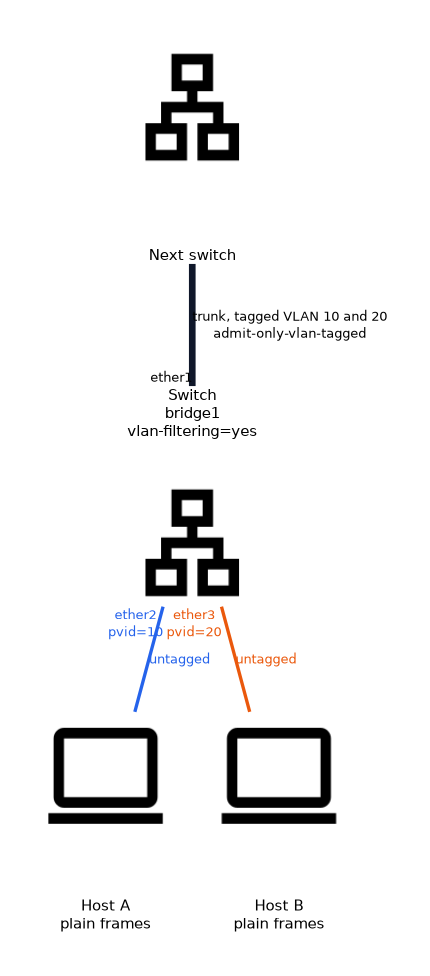 The table lists each VLAN, with its tagged and untagged ports.
/interface bridge add name=bridge1
/interface bridge port add bridge=bridge1 interface=ether2 pvid=10 frame-types=admit-only-untagged-and-priority-tagged
/interface bridge port add bridge=bridge1 interface=ether3 pvid=20 frame-types=admit-only-untagged-and-priority-tagged
/interface bridge port add bridge=bridge1 interface=ether1 frame-types=admit-only-vlan-tagged
/interface bridge vlan add bridge=bridge1 vlan-ids=10 tagged=ether1 untagged=ether2
/interface bridge vlan add bridge=bridge1 vlan-ids=20 tagged=ether1 untagged=ether3
/interface bridge set bridge1 vlan-filtering=yes
A port listed under tagged sends the VLAN with its tag. A port listed under untagged strips the tag on egress. ether2 and ether3 are access ports, and ether1 is a trunk.
Turn on vlan-filtering last, from a port that stays reachable. Enabling it before the table is complete can lock you out of the router.
Management access through the bridge
The router itself is a member of the bridge, through the bridge interface.
To give the router an address in a VLAN, add the bridge as a tagged member of that VLAN, then create a VLAN interface on the bridge.
/interface bridge vlan add bridge=bridge1 vlan-ids=99 tagged=ether1,bridge1
/interface vlan add name=vlan99 interface=bridge1 vlan-id=99
/ip address add address=192.168.99.1/24 interface=vlan99
If the bridge is not listed as tagged, the router never sees traffic for that VLAN. This is the most common reason for management failing after enabling filtering.
Dynamic entries and verification
Some entries are created automatically from port settings.
/interface bridge vlan print
/interface bridge port print
The print shows configured entries and the current tagged and untagged membership. A hardware offloaded port carries a flag in the port list. If the flag is missing, the CPU handles that traffic.
VLAN filtering versus VLAN interfaces
| Aspect | Bridge VLAN filtering | VLAN interfaces and one bridge per VLAN |
|---|---|---|
| Number of bridges | One | One per VLAN |
| Hardware offload | Possible on supported chips | Not possible |
| Configuration | Port settings and one table | Many interfaces and bridges |
Port based VLAN in this model
An access port is a port with a PVID, untagged membership and an access frame type.
The host sends plain frames, the bridge assigns the VLAN, and the bridge removes the tag on the way out. The same VLAN can span many ports and many switches, as long as trunks carry it tagged.
What to remember for the exam
Eight facts cover most questions on this topic.
- Bridge VLAN filtering starts in RouterOS v6.41, and is enabled with
vlan-filtering=yeson the bridge. pvidgives untagged frames their VLAN.frame-typeslimits which frames a port accepts.- The bridge VLAN table lists tagged and untagged ports for each VLAN ID.
- A tagged port keeps the tag, and an untagged port strips it.
- The bridge interface must be tagged in the table for the router to reach a VLAN.
- Enable
vlan-filteringas the last step. - One VLAN aware bridge can be hardware offloaded on supported devices.
Use ingress-filtering=yes on ports so that a frame for a VLAN the port does not carry is dropped at the door.
Common mistakes
These four mistakes appear often.
Enabling filtering too early. A half finished table can cut your access.
Leaving out the bridge as tagged. The router has no path into the VLAN.
Wrong frame type on access ports. A port that admits tagged frames lets a host inject VLAN tags.
Creating one bridge per VLAN. This works, but it loses hardware offload and adds work.
Check yourself
Work through these three questions.
What does
pviddo on a bridge port?It gives untagged frames received on that port their VLAN ID.
Why must the bridge be a tagged member of a VLAN to manage the router in it?
The router connects to the bridge interface, so the bridge must receive the VLAN with its tag.
Which command enables VLAN filtering?
/interface bridge set bridge1 vlan-filtering=yes.
Topic 4 of 6 in VLANs
Test yourself on VLANs
The full MikroTik MTCSWE question bank has 484 questions, with timed practice exams and an explanation for every answer.
This study guide is independent and is not affiliated with, endorsed by, or sponsored by MikroTik. Vendor names, certification names and exam codes are trademarks of their respective owners and are used for identification only.