Tools · Topic 1 of 2
Port Mirroring
Learn how port mirroring copies traffic from switch ports to a monitoring port, how to set it up in the switch chip, and what its limits and pitfalls are.
- 5 min
- Includes a diagram
- Port mirroring copies traffic from a source port to a target port.
- The source can be ingress, egress or both, depending on the chip.
- On chip based devices,
mirror-sourceandmirror-targetare set in the switch menu.
What it is
Port mirroring copies the traffic of one port to another port, so you can watch it with an analyser.
On a switch, a normal port sees only its own traffic. If you plug a laptop with a packet analyser into a free port, it sees almost nothing of what other hosts do. Mirroring solves this by sending a copy of the chosen traffic to the monitoring port.
The original traffic is not changed. Hosts keep talking as before, and they are not aware of the copy.
How it works
You choose a source, a direction and a target.
Terms
Four terms describe a mirror.
- Mirror source: the port or ports whose traffic is copied.
- Mirror target: the port that receives the copies, where the analyser is attached.
- Ingress: traffic received on the source port.
- Egress: traffic sent out of the source port.
Depending on the chip, you can mirror ingress, egress or both. Both directions give the full conversation.
Configuration in the switch chip
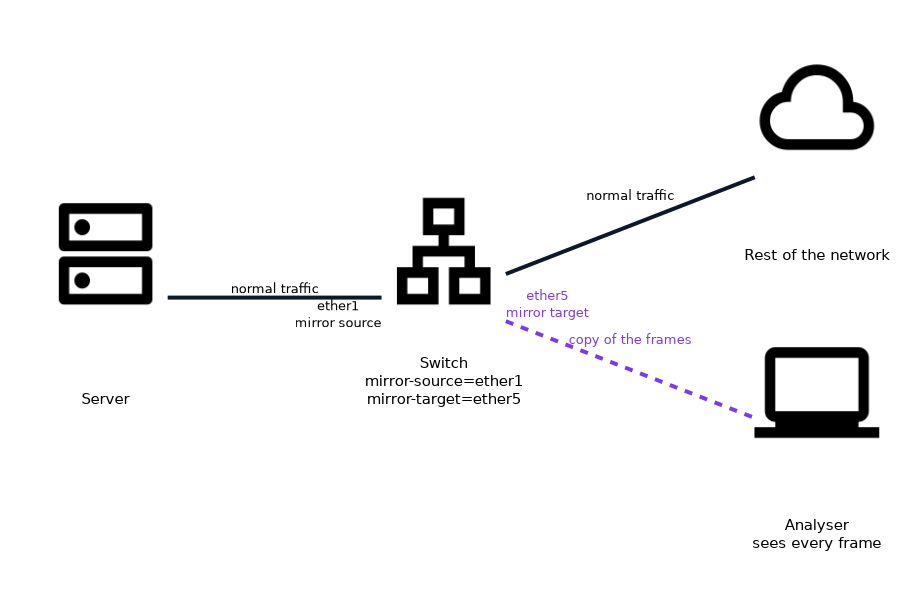 On devices where the switch chip handles it, the mirror settings are in the switch menu.
/interface ethernet switch set switch1 mirror-source=ether1 mirror-target=ether5
/interface ethernet switch print
Here the traffic of ether1 is copied to ether5. The copy is made by the chip at wire speed, without CPU load. Which options exist, which directions are copied, and whether you can mirror several sources, depends on the chip family and the RouterOS version.
Mirroring selected traffic
A switch rule can pick only part of the traffic.
Instead of copying a whole port, a rule matches the traffic you care about, such as one host or one protocol, and tells the chip to copy it to the mirror target. This keeps the volume low. The rule fields available depend on the chip.
The target port
The target port behaves differently from normal ports.
Use a port that is not needed for anything else. Do not put the target port into a bridge with live hosts, because the mirrored frames could confuse other devices. Plan the analyser to be the only thing connected to it.
The mirror target is not a normal port. Do not connect it to the network, because it receives copies of other hosts' frames.
Capacity limits
The target can be overloaded.
If you mirror both directions of a busy port, the copy can need twice the bandwidth of the source. A one gigabit full duplex source can create up to two gigabits of copies.
A one gigabit target then drops frames, and your capture misses traffic. Mirror one direction, or use a faster target.
What a capture can and cannot show
A mirror sees what crosses the source port, nothing more.
- It sees frames between the hosts behind that port and the rest of the network.
- It does not see traffic that never crosses the port.
- Tagged traffic is shown with its tags, if the chip keeps them.
- Errors, such as damaged frames, may be dropped by the chip before the copy.
Do not expect a mirror to show Layer 1 problems.
When to use mirroring
Use it when you need to see real traffic.
- Finding a rogue DHCP server or a loop.
- Checking whether a VLAN tag is present on a link.
- Capturing a faulty device conversation for later study.
- Feeding an intrusion detection system with a copy of the traffic.
Alternatives
If the switch cannot mirror, software tools can help.
The router can capture packets that it handles, and send them to an analyser on another host. This sees only traffic that passes through the CPU, so it misses frames that are switched wholly in hardware. The next page covers the software tools.
Put a label on the mirror target port, and remove the mirror when the investigation ends, so nobody mistakes it for a normal port.
What to remember for the exam
Seven facts cover most questions on this topic.
- Port mirroring copies traffic from a source port to a target port.
- The source can be ingress, egress or both, depending on the chip.
- On chip based devices,
mirror-sourceandmirror-targetare set in the switch menu. - The copy is made in hardware and does not load the CPU.
- A target port should be dedicated to the analyser.
- Mirroring both directions can exceed the capacity of the target.
- A switch rule can mirror only selected traffic.
Common mistakes
These four mistakes appear often.
Plugging the target into the network. The copies confuse other devices.
Overloading the target. The analyser then misses frames.
Forgetting to remove the mirror. The port stays unusable for normal work.
Expecting to see hardware switched traffic with a software capture. The CPU never sees those frames.
Check yourself
Work through these three questions.
What does port mirroring do?
It copies the traffic of a source port to a target port, where an analyser can see it.
Why can a mirror target drop frames?
Mirroring both directions of a busy port can need more bandwidth than the target has.
Which settings define a mirror in the switch menu?
mirror-sourceandmirror-target.
Topic 1 of 2 in Tools
Test yourself on Tools
The full MikroTik MTCSWE question bank has 484 questions, with timed practice exams and an explanation for every answer.
This study guide is independent and is not affiliated with, endorsed by, or sponsored by MikroTik. Vendor names, certification names and exam codes are trademarks of their respective owners and are used for identification only.