Spanning Tree Protocol · Topic 1 of 3
STP and RSTP Concepts
Learn how STP and RSTP prevent Layer 2 loops, how the root bridge is chosen by bridge priority, how path cost works, and how RSTP converges faster.
- 5 min
- Includes a diagram
- Spanning tree blocks redundant links to prevent Layer 2 loops.
- The root bridge has the lowest bridge ID, which is priority plus MAC address.
- A lower priority number wins, and RouterOS writes it in hexadecimal.
What it is
Spanning tree protocol keeps a switched network with redundant links free of loops.
A loop in Layer 2 is dangerous because Ethernet frames have no hop limit. A broadcast frame can circle forever and multiply, which floods the network and fills the MAC tables with false entries. Spanning tree blocks some links so that only one active path exists between any two points.
STP is defined in IEEE 802.1D, and RSTP, the faster version, in IEEE 802.1w. RouterOS bridges support both.
How it works
The bridges elect a root, then every other bridge picks its best path to it.
Choosing the root bridge
Every bridge has a bridge ID made of a priority and its MAC address.
The bridge with the lowest bridge ID becomes the root. If priorities are equal, the lowest MAC address wins. You should set the priority yourself, because otherwise the oldest device with the lowest MAC address may become the root by accident.
/interface bridge set bridge1 priority=0x1000
/interface bridge set bridge1 protocol-mode=rstp
RouterOS writes the bridge priority in hexadecimal. A lower number wins, so the core switch should have the lowest priority in the network. The protocol-mode setting chooses none, stp, rstp or mstp.
Path cost and port roles
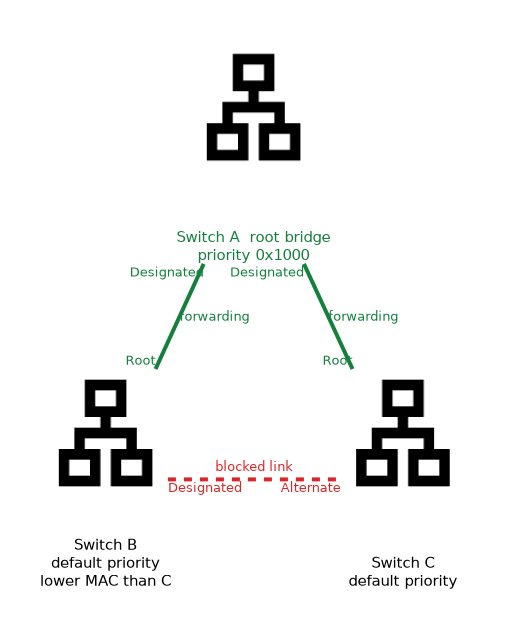 Every other bridge finds the cheapest path to the root.
Each link has a path cost, and a lower cost means a better link. A faster link normally gets a lower cost. A bridge adds the costs along the way, and the port with the lowest total toward the root becomes its root port.
| Role | Meaning |
|---|---|
| Root port | The best port toward the root bridge |
| Designated port | The best port on a segment toward the leaves |
| Alternate port | A backup path to the root, blocked for now |
| Backup port | A backup to a designated port on the same bridge |
On RouterOS you can set the path cost on a bridge port, to steer which link is used. The port priority breaks ties between equal paths.
/interface bridge port set [find interface=ether2] path-cost=20A tie in cost is broken in order by the lowest sender bridge ID, then the lowest sender port priority, then the lowest port number.
STP port states
Classic STP moves a port through states before it forwards.
- Blocking: the port receives BPDUs only.
- Listening: the port takes part in the election but does not learn MAC addresses.
- Learning: the port learns MAC addresses, but still drops traffic.
- Forwarding: the port is fully active.
The standard timers are two seconds for hello, 20 for max age and 15 for forward delay. With these, a topology change can take about 30 to 50 seconds to settle.
RSTP improvements
RSTP gets to the same result much faster.
| Feature | STP | RSTP |
|---|---|---|
| Port states | Blocking, listening, learning, forwarding | Discarding, learning, forwarding |
| Convergence | Slow, driven by timers | Fast, driven by a handshake between neighbours |
| BPDU origin | Only the root creates BPDUs | Every bridge sends its own BPDUs |
| Backup roles | Not defined | Alternate and backup ports ready to take over |
| Edge ports | Not part of the standard | Defined, forward at once |
RSTP uses a proposal and agreement exchange on point to point links, so a port can move to forwarding without waiting for timers. It is backward compatible with STP, but a link to an STP only bridge falls back to the slow behaviour.
Edge and point to point ports
Two port settings help RSTP.
/interface bridge port set [find interface=ether5] edge=yes
/interface bridge port set [find interface=ether1] point-to-point=yes
An edge port faces an end device and can forward at once. A point to point port is a full duplex link to one neighbour, which enables the fast handshake. The default for both is automatic detection.
Checking the result
/interface bridge monitor bridge1
/interface bridge port print
The monitor output names the current root bridge and the path cost to it. The port list shows the role and state of each port.
Set the priority of your intended root and a backup root explicitly, and leave all other bridges at the default.
What to remember for the exam
Eight facts cover most questions on this topic.
- Spanning tree blocks redundant links to prevent Layer 2 loops.
- The root bridge has the lowest bridge ID, which is priority plus MAC address.
- A lower priority number wins, and RouterOS writes it in hexadecimal.
- Each non root bridge picks one root port, the lowest cost path to the root.
- Path cost is cumulative, and a lower cost is better.
- STP has four port states, and RSTP has three.
- RSTP converges faster using a proposal and agreement handshake.
- Edge ports forward at once, and
protocol-modeselects the protocol.
If you leave every bridge at the default priority, the root is decided by the lowest MAC address, and that may be a poor choice.
Common mistakes
These four mistakes appear often.
Leaving the root to chance. An old edge switch can become the root, and traffic then takes odd paths.
Thinking a higher priority number wins. The lowest value wins the election.
Mixing STP and RSTP without noticing. A link to an STP only bridge reverts to slow timers.
Setting edge on a link to a switch. It skips the safe transition and can cause a brief loop.
Check yourself
Work through these three questions.
How is the root bridge chosen?
The bridge with the lowest bridge ID wins, which is the priority first and then the MAC address.
What does a root port do?
It is the port with the lowest cost path toward the root bridge on a non root bridge.
Why does RSTP converge faster than STP?
Neighbours agree on port transitions through a proposal and agreement handshake, instead of waiting for timers.
Topic 1 of 3 in Spanning Tree Protocol
Test yourself on Spanning Tree Protocol
The full MikroTik MTCSWE question bank has 484 questions, with timed practice exams and an explanation for every answer.
This study guide is independent and is not affiliated with, endorsed by, or sponsored by MikroTik. Vendor names, certification names and exam codes are trademarks of their respective owners and are used for identification only.