Spanning Tree Protocol · Topic 3 of 3
BPDUs and Spanning Tree Security
Learn what a BPDU carries, how bridges use configuration and topology change messages, and how to protect spanning tree with edge and restricted ports.
- 5 min
- Includes a diagram
- BPDUs go to the multicast address
01:80:C2:00:00:00. - A BPDU carries the root ID, the path cost, the sender ID and the port ID.
- A better BPDU has a lower root ID, then a lower cost, then a lower sender ID.
What it is
A BPDU is the message that bridges send to run spanning tree, and spanning tree security protects those messages from abuse.
Bridges send BPDUs to a reserved multicast address, 01:80:C2:00:00:00. Bridges do not forward them as normal traffic, they read and act on them. Anything that can send a BPDU can influence the tree, so edge ports need protection.
Security features keep end user ports from changing the topology.
How it works
You learn the BPDU fields first, and then the options that limit who can send them.
What a BPDU contains
The main fields tell a neighbour who the root is and how far away it is.
| Field | Meaning |
|---|---|
| Root bridge ID | The bridge that the sender thinks is the root |
| Root path cost | The cost from the sender to that root |
| Sender bridge ID | The bridge that built this message |
| Port ID | The sending port, used as a tie breaker |
| Message age, max age, hello time, forward delay | Timer values from the root |
| Flags | Topology change, proposal, agreement, port role and state in RSTP |
A bridge compares these fields with its own and decides which BPDU is better. The better BPDU wins, and the port with the best information becomes the designated port of its segment.
BPDU types
There are a few kinds.
- Configuration BPDU: sent regularly to carry root information. In STP, only the root originates it.
- Topology change notification (TCN): an STP message that travels toward the root when the topology changes.
- RST BPDU: the RSTP format. Every bridge sends it, and it carries port roles and flags.
The protocol version field shows which one it is: STP, RSTP or MSTP. An RSTP bridge that receives an STP BPDU on a port switches that port to STP behaviour.
Topology changes
A change means MAC entries may be wrong.
When a link changes state, bridges flush or shorten their MAC tables, so traffic floods until it is relearned. In RSTP, an edge port going up or down is not a topology change. Frequent changes cause repeated flooding, so unstable links harm performance.
Spanning tree threats
Three problems appear in practice.
- A rogue or misconfigured switch with a low priority becomes root.
- A device sends BPDUs from an access port to change the tree.
- A flood of topology change messages keeps flushing MAC tables.
Edge ports
An edge port faces only end devices.
/interface bridge port set [find interface=ether5] edge=yesA port set as edge moves to forwarding at once, and it is not expected to receive BPDUs. If a BPDU does arrive, the port stops acting as an edge port. Combine edge ports with the protections below.
Restricted role and restricted TCN
RouterOS has two port options for protection.
| Option | Effect |
|---|---|
restricted-role=yes | The port cannot become a root port, which protects the chosen root |
restricted-tcn=yes | The port does not pass topology change notifications to others |
/interface bridge port set [find interface=ether5] restricted-role=yes restricted-tcn=yesUse restricted-role on ports that face other administrations, or ports where a new switch could be plugged in by mistake. The port then stays in a blocked role, instead of letting a foreign switch take over as root.
Set edge=yes on user ports, and use restricted-role=yes on ports where no root bridge should ever appear.
BPDU guard
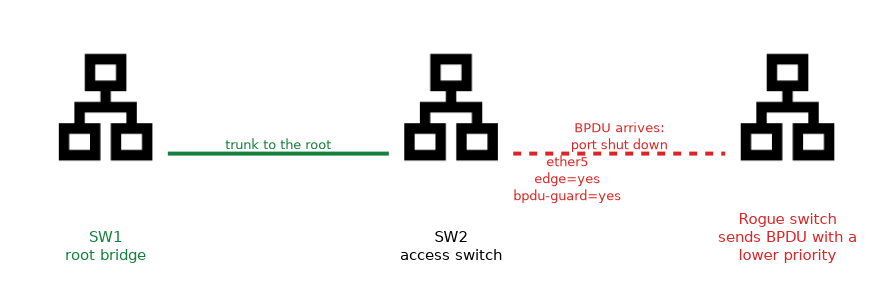 BPDU guard reacts when a BPDU arrives on an edge port.
/interface bridge port set [find interface=ether5] edge=yes bpdu-guard=yesThe port is protectively shut down, and the operator re-enables it after fixing the cause. Ignoring BPDUs on a port would turn spanning tree off for that segment, so avoid it wherever a loop is possible.
Checking
/interface bridge monitor bridge1
/interface bridge port print
Look for an unexpected root bridge ID. If it is not your planned root, find the switch that is sending the better BPDU.
What to remember for the exam
Seven facts cover most questions on this topic.
- BPDUs go to the multicast address
01:80:C2:00:00:00. - A BPDU carries the root ID, the path cost, the sender ID and the port ID.
- A better BPDU has a lower root ID, then a lower cost, then a lower sender ID.
- STP uses configuration BPDUs and TCNs, and RSTP uses RST BPDUs from every bridge.
- Edge ports face end devices and forward at once.
restricted-rolekeeps a port from becoming the root port.bpdu-guardshuts down an edge port that receives a BPDU.
Dropping BPDUs on a port that is part of a loop removes the protection against that loop.
Common mistakes
These four mistakes appear often.
Leaving user ports open to BPDUs. A rogue switch can win the root election.
Using edge on switch to switch links. The port skips the safe transition.
Dropping BPDUs to silence a warning. That disables loop protection on the segment.
Not setting a root priority. An attacker needs only a lower priority to take over.
Check yourself
Work through these three questions.
Which multicast address do BPDUs use?
01:80:C2:00:00:00.What does
restricted-role=yesprevent?The port cannot become a root port, so a foreign switch cannot take over as root through it.
What does BPDU guard do?
It shuts down a port that receives a BPDU, so a switch plugged into an edge port cannot affect the tree.
Topic 3 of 3 in Spanning Tree Protocol
Test yourself on Spanning Tree Protocol
The full MikroTik MTCSWE question bank has 484 questions, with timed practice exams and an explanation for every answer.
This study guide is independent and is not affiliated with, endorsed by, or sponsored by MikroTik. Vendor names, certification names and exam codes are trademarks of their respective owners and are used for identification only.