Port Isolation · Topic 1 of 2
RouterOS Bridge Horizon
Use the bridge port horizon value to stop ports from forwarding frames to each other, isolate clients on a shared bridge, and keep uplink access open.
- 4 min
- Includes a diagram
- Horizon is a number set on a bridge port.
- Ports with the same horizon value cannot forward frames to each other.
- Ports with different values, or with no value, forward as normal.
What it is
Bridge horizon stops frames that enter one port from leaving through other ports that share the same horizon value.
It is a split horizon rule for bridges. Ports with the same value cannot exchange frames with each other, but they can still talk to ports that have a different value or none.
This gives you client isolation on a single bridge, without a VLAN per port.
How it works
Each bridge port may have a horizon number, and the bridge compares the numbers before it forwards.
The rule
A frame is forwarded only if the ingress and egress ports differ in their horizon values.
- Same value: the frame is not forwarded between the two ports.
- Different values: the frame is forwarded as normal.
- No value set on a port: the port is not part of any horizon group.
The rule applies to unicast, multicast and broadcast frames alike. A broadcast from a client with horizon 1 reaches the uplink, but not the other clients with horizon 1.
Configuration
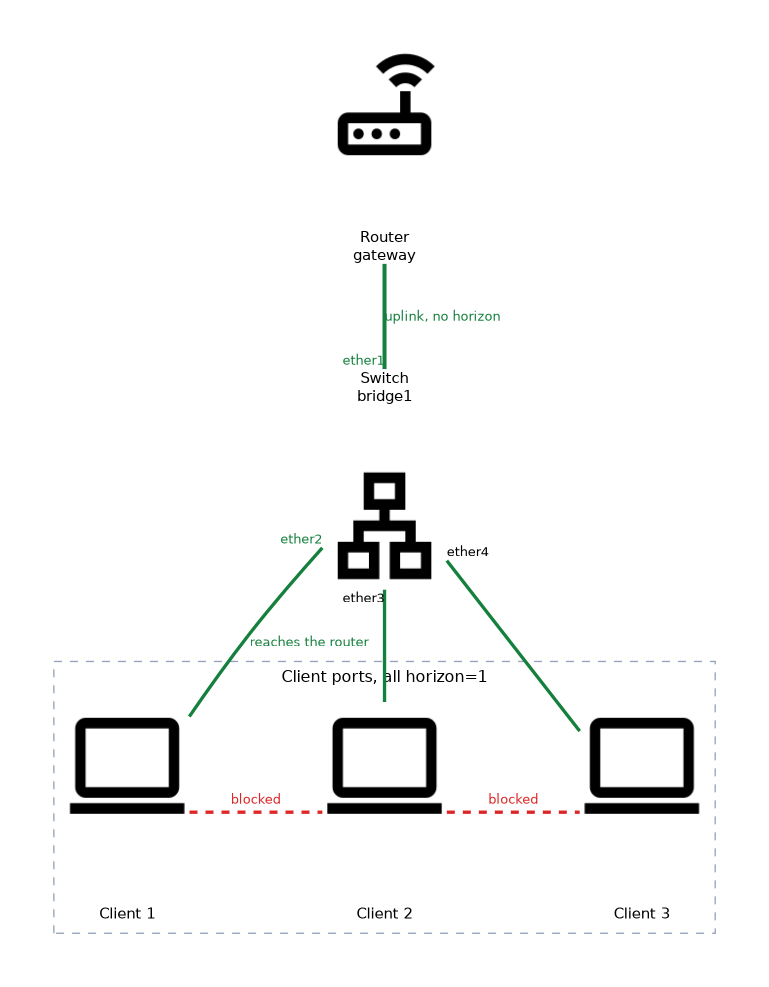 Give all client ports the same value, and leave the uplink without one.
/interface bridge port add bridge=bridge1 interface=ether2 horizon=1
/interface bridge port add bridge=bridge1 interface=ether3 horizon=1
/interface bridge port add bridge=bridge1 interface=ether4 horizon=1
/interface bridge port add bridge=bridge1 interface=ether1
Here ether2, ether3 and ether4 are clients. ether1 is the uplink to the router. Each client reaches the router, and no client reaches another client at Layer 2.
You can change the value on an existing port:
/interface bridge port set [find interface=ether3] horizon=1
/interface bridge port print
Several groups
Different values make several groups.
Ports with horizon 1 are isolated from each other, and ports with horizon 2 are isolated from each other. A port in group 1 can still reach a port in group 2. This allows layouts such as isolated guests on one side and isolated staff devices on the other, with a shared uplink.
What it does not do
Horizon works only at Layer 2, inside one bridge.
Clients can still reach each other if a router sends their traffic back. A router that answers ARP on behalf of other hosts, with local proxy ARP, brings the clients together again at Layer 3. If you want full isolation, add firewall rules on the router too.
It also does not block a client from sending to the router itself. The uplink is open for everyone.
Do not give the uplink the same horizon value as the clients. The clients then lose their gateway, which looks like a total outage.
Typical uses
- Hotels and public networks, where guests must not see each other.
- Wireless access point isolation, where clients on the same radio are kept apart.
- Servers in a shared segment that only need to reach the gateway.
- Services placed in a common bridge, such as a hot spot.
Horizon compared with VLANs
| Method | Isolation | Cost |
|---|---|---|
| One VLAN per port | Strong, separate broadcast domains | Many VLANs and many subnets |
| Bridge horizon | Frames blocked between ports in the same group | One bridge, one subnet |
With horizon all clients still share one subnet and one gateway. This is simpler than VLANs, and it saves addresses.
Checking and offload
Test with a ping between two isolated clients. It fails, while a ping to the gateway works.
On some devices the horizon feature is processed by the CPU. If the chip supports it, the bridge port can still be hardware offloaded, so check the offload flag in the port list.
What to remember for the exam
Seven facts cover most questions on this topic.
- Horizon is a number set on a bridge port.
- Ports with the same horizon value cannot forward frames to each other.
- Ports with different values, or with no value, forward as normal.
- It applies to unicast, multicast and broadcast frames.
- The uplink should not share the horizon value of the clients.
- Horizon is Layer 2 only, and routers can bypass it.
- It isolates ports without needing one VLAN per port.
Horizon is the fastest way to isolate clients on one subnet. Check that the uplink port has no horizon value.
Common mistakes
These four mistakes appear often.
Giving the uplink the same value. Clients cannot reach the gateway.
Expecting Layer 3 isolation. A router with local proxy ARP can still forward client to client traffic.
Setting horizon on one client only. Isolation needs the same value on both ports of the pair.
Forgetting broadcast and multicast. The rule covers them too, so some discovery protocols stop working between clients.
Check yourself
Work through these three questions.
What does horizon do for two ports with the same value?
The bridge does not forward frames between them.
Which port should keep no horizon value in a client isolation design?
The uplink port toward the router.
Can horizon stop clients that reach each other through a router?
No, because it works at Layer 2 only, and a router can send the traffic back.
Topic 1 of 2 in Port Isolation
Test yourself on Port Isolation
The full MikroTik MTCSWE question bank has 484 questions, with timed practice exams and an explanation for every answer.
This study guide is independent and is not affiliated with, endorsed by, or sponsored by MikroTik. Vendor names, certification names and exam codes are trademarks of their respective owners and are used for identification only.