Link Aggregation · Topic 1 of 2
RouterOS Bonding Modes
Learn how RouterOS bonding combines links, what each of the seven bonding modes does, and how to choose a mode, hash policy and link monitoring method.
- 5 min
- Includes a diagram
- A bond has slaves and acts as one logical interface.
- RouterOS has seven modes, and the default is
balance-rr. 802.3adis LACP and is negotiated with the other end.
What it is
Bonding combines several physical interfaces into one logical interface, for more bandwidth or for redundancy.
The logical interface is called a bond, and the physical ones are its slaves. Higher layers see one interface, and the bonding driver spreads traffic across the slaves, or keeps spare ones ready.
You use it between switches, and between a switch and a server. Some modes also protect against the failure of one cable.
How it works
The mode decides how traffic is spread, and what the other end must support.
Creating a bond
/interface bonding add name=bond1 slaves=ether1,ether2 mode=802.3ad
/interface bonding print
The default mode when you add a bond is balance-rr. You then use bond1 like any interface, for example by placing it in a bridge or adding it to a VLAN.
Always set the mode on purpose. The default mode needs a matching static aggregation on the other side, and it can reorder packets.
The seven modes
| Mode | Behaviour | Switch support needed |
|---|---|---|
balance-rr | Sends packets over the slaves in turn | Static aggregation |
active-backup | One slave works, the others wait for a failure | None |
balance-xor | Picks a slave from a hash of addresses | Static aggregation |
broadcast | Sends every packet on all slaves | Static aggregation |
802.3ad | LACP, negotiated with the other end | LACP |
balance-tlb | Sends by current load, receives on one slave | None |
balance-alb | Like tlb, and balances receive traffic using ARP | None |
Round robin and hash modes
Round robin gives the best raw spread, and hash modes keep conversations in order.
balance-rr sends each packet on the next slave, so even a single connection can use all links. The packets may arrive out of order, which can slow TCP. For this reason it is used less than hash based modes.
balance-xor and 802.3ad choose the slave from a hash. A given conversation always takes the same link, which keeps order. One conversation cannot use more than one link.
Hash policy
For balance-xor, 802.3ad and balance-tlb, the hash policy sets what goes into the hash.
| Policy | Hash input |
|---|---|
layer-2 | Source and destination MAC addresses |
layer-2-and-3 | MAC and IP addresses |
layer-3-and-4 | IP addresses and port numbers |
The default is layer-2. If all traffic goes between two MAC addresses, such as a router and a switch, one link takes it all. Use layer-2-and-3 or layer-3-and-4 to spread it better.
/interface bonding set bond1 transmit-hash-policy=layer-2-and-3Active backup
Only one slave carries traffic, and the rest take over when it fails.
/interface bonding add name=bond2 slaves=ether3,ether4 mode=active-backup primary=ether3This mode needs nothing special on the other end, so it works with any switch. The primary setting chooses the preferred slave. It gives redundancy, not extra bandwidth.
802.3ad and LACP
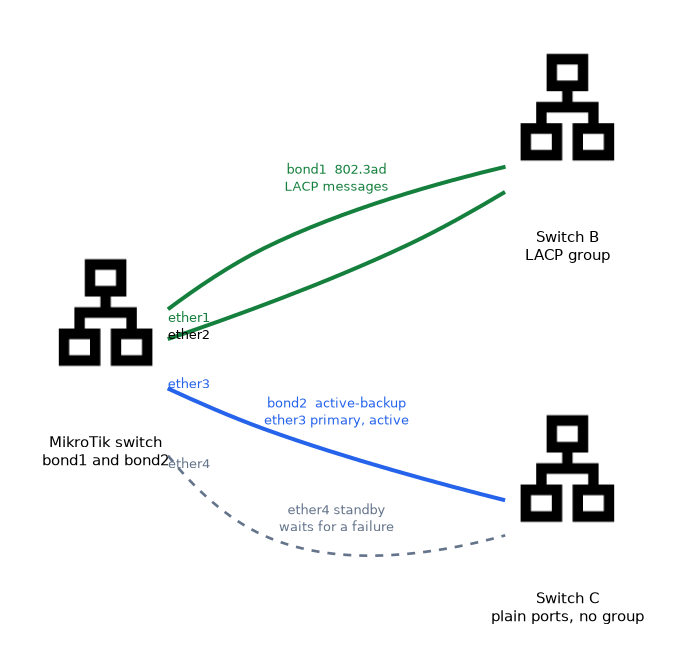
802.3ad is the standard dynamic mode, also known as LACP.
Both ends exchange LACP messages, and agree which links join the bond. A misconfiguration is detected, instead of causing a loop. The lacp-rate setting chooses how often LACP messages are sent.
Adaptive load balancing
balance-tlb and balance-alb work without any switch configuration.
They shift outgoing traffic according to the load on each slave. balance-alb also steers incoming traffic by answering ARP requests with different MAC addresses. They suit servers more than inter-switch links.
Link monitoring
The bond needs a way to notice a dead slave.
| Method | How it detects failure |
|---|---|
mii | Checks the link state of the interface |
arp | Sends ARP probes to listed addresses |
/interface bonding set bond1 link-monitoring=miimii is the default, and it only sees a failed physical link. arp also finds a failure further away, such as a dead device behind a working cable.
/interface bonding monitor bond1The monitor shows the active and inactive ports.
What to remember for the exam
Eight facts cover most questions on this topic.
- A bond has slaves and acts as one logical interface.
- RouterOS has seven modes, and the default is
balance-rr. 802.3adis LACP and is negotiated with the other end.balance-rr,balance-xorandbroadcastneed a static aggregation on the other side.active-backup,balance-tlbandbalance-albneed no switch support.- Hash modes keep a conversation on one link, so one connection never exceeds one link.
transmit-hash-policycan belayer-2,layer-2-and-3orlayer-3-and-4.miichecks the link state, andarpprobes addresses.
With layer-2 hashing, traffic between two fixed MAC addresses always takes the same link, so extra links stay idle.
Common mistakes
These four mistakes appear often.
Leaving the default mode. balance-rr can reorder packets, and it needs a static group on the switch.
Expecting one stream to use all links. Hash modes pin each conversation to one link.
Using layer 2 hashing behind a router. Every flow has the same MAC pair, so one link carries everything.
Choosing 802.3ad without LACP on the switch. The bond does not form properly.
Check yourself
Work through these three questions.
Which bonding mode is LACP?
802.3ad.Which modes work without any special switch configuration?
active-backup,balance-tlbandbalance-alb.Why might all traffic use one link with
layer-2hashing?Traffic between the same two MAC addresses always hashes to the same slave.
Topic 1 of 2 in Link Aggregation
Test yourself on Link Aggregation
The full MikroTik MTCSWE question bank has 484 questions, with timed practice exams and an explanation for every answer.
This study guide is independent and is not affiliated with, endorsed by, or sponsored by MikroTik. Vendor names, certification names and exam codes are trademarks of their respective owners and are used for identification only.