Layer 2 Security · Topic 2 of 7
DHCP Snooping and ARP Modes
Block rogue DHCP servers with DHCP snooping and trusted ports, add Option 82, and use RouterOS ARP modes such as reply only to stop address spoofing.
- 5 min
- Includes a diagram
- DHCP snooping drops DHCP server replies from untrusted ports.
trusted=yeson a bridge port allows DHCP server replies.dhcp-snooping=yesis a bridge setting.
What it is
DHCP snooping and ARP modes protect the address assignment process on a switched network.
A rogue DHCP server can hand out wrong gateways and capture traffic. A host that sends false ARP replies can redirect traffic in the same way. DHCP snooping controls who may answer DHCP requests, and ARP modes control how a router uses ARP.
The two features fit together, because DHCP can create the ARP entries that a strict ARP mode relies on.
How it works
Snooping marks ports as trusted or untrusted, and the ARP mode decides what is learned.
DHCP snooping
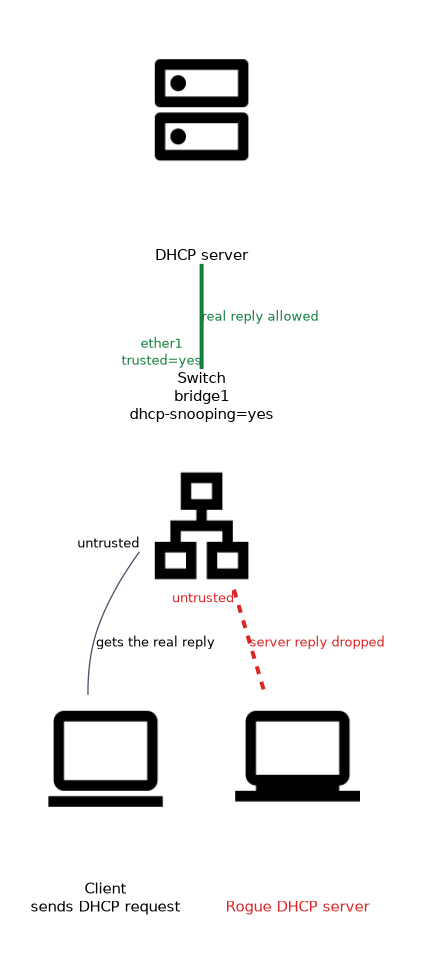 The bridge watches DHCP messages and drops server replies from the wrong ports.
/interface bridge set bridge1 dhcp-snooping=yes
/interface bridge port set [find interface=ether1] trusted=yes
A port marked trusted=yes may carry DHCP server replies. This is the port that faces the real DHCP server or the uplink to it.
Server messages arriving on all other ports are dropped. Clients on untrusted ports can still send requests.
If you forget to mark the uplink as trusted, clients stop receiving addresses because the replies are dropped.
Option 82
Option 82 is relay agent information that the switch adds to each DHCP request.
/interface bridge set bridge1 dhcp-snooping=yes add-dhcp-option82=yesIt carries a circuit ID and a remote ID, which identify the switch and the port where the request entered. The DHCP server can use them to give a fixed address to a certain port, or to log where a device is. The option helps the server, and does not stop a rogue server by itself.
Why it matters
DHCP snooping closes a few attack paths.
- A rogue server cannot hand out leases from a user port.
- Option 82 ties a lease to a physical port.
- Together with ARP controls, hosts cannot easily use addresses that were never leased.
Snooping handles DHCPv4. It involves the CPU, so check whether hardware offload still applies after you enable it.
ARP modes
Each interface has an arp setting that controls how ARP behaves on it.
| Mode | Behaviour |
|---|---|
enabled | Normal ARP, the default |
disabled | No ARP at all, so static entries with MAC addresses are required |
proxy-arp | The router answers ARP for addresses it can route to |
local-proxy-arp | The router answers ARP for hosts on the same interface |
reply-only | The router answers ARP requests, but never learns entries from them |
/interface bridge set bridge1 arp=reply-only
/ip arp add address=192.168.88.50 mac-address=00:11:22:33:44:55 interface=bridge1
With reply-only, the router can only talk to hosts that have an entry in its ARP table. Those entries come from static configuration, or from DHCP.
ARP and DHCP together
A DHCP server can add an ARP entry for each lease.
/ip dhcp-server set dhcp1 add-arp=yesWith add-arp=yes and arp=reply-only on the interface, only hosts that obtained a lease can use the router. A host that sets its own address gets no reply, because the router never learned it.
Proxy ARP modes
proxy-arp and local-proxy-arp solve different problems.
proxy-arp lets the router answer for hosts on other networks, which can hide a missing route. local-proxy-arp makes the router answer for hosts on the same interface. It is used when ports are isolated with horizon and clients must still reach each other through the router.
Checking
/ip arp print
/interface bridge print detail
The ARP table shows which entries are dynamic, and which are static. Check the arp value of the interface when a host cannot be reached.
Combine arp=reply-only with add-arp=yes on the DHCP server for a simple address control on a small network.
What to remember for the exam
Eight facts cover most questions on this topic.
- DHCP snooping drops DHCP server replies from untrusted ports.
trusted=yeson a bridge port allows DHCP server replies.dhcp-snooping=yesis a bridge setting.- Option 82 adds a circuit ID and remote ID to requests.
- ARP modes are
enabled,disabled,proxy-arp,local-proxy-arpandreply-only. reply-onlystops the router from learning ARP entries.add-arp=yeson the DHCP server creates ARP entries for leases.local-proxy-arpanswers for hosts on the same interface.
Common mistakes
These four mistakes appear often.
Not trusting the uplink. The real server replies are dropped.
Using reply-only with no entries. The router cannot reach any host.
Confusing proxy-arp and local-proxy-arp. One answers for other networks, and the other for the same interface.
Expecting snooping to protect against static addresses. A host with a manual address does not use DHCP at all.
Check yourself
Work through these three questions.
What does a trusted port allow in DHCP snooping?
It allows DHCP server replies, while server replies from untrusted ports are dropped.
What does
arp=reply-onlydo?The interface answers ARP requests but does not learn new entries, so only static or DHCP created entries work.
How does
add-arp=yeshelp?The DHCP server adds an ARP entry for each lease, so leased hosts work with
reply-only.
Topic 2 of 7 in Layer 2 Security
Test yourself on Layer 2 Security
The full MikroTik MTCSWE question bank has 484 questions, with timed practice exams and an explanation for every answer.
This study guide is independent and is not affiliated with, endorsed by, or sponsored by MikroTik. Vendor names, certification names and exam codes are trademarks of their respective owners and are used for identification only.