Layer 2 Security · Topic 7 of 7
802.1X Port Based Authentication
Understand 802.1X roles and EAPOL, how a RADIUS server authorises a port, and how RouterOS acts as an authenticator and as a supplicant on Ethernet ports.
- 5 min
- Includes a diagram
- 802.1X has a supplicant, an authenticator and an authentication server.
- The authentication server is normally a RADIUS server.
- EAPOL carries EAP between supplicant and authenticator, with Ethernet type
0x888E.
What it is
802.1X lets a switch port stay closed until the device behind it proves who it is.
Instead of trusting any cable that is plugged in, the switch asks the device for credentials and checks them with a central server. Only after a successful check does the port carry normal traffic.
The standard is IEEE 802.1X. It is widely used on office networks for laptops, phones and printers.
How it works
Three roles take part, and the port moves from unauthorised to authorised.
The three roles
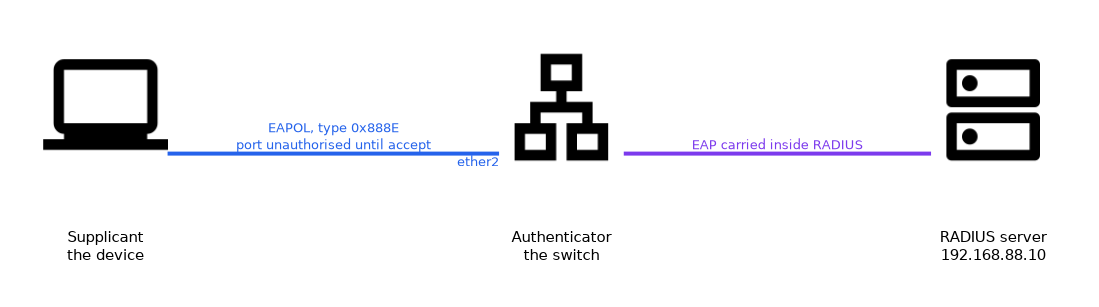
| Role | Who it is | Job |
|---|---|---|
| Supplicant | The client device | Presents credentials |
| Authenticator | The switch or access device | Controls the port and relays messages |
| Authentication server | A RADIUS server | Decides whether to accept |
The authenticator does not decide anything by itself. It passes the messages between the supplicant and the server, and it applies the result to the port.
EAP and EAPOL
The login messages use the Extensible Authentication Protocol, EAP.
Between the supplicant and the authenticator, EAP travels directly inside Ethernet frames. This is called EAPOL, EAP over LAN, and it uses its own Ethernet type, 0x888E. Between the authenticator and the server, the same EAP messages are carried inside RADIUS.
Several EAP methods exist, and the choice depends on the server and the clients. Some use certificates, and some use a user name and password inside a protected tunnel.
Port states
The port has two states.
- Unauthorised: only EAPOL frames pass. All other traffic is dropped.
- Authorised: after success, the port forwards normal traffic.
When the device disconnects, or the session ends, the port returns to the unauthorised state.
MAC authentication
Some devices have no 802.1X client. Printers and old cameras are typical.
For these, the switch can use the MAC address of the device as its identity, and ask the RADIUS server whether it is allowed. This is called MAC authentication. It is weaker than 802.1X, because a MAC address can be copied, so use it only for devices that cannot do better.
RouterOS as an authenticator
RouterOS can act as the authenticator in newer releases, with a RADIUS server behind it.
/radius add service=dot1x address=192.168.88.10 secret=changeme
/interface dot1x server add interface=ether2 auth-types=dot1x,mac-auth
/interface dot1x server print
The RADIUS entry names the server and the shared secret. The dot1x server entry turns on authentication for a port. The auth-types list allows full 802.1X, MAC authentication, or both.
Do not enable 802.1X on the port you manage the switch from, until the server and the credentials are tested. A failed login leaves the port closed.
RouterOS as a supplicant
A RouterOS device can also be the client.
/interface dot1x client add interface=ether1 identity=switch1This is useful when a router or access point sits behind a switch that requires authentication. The client entry names the interface and the identity. The EAP method and credentials come with the further settings.
Results and VLANs
The server can return more than yes or no.
RADIUS can send attributes with the accept message, such as a VLAN to place the port in. Support for this, and for guest or rejected VLANs, depends on the device and version. Check what your RouterOS version offers.
Where it sits with the other features
802.1X is the strongest port control in this chapter.
It authenticates users or devices, and not just addresses. Combine it with BPDU guard, storm limits and DHCP snooping, because an authenticated device can still misbehave.
Checking
/interface dot1x server print
/log print
The log shows authentication events. If a device fails, check the shared secret, the server address and the clock, and then the credentials.
What to remember for the exam
Eight facts cover most questions on this topic.
- 802.1X has a supplicant, an authenticator and an authentication server.
- The authentication server is normally a RADIUS server.
- EAPOL carries EAP between supplicant and authenticator, with Ethernet type
0x888E. - The authenticator relays messages, and does not decide.
- An unauthorised port passes only EAPOL frames.
- MAC authentication uses the MAC address as identity, and it is weaker.
- RouterOS uses
/radiuswithservice=dot1xand/interface dot1x server. - RouterOS can act as a supplicant with
/interface dot1x client.
Test 802.1X on a spare port first, and keep one port with plain access for recovery.
Common mistakes
These four mistakes appear often.
Enabling it on the management port too early. A failure closes the port and removes your access.
Wrong shared secret. The server ignores the requests, so every login fails.
Using MAC authentication for everything. Addresses can be copied, so security is weak.
Forgetting the supplicant. Without a configured client, the device never answers.
Check yourself
Work through these three questions.
Which three roles take part in 802.1X?
The supplicant, the authenticator and the authentication server.
What passes through a port that is not yet authorised?
Only EAPOL frames, and all other traffic is dropped.
Why is MAC authentication weaker than 802.1X?
It identifies the device only by its MAC address, which can be copied.
Topic 7 of 7 in Layer 2 Security
Test yourself on Layer 2 Security
The full MikroTik MTCSWE question bank has 484 questions, with timed practice exams and an explanation for every answer.
This study guide is independent and is not affiliated with, endorsed by, or sponsored by MikroTik. Vendor names, certification names and exam codes are trademarks of their respective owners and are used for identification only.