Introduction · Topic 2 of 2
RouterOS Bridge, Switch Chips and SwOS Overview
Compare the RouterOS software bridge with basic and CRS switch chips, see what hardware offload means, and get a short view of SwOS on switch devices.
- 4 min
- Includes a diagram
- A bridge is a software interface, and hardware offload moves its forwarding into the switch chip.
- Basic switch chips offer simple per port VLAN and forwarding functions.
- From RouterOS v6.41 hardware offload is configured through the bridge, replacing
master-port.
What it is
MikroTik devices switch frames either in the CPU through a RouterOS bridge or in a dedicated switch chip.
The choice decides speed and features. A switch chip forwards at wire speed without touching the CPU, but it supports a fixed set of functions. The CPU can do anything RouterOS offers, but it is far slower.
You need to know which path a device uses before you plan VLANs, filters or limits.
How it works
A bridge groups ports into one broadcast domain, and hardware offload moves that forwarding into the chip.
The RouterOS bridge
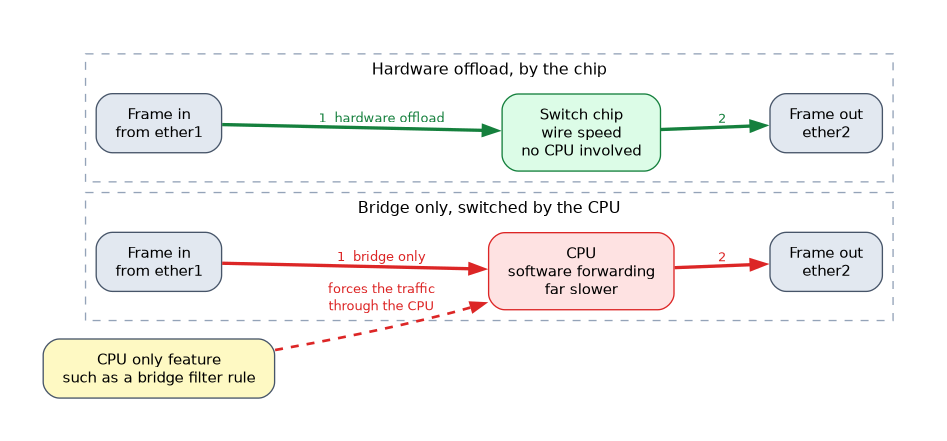 The bridge is a logical interface that holds ports. Frames between its ports are switched using MAC learning.
/interface bridge add name=bridge1
/interface bridge port add bridge=bridge1 interface=ether2
/interface bridge port add bridge=bridge1 interface=ether3
/interface bridge port print
In the port list, a flag marks ports that are hardware offloaded. A port with hw=yes is allowed to offload when the chip supports it. Some bridge features, such as bridge filter rules, force the traffic through the CPU.
The bridge interface itself is also where the router gets its own IP address on that network.
Basic switch chips
Many small RouterBOARDs have a basic switch chip behind several Ethernet ports.
The chip can forward between ports and apply simple per port VLAN handling. In older RouterOS v6 releases these ports were grouped with the master-port setting. From RouterOS v6.41 the model changed to a bridge with hardware offload, and v7 uses the bridge only.
Basic chips have a small feature set and limited VLAN support. Anything the chip cannot do is handled by the CPU, or is not available.
CRS devices and advanced chips
Cloud Router Switch devices pair a stronger switch chip with a small CPU.
| Family | Typical handling |
|---|---|
| CRS1xx and CRS2xx | Switch menu holds VLAN, host and rule tables, and bridge forwarding is offloaded |
| CRS3xx and newer | Bridge with VLAN filtering is offloaded, and many bridge features are handled by the chip |
The older CRS1xx and CRS2xx devices are configured partly under /interface ethernet switch. On them, bridge VLAN filtering is not offloaded, so VLANs are set in the switch menu instead. Newer CRS models offload the standard bridge VLAN filtering configuration.
The CPU on a CRS is meant for management, not for forwarding user traffic. Traffic that reaches the CPU is limited by CPU speed.
Turning on a CPU only bridge feature on a CRS can silently disable hardware offload and drop throughput. Check the offload flag after every change.
SwOS in brief
SwOS is a small, separate operating system for switching only.
It has a web interface, a fixed set of menus and no RouterOS console or scripting. Some CRS devices can run either RouterOS or SwOS, and some switches ship with SwOS only. Its features are covered in the SwOS chapter.
Choosing between them
| Need | Better fit |
|---|---|
| Routing, firewall, queues on the same box | RouterOS |
| Many ports at wire speed with VLANs | CRS in RouterOS or SwOS |
| Simple, web managed switch | SwOS |
What to remember for the exam
Seven facts cover most questions on this topic.
- A bridge is a software interface, and hardware offload moves its forwarding into the switch chip.
- Basic switch chips offer simple per port VLAN and forwarding functions.
- From RouterOS v6.41 hardware offload is configured through the bridge, replacing
master-port. - CRS1xx and CRS2xx use the
/interface ethernet switchmenus for VLAN and rules. - Newer CRS devices offload bridge VLAN filtering.
- Some bridge features force traffic through the CPU and stop offload.
- SwOS is a separate switch only operating system with a web interface.
Always ask which chip the device has, because the same VLAN task is configured in different places on different families.
Common mistakes
These four mistakes appear often.
Assuming every bridge is offloaded. Only ports on a supported chip, and only without CPU only features, are switched in hardware.
Forwarding user traffic through the CPU of a CRS. The CPU is slow compared with the chip, so heavy traffic through it causes loss.
Applying CRS1xx and CRS2xx steps to newer models. The switch menu method differs from bridge VLAN filtering on newer devices.
Expecting RouterOS features in SwOS. SwOS has no firewall, routing or console, only switching functions.
Check yourself
Work through these three questions.
What does hardware offload mean for a bridge port?
The switch chip forwards the frames at wire speed instead of the CPU.
Which menu is used for VLAN and rule tables on CRS1xx and CRS2xx devices?
The
/interface ethernet switchmenus.What kind of operating system is SwOS?
A separate switch only operating system with a web interface and no console.
Topic 2 of 2 in Introduction
Test yourself on Introduction
The full MikroTik MTCSWE question bank has 484 questions, with timed practice exams and an explanation for every answer.
This study guide is independent and is not affiliated with, endorsed by, or sponsored by MikroTik. Vendor names, certification names and exam codes are trademarks of their respective owners and are used for identification only.