Secure Tunnels · Topic 2 of 3
L2TP with IPsec
Learn how L2TP over IPsec builds a remote access VPN on RouterOS, how the server, PPP secrets and client are set up, and which ports the firewall allows.
- 5 min
- Includes a diagram
- L2TP builds the tunnel, PPP checks the user, and IPsec encrypts.
- L2TP alone has no encryption.
- L2TP uses UDP port 1701, IKE uses UDP 500 and NAT traversal uses UDP 4500.
What it is
L2TP with IPsec is a remote access VPN that joins a PPP tunnel with IPsec protection.
L2TP creates the tunnel and the virtual interface, and PPP handles the user login and the address assignment. L2TP has no encryption of its own, so IPsec is added to encrypt and protect it.
The result is a VPN that many client systems support. A road user can connect to the office and get an inside address.
How it works
IPsec first protects the path, then L2TP builds the tunnel inside it, and PPP authenticates the user.
The layers
| Layer | Job |
|---|---|
| IPsec | Encrypts and authenticates the traffic between the two endpoints |
| L2TP | Builds the tunnel and carries PPP frames |
| PPP | Checks the user name and password, and assigns an address |
IPsec runs in transport mode here, because the L2TP traffic already has the correct outer addresses. The client proves itself twice. It uses the IPsec secret for the IPsec layer, and the user name and password for PPP.
Ports and protocols
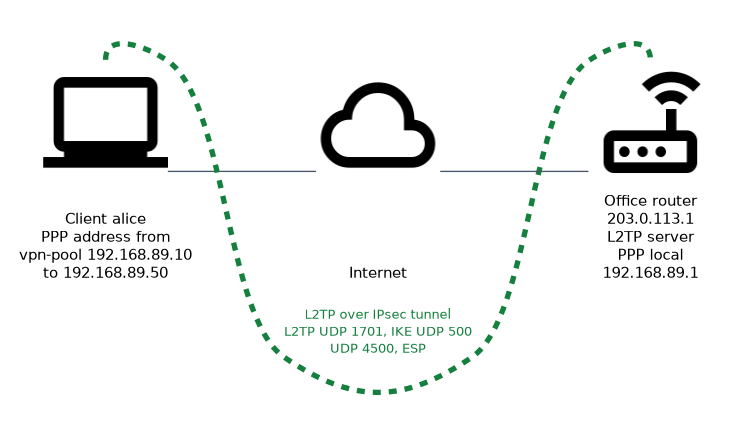
| Protocol | Port | Purpose |
|---|---|---|
| L2TP | UDP 1701 | The tunnel control and data |
| IKE | UDP 500 | IPsec negotiation |
| NAT traversal | UDP 4500 | IPsec through NAT |
| ESP | IP protocol 50 | Protected data |
Server configuration
The server needs an address pool, a PPP profile, a user and the L2TP server with IPsec turned on.
/ip pool add name=vpn-pool ranges=192.168.89.10-192.168.89.50
/ppp profile add name=vpn-profile local-address=192.168.89.1 remote-address=vpn-pool
/ppp secret add name=alice password=UseALongPassword service=l2tp profile=vpn-profile
/interface l2tp-server server set enabled=yes use-ipsec=yes ipsec-secret=UseALongRandomSecret default-profile=vpn-profile authentication=mschap2
The use-ipsec=yes setting makes RouterOS create the matching IPsec configuration on its own. The strictest value of this setting makes IPsec compulsory, so clients without it are refused. Use ? after use-ipsec= to list the value names on your version.
The ppp secret is the user account for the tunnel. The service=l2tp limits it to L2TP, and profile says which address it gets.
Firewall rules
The input chain must accept the traffic that builds the tunnel.
/ip firewall filter add chain=input protocol=udp dst-port=500,1701,4500 action=accept
/ip firewall filter add chain=input protocol=ipsec-esp action=accept
Place these rules above the final drop rule. After the tunnel is up, the clients appear as an interface on the router, so you can write forward rules for the VPN pool as for any other network.
Client on RouterOS
A RouterOS router can also be the client.
/interface l2tp-client add name=to-office connect-to=203.0.113.1 user=alice password=UseALongPassword use-ipsec=yes ipsec-secret=UseALongRandomSecretThe client must use the same IPsec secret and the same user and password as the server. Other client systems have their own settings for the same items.
Checking
/interface l2tp-server print
/ppp active print
/ip ipsec active-peers print
The first command lists the connected L2TP interfaces, the second lists active PPP users with their addresses, and the third shows the IPsec peers.
Why use both?
L2TP alone sends data without encryption, so a listener could read it. IPsec alone lacks the user based login and the virtual interface with an assigned address. Together they give an encrypted, user authenticated, routable tunnel.
Make IPsec compulsory with the strictest use-ipsec value and use a long IPsec secret. A server that accepts clients without IPsec exposes the traffic.
What to remember for the exam
Seven facts summarise L2TP with IPsec.
- L2TP builds the tunnel, PPP checks the user, and IPsec encrypts.
- L2TP alone has no encryption.
- L2TP uses UDP port 1701, IKE uses UDP 500 and NAT traversal uses UDP 4500.
- IPsec runs in transport mode for L2TP.
- The server needs a PPP profile, an address pool and a
ppp secret. use-ipsec=yescreates the IPsec parts automatically, and the strictest value forces IPsec.- Clients need both the IPsec secret and the PPP user name and password.
Common mistakes
Four mistakes appear on this topic.
Forgetting the firewall rules. UDP 500, 1701, 4500 and ESP must all be accepted, or the tunnel fails.
Mixing up the two secrets. The IPsec secret and the PPP password are different values that are used at different layers.
Allowing clients without IPsec. A server that does not insist on IPsec may accept clients without protection. Use the strictest use-ipsec value when all traffic must be encrypted.
Forgetting the address pool. Without a profile that assigns an address, the client connects but gets no usable address.
Clients behind NAT need UDP 4500 to work. If the tunnel connects and then stalls, check that port first.
Check yourself
Work through these three questions.
Why is IPsec combined with L2TP?
L2TP has no encryption of its own. IPsec adds encryption and authentication of the traffic.
Which ports does the firewall need to accept for L2TP with IPsec?
UDP 1701 for L2TP, UDP 500 for IKE and UDP 4500 for NAT traversal, together with ESP, which is IP protocol 50.
What does the strictest
use-ipsecvalue do on the L2TP server?It makes IPsec compulsory for every client. Clients that do not use IPsec are refused.
Topic 2 of 3 in Secure Tunnels
Test yourself on Secure Tunnels
The full MikroTik MTCSE question bank has 446 questions, with timed practice exams and an explanation for every answer.
This study guide is independent and is not affiliated with, endorsed by, or sponsored by MikroTik. Vendor names, certification names and exam codes are trademarks of their respective owners and are used for identification only.