Secure Tunnels · Topic 1 of 3
Introduction to IPsec
Learn what IPsec is, how AH, ESP and IKE work, tunnel mode versus transport mode, and how a MikroTik site to site IPsec tunnel is configured.
- 6 min
- Includes a diagram
- IPsec protects IP traffic with encryption and authentication.
- IKE uses UDP port 500 and NAT traversal uses UDP port 4500.
- ESP is IP protocol 50 and AH is IP protocol 51.
What it is
IPsec is a set of protocols that protects IP traffic between two devices by encrypting and authenticating it.
It works at the network layer, so it can protect any traffic above it without changing the applications. This makes it a popular choice for site to site links and remote access.
IPsec uses the algorithms and certificates from the Cryptography chapter. Two peers first agree on keys and algorithms, and then protect the data with them.
How it works
IPsec has a control part that negotiates keys, and a data part that protects each packet.
The main protocols
| Protocol | Role | Transport |
|---|---|---|
| IKE | Negotiates algorithms and keys, and authenticates the peers | UDP port 500 |
| NAT traversal | Carries IPsec through NAT devices | UDP port 4500 |
| ESP | Encrypts and authenticates the data | IP protocol 50 |
| AH | Authenticates the packet but does not encrypt | IP protocol 51 |
ESP, the Encapsulating Security Payload, is the one that is used almost everywhere, because it gives both confidentiality and integrity. AH, the Authentication Header, gives integrity only, and it breaks when the packet crosses NAT.
Tunnel mode and transport mode
In tunnel mode, the whole original IP packet is protected and placed inside a new packet with new outer addresses. Routers use this mode for site to site links.
In transport mode, only the payload is protected, and the original IP header stays. Hosts use this mode when two endpoints talk directly. L2TP over IPsec uses it, as the next page shows.
The two phases
The peers first run a control exchange, and then they build the protection for the data.
- Phase 1. The peers authenticate each other and agree on how to protect their own negotiation. The result is a secure channel.
- Phase 2. Inside that channel, they agree on the keys and algorithms for the data. The result is a pair of security associations, one for each direction.
A security association, or SA, is a one way agreement that holds the algorithm, the keys and the lifetime. When the lifetime ends, the peers make new keys.
IKE comes in two versions. IKEv2 is newer and simpler, and IKEv1 is older and still common.
Authentication methods
| Method | How the peers prove who they are |
|---|---|
| Pre shared key | Both sides know the same secret |
| RSA key or certificate | Each side has a key pair or a certificate signed by a trusted CA |
A pre shared key is easy to set up and must be long and random. Certificates scale better and avoid sharing one secret among many peers.
The RouterOS objects
RouterOS builds IPsec from several linked menus. The examples here follow RouterOS 7 and the newer 6.x structure.
| Menu | Purpose |
|---|---|
/ip ipsec profile | Phase 1 algorithms and group |
/ip ipsec peer | The remote device address and its profile |
/ip ipsec identity | How to authenticate the peer |
/ip ipsec proposal | Phase 2 algorithms |
/ip ipsec policy | Which traffic is protected |
A site to site example
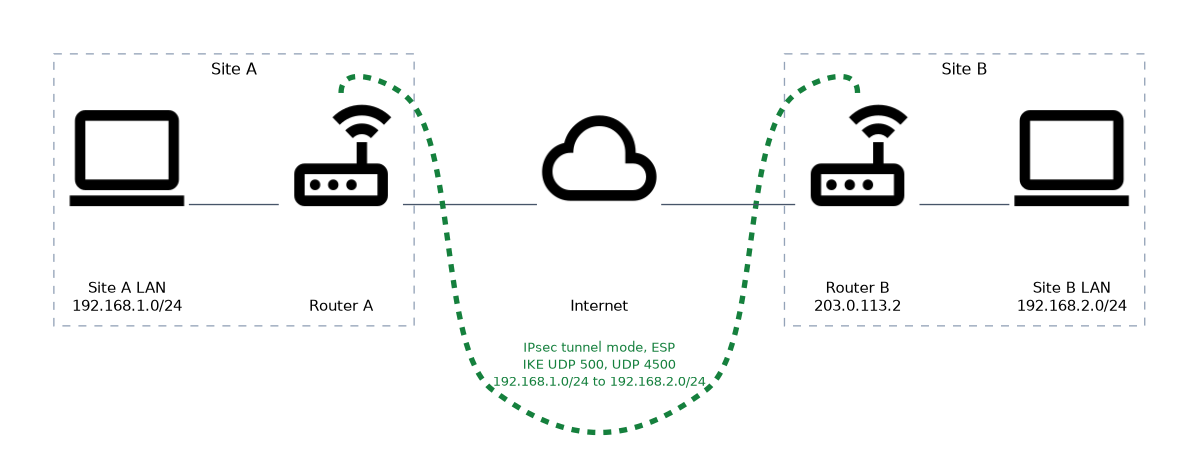
/ip ipsec profile add name=p1 hash-algorithm=sha256 enc-algorithm=aes-256 dh-group=modp2048
/ip ipsec peer add name=siteb address=203.0.113.2/32 profile=p1 exchange-mode=ike2
/ip ipsec identity add peer=siteb auth-method=pre-shared-key secret=UseALongRandomSecret
/ip ipsec proposal add name=p1 auth-algorithms=sha256 enc-algorithms=aes-256-cbc pfs-group=modp2048
/ip ipsec policy add peer=siteb src-address=192.168.1.0/24 dst-address=192.168.2.0/24 tunnel=yes proposal=p1
In RouterOS 7 and in newer 6.x releases the policy refers to the peer. Very old 6.x releases name the addresses of the tunnel ends in the policy instead. The other router needs the mirror image of the addresses and the same secret and algorithms.
Firewall and NAT
The firewall must accept the IPsec traffic, and NAT must not change traffic that is going into the tunnel.
/ip firewall filter add chain=input protocol=udp dst-port=500,4500 action=accept
/ip firewall filter add chain=input protocol=ipsec-esp action=accept
/ip firewall nat add chain=srcnat src-address=192.168.1.0/24 dst-address=192.168.2.0/24 action=accept place-before=0
The NAT rule must come before the masquerade rule. If masquerade changes the source address first, the traffic no longer matches the policy.
Checking
/ip ipsec active-peers print
/ip ipsec installed-sa print
/ip ipsec policy print
The first two commands show established peers and the live security associations. A policy marked as not active means that the tunnel is not up.
When a tunnel does not come up, compare both ends first. A mismatch in algorithms, groups or secrets is the most common cause.
What to remember for the exam
Eight facts summarise IPsec.
- IPsec protects IP traffic with encryption and authentication.
- IKE uses UDP port 500 and NAT traversal uses UDP port 4500.
- ESP is IP protocol 50 and AH is IP protocol 51.
- ESP encrypts and authenticates. AH only authenticates and does not work through NAT.
- Tunnel mode protects the whole original packet. Transport mode protects only the payload.
- Phase 1 secures the negotiation. Phase 2 creates the security associations for data.
- Peers authenticate with a pre shared key or with certificates.
- A NAT bypass rule must sit above masquerade.
Common mistakes
Four mistakes appear in IPsec setups.
Mismatched settings. Algorithms, groups, lifetimes or secrets that differ between peers stop the tunnel.
Missing firewall rules. UDP 500, UDP 4500 and ESP must be accepted on the input chain.
Forgetting the NAT bypass. Masquerade changes the source address, so traffic does not match the policy.
Choosing AH for traffic that crosses NAT. AH breaks when the addresses change. Use ESP.
A weak pre shared key defeats strong algorithms. Use a long random secret and never reuse it.
Check yourself
Work through these three questions.
Which protocols and ports does IPsec use?
IKE uses UDP port 500 and NAT traversal uses UDP port 4500. ESP is IP protocol 50 and AH is IP protocol 51.
What is the difference between tunnel mode and transport mode?
Tunnel mode protects the whole original packet and adds a new outer header, so routers use it for site to site links. Transport mode protects only the payload.
Why is a NAT bypass rule needed above masquerade?
Masquerade would change the source address of traffic that is meant for the tunnel. The traffic would then not match the policy.
Topic 1 of 3 in Secure Tunnels
Test yourself on Secure Tunnels
The full MikroTik MTCSE question bank has 446 questions, with timed practice exams and an explanation for every answer.
This study guide is independent and is not affiliated with, endorsed by, or sponsored by MikroTik. Vendor names, certification names and exam codes are trademarks of their respective owners and are used for identification only.