OSI Layer Attacks · Topic 2 of 5
TCP SYN and UDP Attacks and Prevention
Learn how TCP SYN floods and UDP floods work, why spoofed sources and amplification make them hard to stop, and how to limit them on a MikroTik router.
- 5 min
- Includes a diagram
- A SYN flood sends many SYN packets and never completes the handshake.
- The server is left with half open connections and refuses real clients.
- Limit connections per source with
connection-limitand collect offenders in an address list.
What it is
TCP SYN and UDP attacks are transport layer floods that try to use up the resources of a router or a server.
A SYN attack abuses the way TCP starts a connection. A UDP attack abuses the fact that UDP has no connection at all.
Both are denial of service attacks. They often use fake source addresses, which makes it hard to block the sender by address.
How it works
Each attack exploits a design feature of its protocol, so each has its own defence.
The TCP handshake
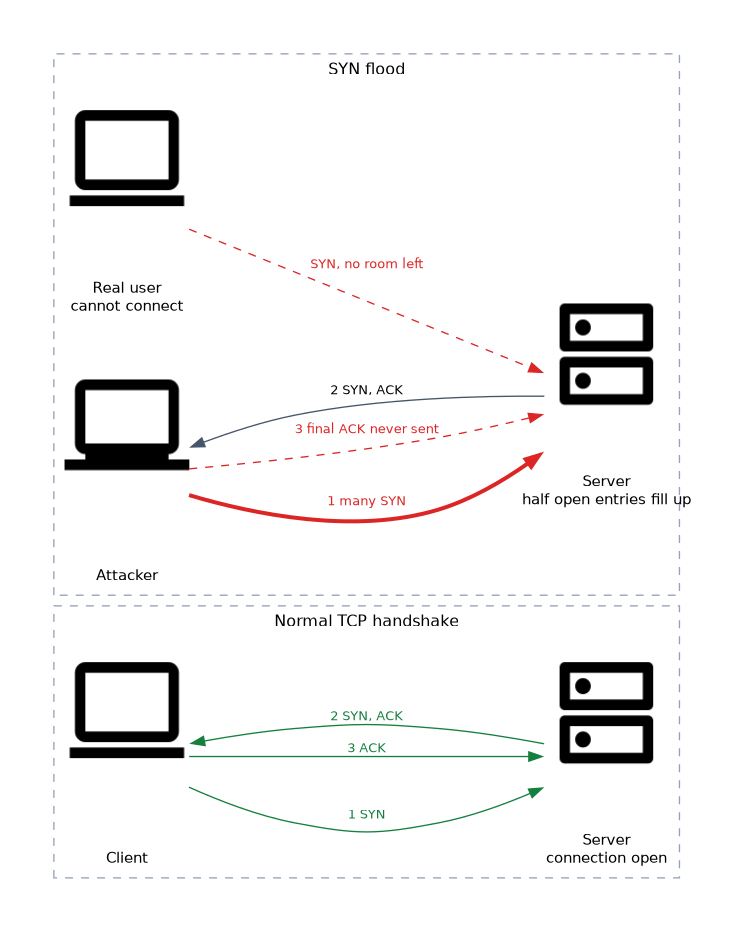 TCP opens a connection in three steps. The client sends a SYN, the server answers with a SYN and ACK, and the client sends an ACK.
After the second step the server holds a half open connection and waits. A SYN flood sends many SYN packets and never sends the final ACK. The waiting entries fill the table, and real clients cannot connect.
Defences against SYN floods
| Defence | How it helps |
|---|---|
| Drop SYN to unused ports | No service, no reason to answer |
| Limit SYN rate or connections per source | Caps what one source can hold |
| Address lists with timeout | Blocks sources that break the limit |
| SYN cookies | Router keeps no state for half open connections |
| Shorter half open timeout | Frees entries sooner |
/ip firewall filter add chain=input protocol=tcp tcp-flags=syn connection-limit=30,32 action=add-src-to-address-list address-list=syn-attackers address-list-timeout=1d
/ip firewall raw add chain=prerouting src-address-list=syn-attackers action=drop
/ip settings set tcp-syncookies=yes
All numbers and timeouts in these examples are only example values.
The first rule collects sources that hold too many connections. The raw rule then drops them before tracking. The last command turns on SYN cookies for the router itself.
You can also shorten the time the tracker waits for the third step of the handshake. The setting is tcp-syn-received-timeout in the connection tracking menu, and the right value depends on your network.
/ip firewall connection tracking set tcp-syn-received-timeout=10sVery short timeouts can break slow links. Change one value at a time and watch for user complaints.
UDP attacks
UDP sends packets without a handshake, so the sender can fake its source address easily. The target cannot tell real traffic from a flood.
A UDP flood sends a large number of packets to random or chosen ports. For each packet to a closed port the router may reply with an ICMP port unreachable message, which doubles the work.
Amplification
In an amplification attack the attacker sends a small request to a public server with the victim's address as the source. The server sends a much larger answer to the victim. Open DNS resolvers and time servers are well known examples.
If your router answers DNS queries from the outside, it can be used in this way. You then take part in an attack on someone else.
Defences against UDP floods
/ip firewall filter add chain=input protocol=udp in-interface-list=WAN dst-port=53 action=drop
/ip firewall filter add chain=input protocol=udp connection-limit=100,32 action=add-src-to-address-list address-list=udp-flood address-list-timeout=10m
/ip firewall filter add chain=input src-address-list=udp-flood action=drop
/ip firewall filter add chain=input in-interface-list=WAN action=drop- The first rule stops outside hosts from using the router as a resolver.
- The second and third rules collect and drop sources that open too many UDP flows.
- The last rule drops everything else from the WAN, without any reply.
Use drop and not reject for UDP from the outside, because a drop sends no ICMP message and costs the router less.
Anti spoofing
Because both floods use fake sources, add checks for impossible addresses. Reverse path filtering drops a packet if its source address would not be routed back through the same interface.
/ip settings set rp-filter=strictStrict mode can break networks with asymmetric routing, so use loose mode there. Bogon lists on the WAN side are another simple filter.
What to remember for the exam
Eight facts cover SYN and UDP attacks.
- A SYN flood sends many SYN packets and never completes the handshake.
- The server is left with half open connections and refuses real clients.
- Limit connections per source with
connection-limitand collect offenders in an address list. - Drop listed sources in the raw table to save processing power.
- SYN cookies are set with
/ip settings set tcp-syncookies=yes. - UDP has no handshake, so sources are easy to fake.
- Amplification uses open servers such as DNS resolvers to send large answers to a victim.
- Block outside DNS requests and drop, not reject, unwanted UDP from the WAN.
Common mistakes
Four mistakes are common here.
Blocking the spoofed source address. The attacker fakes the address, so you may block an innocent host and not stop the flood.
Leaving the DNS resolver open to the internet. The router can be used to attack others and it burns its own resources.
Using reject for flood traffic. Each reject sends an ICMP packet, which adds load.
Setting strict reverse path filtering on a multi homed router. Asymmetric paths make valid packets get dropped, so use loose mode.
Raw rules are the cheapest place to drop flood traffic. Use filter rules to detect and raw rules to block.
Check yourself
Work through these three questions.
Why does a SYN flood stop real users from connecting?
The attacker never completes the handshake, so the server fills with half open connections. There is no room left for real clients.
What is an amplification attack?
The attacker sends a small request to a public server with the victim's address as the source. The server sends a much larger answer to the victim.
Why use drop and not reject for unwanted UDP from the WAN?
A drop sends no reply, while a reject sends an ICMP message and costs the router more work.
Topic 2 of 5 in OSI Layer Attacks
Test yourself on OSI Layer Attacks
The full MikroTik MTCSE question bank has 446 questions, with timed practice exams and an explanation for every answer.
This study guide is independent and is not affiliated with, endorsed by, or sponsored by MikroTik. Vendor names, certification names and exam codes are trademarks of their respective owners and are used for identification only.