OSI Layer Attacks · Topic 1 of 5
MNDP and DHCP Attacks and Prevention
Understand how MNDP leaks router details, how rogue DHCP servers and DHCP starvation work, and how to stop them with discovery limits, snooping and alerts.
- 5 min
- Includes a diagram
- MNDP announces identity, version, board, MAC and IP, and uses UDP port 5678.
- Limit discovery and the MAC server to trusted interface lists.
- A rogue DHCP server hands out wrong settings, often its own gateway.
What it is
MNDP and DHCP are helpful local protocols that attackers can abuse because they trust everyone on the segment.
MNDP is the MikroTik Neighbor Discovery Protocol. Routers use it to announce themselves to their neighbours.
DHCP hands out addresses, gateways and DNS servers. A rogue server or a flood of requests can break it.
How it works
Each attack uses a trusted broadcast on the local segment, and each has a direct defence.
MNDP attacks
MNDP sends periodic announcements that carry the router identity, the RouterOS version, the board type, the MAC address and the IP address. The protocol uses UDP port 5678.
An attacker on the same segment learns exactly what to attack and which known weaknesses apply. This is the reconnaissance step described in the Introduction chapter.
The router also listens to neighbours. Discovery is useful for admins, so the fix is to turn it off where it is not needed.
/interface list add name=LAN
/interface list member add list=LAN interface=bridge
/ip neighbor discovery-settings set discovery-interface-list=LAN
/tool mac-server set allowed-interface-list=LAN
/tool mac-server mac-winbox set allowed-interface-list=LAN
Older RouterOS versions have a per interface setting instead of an interface list. The idea is the same. Allow discovery on trusted interfaces only, and never on the WAN.
Rogue DHCP servers
A rogue DHCP server is any device that answers DHCP requests without permission. It may be a home router plugged in by mistake, or an attacker on purpose.
A rogue server can offer its own address as the gateway. All client traffic then passes through the attacker, who can read it. This is a man in the middle attack.
DHCP starvation
In a starvation attack the attacker sends many DHCP requests, each with a different fake MAC address. The server gives away every address in its pool, so real clients get none.
The attacker often then runs a rogue server to give the starved clients its own settings. Starvation is therefore both a denial of service and a first step to a man in the middle.
Defences
| Attack | Defence on RouterOS |
|---|---|
| MNDP leak | Limit discovery and the MAC server to the LAN list |
| Rogue DHCP server | DHCP snooping with trusted ports, DHCP alert, bridge filter |
| DHCP starvation | Static leases, a static only pool, ARP control |
DHCP snooping
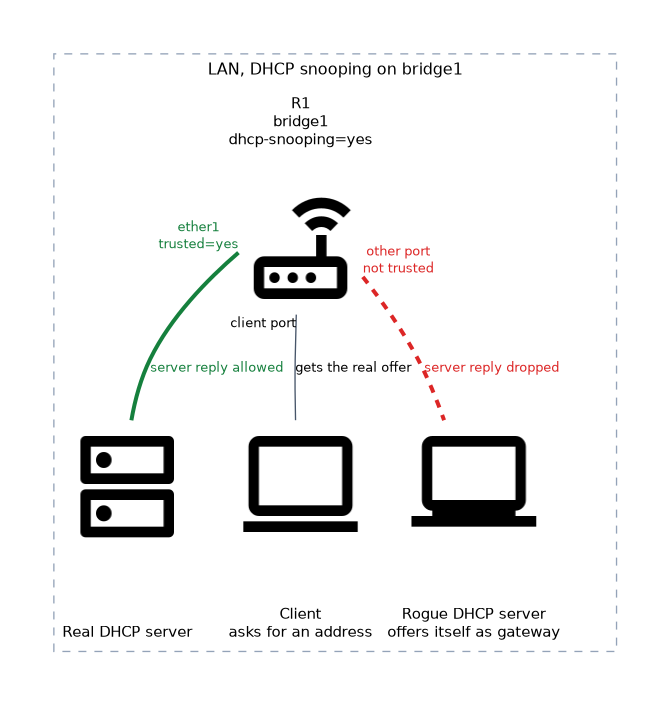 DHCP snooping is a feature of the bridge. It accepts DHCP server messages only from ports marked as trusted.
/interface bridge set bridge1 dhcp-snooping=yes add-dhcp-option82=yes
/interface bridge port set [find interface=ether1] trusted=yes
Here ether1 is the port that leads to the real DHCP server. A server reply from any other port is dropped.
DHCP alert
The DHCP alert listens on an interface and warns you when an unknown server answers.
/ip dhcp-server alert add interface=bridge1 valid-server=AA:BB:CC:DD:EE:FF on-alert="/log warning rogue-dhcp"The valid-server setting is the MAC address of the real server. The alert only warns. It does not block, so combine it with snooping or a bridge filter rule.
Limiting starvation
If you know your clients, hand out addresses only to them. Use static leases and an address pool that cannot give out anything else.
/ip dhcp-server lease add address=192.168.88.50 mac-address=AA:BB:CC:00:00:01 server=dhcp1
/ip dhcp-server set dhcp1 address-pool=static-only add-arp=yes
/interface bridge set bridge1 arp=reply-only
With add-arp=yes the server adds an ARP entry for each lease, and arp=reply-only makes the bridge answer only for those entries. Hosts without a lease then cannot easily use the network.
Use a short lease time on guest networks. Leases from a starvation attack expire sooner and the pool recovers faster.
What to remember for the exam
Eight facts cover this topic.
- MNDP announces identity, version, board, MAC and IP, and uses UDP port 5678.
- Limit discovery and the MAC server to trusted interface lists.
- A rogue DHCP server hands out wrong settings, often its own gateway.
- Starvation uses many fake MAC addresses to empty the pool.
- DHCP snooping on a bridge accepts server messages only from trusted ports.
/ip dhcp-server alertwarns when an unknown server answers.- A bridge filter rule can drop DHCP replies from untrusted ports.
- Static leases with
add-arp=yesandarp=reply-onlylimit who can use the network.
Common mistakes
Four mistakes appear on this topic.
Leaving discovery on for the WAN. The ISP side or the internet then sees the router details.
Marking the wrong port as trusted. If a user port is trusted, snooping no longer protects you.
Relying on the DHCP alert alone. It warns but does not block the rogue server.
Using a large pool with long leases. A starvation attack empties it quickly and the addresses stay lost for a long time.
Turning on arp=reply-only without static ARP entries or leases leaves hosts without a reply. Plan the lease list before you enable it.
Check yourself
Work through these three questions.
What information does MNDP reveal to a neighbour?
It reveals the router identity, version, board type, MAC address and IP address. You limit this by allowing discovery only on trusted interfaces.
What does a DHCP starvation attack do?
It sends many requests with fake MAC addresses so the server gives out all the addresses in its pool. Real clients then get no address.
How does DHCP snooping stop a rogue DHCP server?
The bridge accepts DHCP server messages only from ports marked as trusted. Replies from other ports are dropped.
Topic 1 of 5 in OSI Layer Attacks
Test yourself on OSI Layer Attacks
The full MikroTik MTCSE question bank has 446 questions, with timed practice exams and an explanation for every answer.
This study guide is independent and is not affiliated with, endorsed by, or sponsored by MikroTik. Vendor names, certification names and exam codes are trademarks of their respective owners and are used for identification only.