Static Routing · Topic 3 of 4
Routing Marks and Policy Routing
Learn how routing marks and routing rules steer chosen traffic into separate routing tables, with v6 and v7 syntax and the classic two ISP setup.
- 5 min
- Includes a diagram
- Policy routing selects a route by source or other packet properties, not only the destination.
- A routing mark selects a separate routing table.
- The mangle action
mark-routingwithnew-routing-marksets the mark.
What it is
Policy routing chooses a route by who sends the traffic, not only by where it is going.
Normal routing looks only at the destination address. With policy routing you can send traffic from one source through ISP A, and traffic from another source through ISP B.
Two tools do this. A routing mark tags packets and selects a separate routing table. A routing rule selects a table based on packet properties such as the source address.
How it works
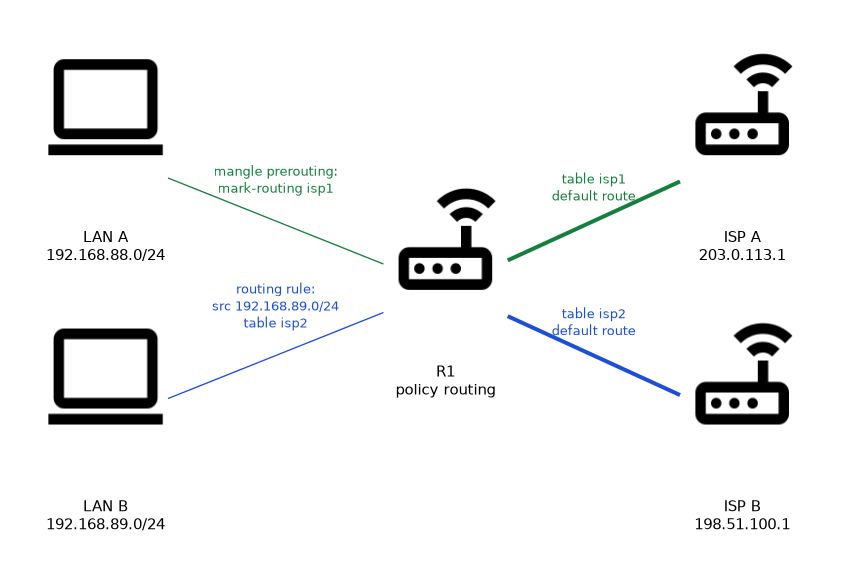 Packets get a mark, the mark selects a routing table, and that table holds its own routes.
RouterOS v6 and v7
The idea is the same in both versions, but the syntax differs.
| Item | RouterOS v6 | RouterOS v7 |
|---|---|---|
| Table creation | Created by using a name in a route | Declared first in /routing table |
| Route parameter | routing-mark | routing-table |
| Packet mark action | mark-routing in mangle | mark-routing in mangle |
| Rule menu | /ip route rule | /routing rule |
In v6 a table exists as soon as a route or mangle rule names it. In v7 you must declare the table first, and the fib keyword makes it a forwarding table.
Method 1: mangle and routing mark
The mangle rule marks packets as they arrive, and a route with the same mark carries them.
/ip firewall mangle add chain=prerouting src-address=192.168.88.0/24 action=mark-routing new-routing-mark=isp1 passthrough=no
/ip route add dst-address=0.0.0.0/0 gateway=203.0.113.1 routing-mark=isp1
The chain prerouting catches traffic that comes from the LAN. Traffic that the router itself creates is marked in the chain output instead.
On v7 the same setup first needs the table.
/routing table add name=isp1 fib
/ip route add dst-address=0.0.0.0/0 gateway=203.0.113.1 routing-table=isp1
Method 2: routing rules
A routing rule needs no mangle at all. It matches properties such as src-address or dst-address and then looks in a table.
/ip route rule add src-address=192.168.89.0/24 table=isp2On v7 the same rule lives in /routing rule. The action decides what happens when the table has no matching route.
| Action | Behaviour |
|---|---|
lookup | Use the named table, and if no route matches, continue with the next rules and finally the main table |
lookup-only-in-table | Use only the named table, and stop if no route matches |
drop | Silently discard the packet |
unreachable | Discard and send an ICMP unreachable |
Marked tables need their own routes
A marked table holds the routes you put in it. A marked packet that goes to a local host may find no suitable route there, so check this case.
The usual fix is to let local destinations bypass the marking. You can exclude local networks from the mangle rule, or add a rule that looks up the main table first for them.
Return traffic is another issue. Connection marks combined with routing marks keep replies leaving over the same ISP that the request used.
Verifying
/ip route print where routing-mark=isp1
/ip firewall mangle print stats
/ip route rule print
The mangle counters show whether packets are being marked. Remember that routing-mark in the first command is the v6 parameter, and routing-table is its v7 counterpart.
Use passthrough=no on a routing mark rule when no later mangle rule should touch the packet.
What to remember for the exam
Seven facts cover most questions on this topic.
- Policy routing selects a route by source or other packet properties, not only the destination.
- A routing mark selects a separate routing table.
- The mangle action
mark-routingwithnew-routing-marksets the mark. - Use the mangle chain
preroutingfor forwarded traffic andoutputfor router traffic. - v6 uses
routing-markon routes, and v7 usesrouting-tableafter declaring the table. /ip route rulein v6 and/routing rulein v7 select a table without mangle.lookup-only-in-tablestops the search if the named table has no match.
A marked table may lack routes to local networks. Always plan how local traffic reaches its destination.
Common mistakes
These four errors appear often.
Marking in the wrong chain. Traffic from the router itself never passes prerouting, so it needs a rule in output.
Giving a marked table no default route. The mark matches, but the table has nothing to forward with, so the traffic does not leave as planned.
Forgetting the v7 table declaration. A route that names a table that was never declared with /routing table is rejected.
Ignoring return traffic. Replies may leave through a different ISP than the request used, and the remote end then drops them.
Check yourself
Work through these three questions.
What does a routing mark do?
It selects a separate routing table for the marked packets. Routes that carry the same mark are used for them.
Which mangle chain marks traffic that the router itself generates?
The chain
output. Forwarded traffic is marked in the chainprerouting.What is the difference between
lookupandlookup-only-in-tablein a routing rule?With
lookup, the router carries on with the remaining rules and the main table if the named table has no match. Withlookup-only-in-table, the search stops there.
Topic 3 of 4 in Static Routing
Test yourself on Static Routing
The full MikroTik MTCRE question bank has 417 questions, with timed practice exams and an explanation for every answer.
This study guide is independent and is not affiliated with, endorsed by, or sponsored by MikroTik. Vendor names, certification names and exam codes are trademarks of their respective owners and are used for identification only.