Static Routing · Topic 2 of 4
Gateway Selection, Reachability Check and Route Distance
Learn how to force a gateway over a specific interface, use check gateway to detect dead next hops, and build backup routes with higher distance.
- 5 min
- Includes a diagram
- A gateway can be an IP address, an interface name, or an address with a percent sign and interface.
- Use the address with interface form to force the interface for a next hop.
- An interface name as gateway on Ethernet relies on proxy ARP at the far end.
What it is
A static route needs a gateway, and the gateway can be written in several ways and checked for health.
The gateway can be an IP address, an interface name, or an address with an interface attached. Each form tells the router something different about how to reach the next hop.
Reachability checking lets the router stop using a gateway that no longer answers. Distance then lets a backup route take over.
How it works
You pick the gateway form, optionally enable a check, and use distance to order the routes.
Forms of gateway
| Gateway written as | Meaning |
|---|---|
| An IP address | The router finds the interface by looking up that address in its routes |
| An interface name | Packets are sent out that interface, and the router asks for the destination address directly |
| Address with a percent sign and interface | The address is used as next hop, and the interface is forced |
An interface name as gateway works well on point to point links. On Ethernet it makes the router send an ARP request for every final destination, so the far router must answer for them with proxy ARP.
The address with interface form removes doubt about the path. It is useful when the same next hop address could be reached through more than one interface.
/ip route add dst-address=10.50.0.0/16 gateway=10.0.0.2%ether1
/ip route add dst-address=10.60.0.0/16 gateway=pppoe-out1
Check gateway
By default a static route stays active as long as its gateway can be resolved. A link that is up but silently broken is not noticed.
The check-gateway setting adds an active test. With ping, the router sends ICMP echo requests to the gateway. With arp, it checks that the gateway answers ARP.
/ip route add dst-address=0.0.0.0/0 gateway=203.0.113.1 check-gateway=pingIf the gateway stops answering, the route is marked as not usable and the router moves to the next best route. When the gateway answers again, the route returns.
The ARP check suits a gateway on the same Ethernet segment. The ping check tests whether the gateway answers ICMP.
Backup routes with distance
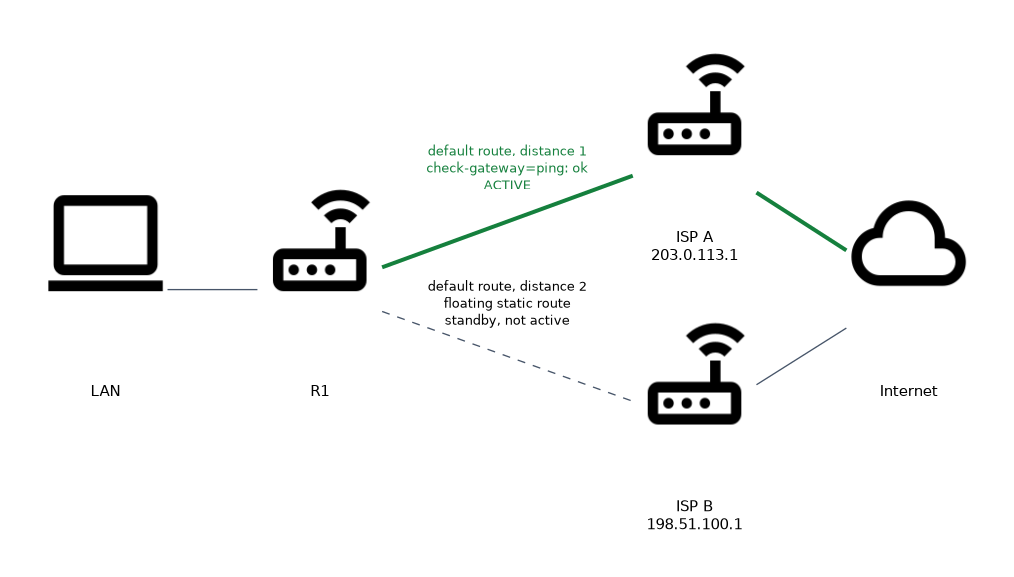
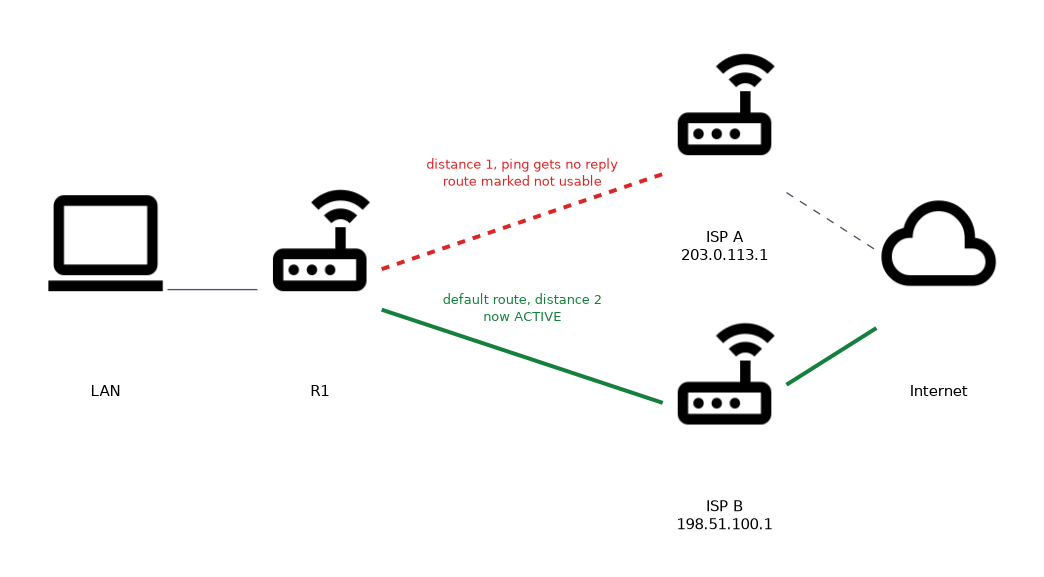 Two routes with the same destination prefix and different distances form a primary and a backup. The lower distance is active, and the higher one stays inactive until it is needed.
/ip route add dst-address=0.0.0.0/0 gateway=203.0.113.1 distance=1 check-gateway=ping
/ip route add dst-address=0.0.0.0/0 gateway=198.51.100.1 distance=2
This pair is called a floating static route. The second route is installed only when the first one becomes unusable. Without the check on the primary route, the failover would happen only when the interface itself goes down.
Verifying
/ip route print detail
/ip route print where dst-address=0.0.0.0/0
Inactive routes show without the A flag. The detail view shows the gateway status, which tells you whether the gateway is reachable and over which interface.
Distance also applies across protocols. A static route with a high distance can serve as a fallback behind OSPF, because a dynamic route with distance 110 beats a static route with distance 200.
To keep a static route as a last resort behind OSPF, give it a distance above 110.
What to remember for the exam
Seven facts cover most questions on this topic.
- A gateway can be an IP address, an interface name, or an address with a percent sign and interface.
- Use the address with interface form to force the interface for a next hop.
- An interface name as gateway on Ethernet relies on proxy ARP at the far end.
check-gatewayacceptspingorarp.- Without a check, a route stays active while its gateway can be resolved, even if the gateway is dead.
- A lower distance wins between routes to the same prefix.
- A backup route is a route with a higher distance, called a floating static route.
A route that is active in the table is not proof that the next hop is alive. Only a gateway check tests the next hop.
Common mistakes
These four errors appear often.
Skipping the gateway check on a primary route. The link stays up but the ISP side is dead, and the router never switches to the backup.
Giving both routes the same distance. The two routes then have the same priority, so neither one is a clear primary or backup.
Using an interface name on Ethernet without proxy ARP. The router asks for every destination, the neighbour does not answer, and traffic fails.
Setting the backup distance lower than a dynamic protocol. A static route with distance 1 hides the OSPF route that you meant it to back up.
Check yourself
Work through these three questions.
How do you force a next hop to be reached over one specific interface?
Write the gateway as the address followed by a percent sign and the interface, for example
gateway=10.0.0.2%ether1. The interface is then fixed for that next hop.Why is
check-gateway=pinguseful on a default route?It lets the router notice a dead next hop even when the interface is still up. The route is then marked unusable and a backup route can take over.
How do you build a primary and backup default route over two ISPs?
Add two routes to 0.0.0.0/0 with different distances, such as 1 and 2. The route with the lower distance is used, and the other waits as a floating static route.
Topic 2 of 4 in Static Routing
Test yourself on Static Routing
The full MikroTik MTCRE question bank has 417 questions, with timed practice exams and an explanation for every answer.
This study guide is independent and is not affiliated with, endorsed by, or sponsored by MikroTik. Vendor names, certification names and exam codes are trademarks of their respective owners and are used for identification only.