Tunnels · Topic 4 of 4
PPTP and SSTP Tunnels for Remote Networks
Connect remote networks securely with RouterOS PPTP client and server tunnels, the Quick Set VPN option, and SSTP clients that run over TLS.
- 6 min
- Includes a diagram
- PPTP and SSTP are PPP based, and use PPP secrets and profiles.
- PPTP uses TCP port 1723 and the GRE protocol.
- The PPTP server is enabled with
/interface pptp-server server set enabled=yes.
What it is
A tunnel carries private traffic across an untrusted network, such as the Internet, as if the two ends shared a cable.
RouterOS supports several tunnel types, and this page covers two.
PPTP is simple and widely supported. SSTP carries PPP inside an encrypted TLS connection.
Both are PPP based, so they use the same PPP secrets and profiles as PPPoE. The difference is the transport that carries the PPP session between the two ends.
How it works
The server accepts logins, the client connects with a name and password, and a PPP interface appears at each end.
The common pieces
A PPP tunnel needs the same three pieces as other PPP services.
- A PPP secret on the server with the user name, the password and the service.
- A PPP profile with the local and remote addresses of the tunnel.
- A route so that each side knows about the network behind the other.
/ppp secret add name=branch1 password=Str0ngPass service=any profile=default-encryption local-address=10.77.0.1 remote-address=10.77.0.2The two tunnel addresses are the point-to-point addresses of the link. To reach the LAN behind the client, add a static route on the server that uses the client tunnel address as the gateway, and a route on the client that does the same in the other direction.
PPTP server
The PPTP server is switched on in its own menu.
/interface pptp-server server set enabled=yesPPTP uses a TCP connection on port 1723 together with the GRE protocol for the tunnel traffic. A firewall in front of the server must therefore allow both. On a router with a drop rule in the input chain, add allow rules first.
/ip firewall filter add chain=input protocol=tcp dst-port=1723 action=accept
/ip firewall filter add chain=input protocol=gre action=accept
A dynamic interface appears for each client that connects, as with other PPP servers.
Quick Set and VPN access
Quick Set contains a VPN access option for a home style setup. Switching it on enables a VPN server on the router, so that you can reach the home network remotely.
The exact protocol that Quick Set enables depends on the version, so check which one your version turns on before you rely on it. Quick Set only writes ordinary configuration, so you can look at the result in the normal menus.
PPTP client
The client connects to the server address with a user name and password.
/interface pptp-client add name=pptp-out1 connect-to=203.0.113.10 user=branch1 password=Str0ngPass disabled=no| Setting | Meaning |
|---|---|
connect-to | The address of the PPTP server |
user and password | The login, matching a secret on the server |
disabled | Set to no to start the connection |
Check the tunnel on both sides.
/interface pptp-client print
/ppp active printPPTP is considered weak by modern standards, so use it only where nothing stronger is possible.
SSTP
SSTP carries the PPP session inside a TLS connection on a TCP port, which is normally the same one that HTTPS uses. Because it looks like ordinary secure web traffic, it passes through most firewalls and proxies. Encryption comes from TLS, which is stronger than the PPTP encryption.
The SSTP server normally uses a certificate. The client can check this certificate to make sure it talks to the right server.
/interface sstp-client add name=sstp-out1 connect-to=203.0.113.10 user=branch1 password=Str0ngPass verify-server-certificate=yes disabled=noThe verify-server-certificate setting makes the client check the certificate. Turning it off removes that protection, so use it only for a short test.
The client then has a PPP interface called sstp-out1, with the addresses taken from the server profile.
PPTP and SSTP compared
| Point | PPTP | SSTP |
|---|---|---|
| Transport | TCP 1723 plus GRE | TLS over TCP |
| Firewall friendliness | Needs GRE to pass | Passes like HTTPS |
| Certificate | Not used | Normally used on the server |
| Security | Weak | Stronger |
Choose SSTP when the path crosses strict firewalls, or when security matters. PPTP is simple, but it is a legacy choice.
Routing across the tunnel
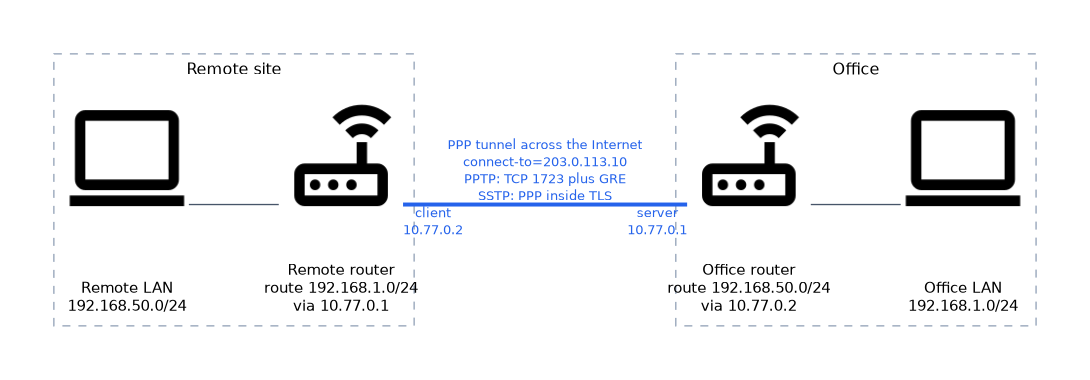 A tunnel connects two addresses. For the LANs behind each end to talk, add routes.
# On the server
/ip route add dst-address=192.168.50.0/24 gateway=10.77.0.2
# On the client
/ip route add dst-address=192.168.1.0/24 gateway=10.77.0.1
Both LANs must use different subnets. Also check that the firewall of each router allows the forwarded traffic through the tunnel interface.
Test the tunnel by pinging the far tunnel address first, and then a host in the far LAN, so you find the broken step quickly.
What to remember for the exam
Seven facts cover this topic.
- PPTP and SSTP are PPP based, and use PPP secrets and profiles.
- PPTP uses TCP port 1723 and the GRE protocol.
- The PPTP server is enabled with
/interface pptp-server server set enabled=yes. - The PPTP client uses
connect-to,userandpassword. - SSTP runs PPP inside TLS and passes through firewalls like HTTPS.
- The SSTP server normally uses a certificate, and the client can verify it.
- Routes on both sides are needed to reach the LANs behind the tunnel.
Common mistakes
These four mistakes are common.
Blocking GRE. PPTP needs both TCP 1723 and the GRE protocol.
Forgetting the routes. The tunnel comes up but the LANs cannot reach each other.
Overlapping LAN subnets. Routing between two identical subnets cannot work.
Disabling certificate checks permanently. The client then cannot detect a fake server.
Check yourself
Work through these three questions.
What does a PPTP firewall need to allow?
It must allow TCP port 1723 and the GRE protocol. Without GRE the tunnel does not carry traffic.
Why does SSTP pass through strict firewalls?
It runs PPP inside a TLS connection on a TCP port that HTTPS normally uses. It looks like ordinary secure web traffic.
The tunnel is up but the LANs cannot reach each other, so what is missing?
A route on each side. Each router needs a static route to the far LAN through the tunnel address.
Topic 4 of 4 in Tunnels
Test yourself on Tunnels
The full MikroTik MTCNA question bank has 558 questions, with timed practice exams and an explanation for every answer.
This study guide is independent and is not affiliated with, endorsed by, or sponsored by MikroTik. Vendor names, certification names and exam codes are trademarks of their respective owners and are used for identification only.