Tunnels · Topic 3 of 4
PPPoE, Securing the Local Network with a Client and a Server
Secure a local network with PPPoE on RouterOS, covering the PPPoE server, the PPPoE client, the service name and the PPP profile and secret behind them.
- 5 min
- Includes a diagram
- PPPoE runs PPP over Ethernet, so the client and server must share a Layer 2 segment.
- The PPPoE server is created with
/interface pppoe-server server addon an interface. - The service name selects which server the client talks to.
What it is
PPPoE carries PPP sessions over an Ethernet network, and it adds a login to a local network.
On a plain LAN, anyone who plugs in can send traffic. With PPPoE, the client must authenticate with a user name and password before it gets an IP address and access.
Internet providers use PPPoE for the same reason, and the same technology secures a local network. The server accepts the logins, the client logs in, and the service name identifies which server the client means.
How it works
PPPoE runs directly on Ethernet, so the client and the server must be on the same Layer 2 network.
What makes PPPoE different
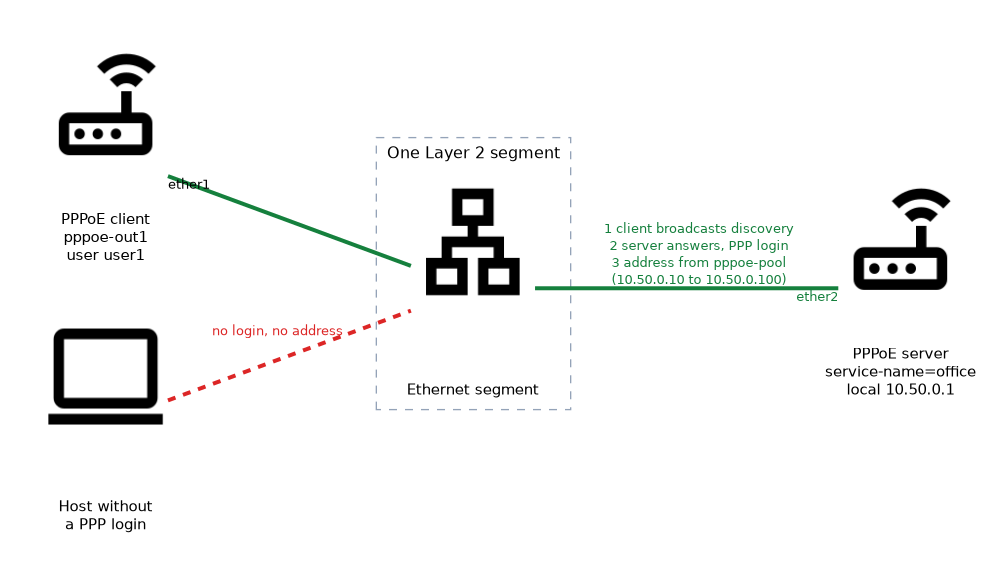 PPPoE does not use IP to find the server. The client broadcasts a discovery request on the Ethernet segment, and the servers that hear it answer. This means the two ends must share a broadcast domain, with no router between them.
Once a server is chosen, a PPP session starts, and the PPP login takes place. The server then gives an address to the client, and traffic flows through the new PPP interface.
The server interface does not need an IP address of its own for PPPoE to work. Many networks keep the server port free of IP addresses, so that unauthenticated hosts cannot use any IP service.
PPPoE server
The server is created on an interface, and it uses a PPP profile and the PPP secrets.
/ip pool add name=pppoe-pool ranges=10.50.0.10-10.50.0.100
/ppp profile add name=pppoe-prof local-address=10.50.0.1 remote-address=pppoe-pool
/ppp secret add name=user1 password=Str0ngPass service=pppoe profile=pppoe-prof
/interface pppoe-server server add service-name=office interface=ether2 default-profile=pppoe-prof disabled=no
The steps are:
- Create the pool of addresses for the clients.
- Create a profile with the local address and the pool.
- Create a secret for each user, with the service set to
pppoe. - Create the server entry on the LAN interface, with a service name.
The default-profile is used for users whose secret names no other profile. An authentication method list can also be set on the server to say which login methods it accepts.
Do not run a PPPoE server on the WAN interface unless you mean to, because anyone on that network could try to log in.
The service name
The service name is a label that identifies a PPPoE server. A client names the service it wants, and only a server with a matching name answers.
This lets several servers share one segment. Each client chooses its own service by name. If the client leaves the name empty, it accepts any server that answers.
The service name is not a password. It only selects the server, and the login still needs a valid secret.
PPPoE client
The client is created on the interface that faces the server.
/interface pppoe-client add name=pppoe-out1 interface=ether1 user=user1 password=Str0ngPass service-name=office add-default-route=yes use-peer-dns=yes disabled=no| Setting | Meaning |
|---|---|
interface | The Ethernet port that faces the PPPoE server |
user and password | The login that matches a secret on the server |
service-name | The service to connect to, or empty for any |
add-default-route | Adds a default route through the PPP link |
use-peer-dns | Uses the DNS server that the server provides |
The client creates a PPP interface, here called pppoe-out1. This interface carries the address that the server assigned. Use it as the WAN interface in firewall and NAT rules, because the traffic leaves through the PPP interface and not through the Ethernet port.
/ip firewall nat add chain=srcnat out-interface=pppoe-out1 action=masqueradeChecking the result
/interface pppoe-client print
/ppp active print
On the client, the interface shows whether it is running. On the server, the active list shows the connected user and the assigned address. If the client does not connect, check these points:
- Both ends are on the same Layer 2 segment.
- The user name and password match a secret that allows
pppoe. - The service name is the same, or empty on the client.
- The server is enabled and its pool is not exhausted.
When PPPoE does not connect, look at the log on both ends, because a wrong password and a wrong service name show different messages.
What to remember for the exam
Seven facts cover this topic.
- PPPoE runs PPP over Ethernet, so the client and server must share a Layer 2 segment.
- The PPPoE server is created with
/interface pppoe-server server addon an interface. - The service name selects which server the client talks to.
- The client is created with
/interface pppoe-client addand creates a PPP interface. - The login must match a PPP secret whose service allows
pppoe. - The server assigns the address from the profile, often through a pool.
- Use the PPPoE client interface as the WAN in NAT rules.
Common mistakes
These four mistakes are common.
Crossing a router. PPPoE discovery does not pass through a router, so the ends must be on one segment.
Masquerading on the Ethernet port. Traffic leaves through the PPP interface, so name that interface.
Forgetting the secret service. A secret set to another service does not accept a PPPoE login.
Running the server on the wrong interface. Run it only on the interface that faces your clients.
Check yourself
Work through these three questions.
Why must a PPPoE client and server be on the same segment?
PPPoE discovery is a broadcast on the Ethernet segment and does not cross a router. The server cannot hear a client that is behind another router.
What does the service name do?
It identifies a PPPoE server. A client asks for a service by name, and only a server with that name answers.
Which interface should the masquerade rule name when the WAN uses a PPPoE client?
It should name the PPPoE client interface, such as
pppoe-out1. Traffic leaves through that PPP interface and not through the Ethernet port.
Topic 3 of 4 in Tunnels
Test yourself on Tunnels
The full MikroTik MTCNA question bank has 558 questions, with timed practice exams and an explanation for every answer.
This study guide is independent and is not affiliated with, endorsed by, or sponsored by MikroTik. Vendor names, certification names and exam codes are trademarks of their respective owners and are used for identification only.