Firewall · Topic 6 of 6
FastTrack and Faster Forwarding
Learn what RouterOS FastTrack does, how the fasttrack-connection action and its companion accept rule work, and which features it bypasses on the router.
- 5 min
- Includes a diagram
- FastTrack speeds up forwarding by skipping most processing for established connections.
- It is enabled by a forward rule with
action=fasttrack-connectionandconnection-state=established,related. - A second rule that accepts established and related traffic must follow it.
What it is
FastTrack is a way to forward established connections faster, by skipping most of the normal packet processing.
Normally every packet passes through the firewall rules, the mangle table and the queues. For a long running connection that work is the same for every packet, and it uses CPU time. FastTrack lets selected connections skip it.
The price is that fast tracked packets no longer see features that sit in the skipped path. This is the main thing to understand about FastTrack.
How it works
A rule marks an established connection, and later packets of that connection take a shorter path through the router.
The fasttrack-connection action
FastTrack is turned on by a rule in the forward chain with the action fasttrack-connection.
/ip firewall filter add chain=forward action=fasttrack-connection connection-state=established,related hw-offload=yes
/ip firewall filter add chain=forward action=accept connection-state=established,related
The first rule marks the connection for fast tracking. The second rule accepts the packet that is being handled now.
Both rules are needed. The fasttrack rule only marks the connection, and it does not accept the packet. Without the accept rule, the packet would continue through the chain and be treated as usual.
The optional hw-offload=yes parameter is available on newer versions, and it lets a device with a supporting switch chip forward the connection in hardware. Where the device does not support it, the software path is used.
Why the state matters
The rule matches only the established and related states. A new connection first goes through the full set of rules, so the filter can still allow or drop it. Only after a connection is established does the router mark it for the fast path.
This keeps security intact for the start of each connection.
What FastTrack bypasses
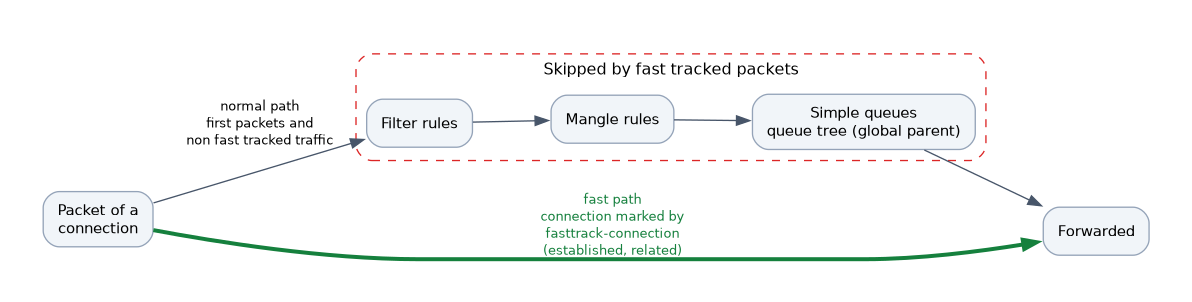 Packets on the fast path skip several parts of RouterOS processing.
| Feature | Effect on fast tracked traffic |
|---|---|
| Firewall filter rules | Skipped for later packets |
| Mangle rules | Skipped, so packet marks are not applied |
| Simple queues | Skipped, so limits do not apply |
| Queue trees with the global parent | Skipped |
Because of this, FastTrack and traffic shaping do not mix well. If a simple queue limits a host, FastTrack would let that host's established connections ignore the limit.
The usual solution is to fast track only the traffic that needs no shaping. For example, you can add conditions to the fasttrack rule that exclude the hosts under a queue, or you can leave FastTrack off.
FastTrack bypasses simple queues, so bandwidth limits and PCQ do not work on fast tracked connections.
NAT and FastTrack
NAT keeps working with FastTrack, because connection tracking still holds the translation. A router that does masquerade or port forwarding can use FastTrack at the same time.
Checking that it works
/ip firewall filter print stats
/ip firewall connection print
The counters of the fasttrack rule show how many packets it has marked. The connection table flags fast tracked connections, so you can see which ones use the fast path.
A big drop in CPU load on a busy router after enabling FastTrack is a sign that it works.
When to use it
FastTrack is a good fit when:
- the router carries a lot of simple forwarded traffic,
- you need no queues or mangle marking on that traffic,
- the CPU of the router is the limit.
It is a poor fit when:
- you rely on simple queues or the queue tree for limits,
- mangle rules must see every packet,
- you need accurate per packet filtering on established connections.
If shaping does not work and you cannot see why, check whether a FastTrack rule is matching the same traffic.
What to remember for the exam
Six facts cover this topic.
- FastTrack speeds up forwarding by skipping most processing for established connections.
- It is enabled by a forward rule with
action=fasttrack-connectionandconnection-state=established,related. - A second rule that accepts established and related traffic must follow it.
- FastTrack bypasses filter rules for later packets, mangle and simple queues.
- Queues and PCQ limits do not apply to fast tracked traffic.
- NAT still works on fast tracked connections.
Common mistakes
These four mistakes are common.
Adding only the fasttrack rule. The packet is not accepted, so the accept rule for established and related traffic is also needed.
Expecting queues to work. Fast tracked traffic bypasses simple queues, so limits do not apply.
Fast tracking new connections. The rule must match established and related, so the first packets pass through the full firewall.
Assuming hw-offload always applies. It depends on the version and on a supporting switch chip.
Check yourself
Work through these three questions.
Which rule action enables FastTrack, and in which chain?
The action
fasttrack-connectionin the forward chain, withconnection-state=established,related. A companion accept rule follows it.Why does FastTrack break simple queue limits?
Fast tracked packets skip most processing, including simple queues. The limits therefore do not apply to those connections.
Why does the FastTrack rule match only established and related connections?
The first packets of a connection must go through the full firewall. Only once the connection is established is it marked for the fast path.
Topic 6 of 6 in Firewall
Test yourself on Firewall
The full MikroTik MTCNA question bank has 558 questions, with timed practice exams and an explanation for every answer.
This study guide is independent and is not affiliated with, endorsed by, or sponsored by MikroTik. Vendor names, certification names and exam codes are trademarks of their respective owners and are used for identification only.