Firewall · Topic 5 of 6
Destination NAT with dst-nat and Redirect
Learn how destination NAT publishes an internal server with the dst-nat action, how redirect targets the router itself, and how to keep the filter open.
- 6 min
- Includes a diagram
- Destination NAT uses the dstnat chain, which is checked before routing.
action=dst-natwithto-addressesandto-portsforwards traffic to another host.action=redirectsends traffic to the router itself.
What it is
Destination NAT changes the destination address or port of packets that arrive at the router.
Its best known use is port forwarding. A server on the private LAN has no public address, so the router accepts connections on its public address and passes them to the server.
RouterOS has two actions for this. The dst-nat action sends the traffic to another address. The redirect action sends it to the router itself.
How it works
The rule sits in the dstnat chain, which is checked before the routing decision, and the translated packet then follows the normal routing and filter rules.
The dstnat chain
The dstnat chain of the NAT table handles packets as they arrive, before the router decides where to route them. This order is needed, because the router must know the real destination before it can route the packet.
As with source NAT, only the first packet of a connection meets the rule. Connection tracking handles the rest, and it also changes the source address of the replies back to the address the client used.
The dst-nat action
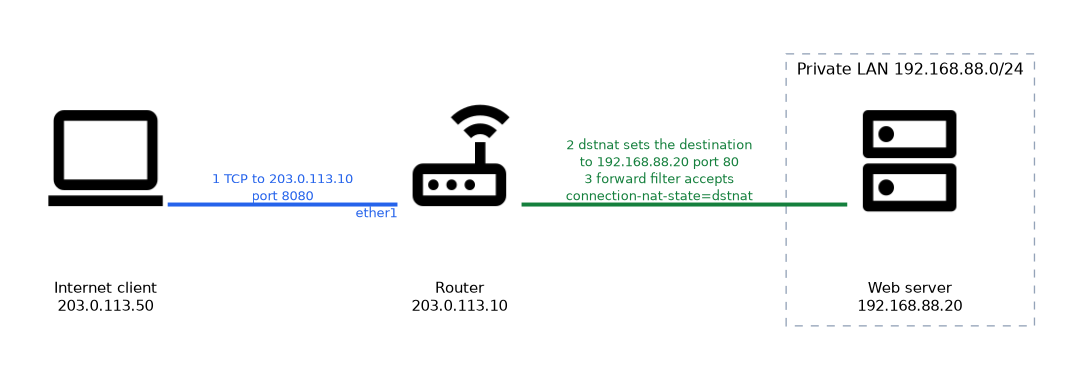 The action replaces the destination address, and optionally the port.
/ip firewall nat add chain=dstnat protocol=tcp dst-port=8080 in-interface=ether1 action=dst-nat to-addresses=192.168.88.20 to-ports=80The rule says: when a TCP packet arrives on ether1 for port 8080, send it to the server 192.168.88.20 on port 80.
The matching parameters decide which traffic is forwarded.
| Parameter | Role |
|---|---|
in-interface | The interface where the packet arrives, usually the WAN |
dst-address | The public address that the client connects to |
protocol and dst-port | The service to forward |
to-addresses | The private server address |
to-ports | The port on the server, if it differs |
If the router has several public addresses, match with dst-address so that only one of them is forwarded. If it has a single address that can change, match with in-interface instead.
Use a different outside port from the inside port when you want to hide a service, or when two servers need the same service. For example, port 8080 can lead to server A and port 8081 to server B, both on port 80.
The redirect action
The redirect action changes the destination to the router itself. The packet is then handled by a service that runs on the router.
/ip firewall nat add chain=dstnat protocol=udp dst-port=53 src-address=192.168.88.0/24 action=redirect to-ports=53This rule catches DNS requests from the LAN and hands them to the DNS service of the router, whatever server the client asked for. A similar rule can send web traffic to a proxy that runs on the router.
The to-ports setting gives the port on the router. The destination address is always the router.
| Action | Sends the traffic to |
|---|---|
| dst-nat | The address in to-addresses, which can be another host |
| redirect | The router itself, on the port in to-ports |
Allowing the translated traffic
NAT changes the address, but the firewall filter still decides whether the packet may pass. If the forward chain drops new connections from the WAN, the forwarded traffic is dropped too.
The standard solution is to let the filter recognise traffic that NAT has translated.
/ip firewall filter add chain=forward connection-nat-state=dstnat connection-state=new in-interface=ether1 action=acceptThe connection-nat-state=dstnat condition matches connections that a dstnat rule has translated. Placing this accept rule before a general drop keeps published servers reachable and still blocks everything else.
In the filter, the destination is already the private address, because the dstnat chain runs first. A filter rule must therefore name the private address and port, not the public one.
A dstnat rule alone does not open the server, because the forward chain can still drop the traffic.
LAN clients that use the public address
A common surprise is that LAN hosts cannot reach the published server through the public address. The packet goes to the server directly, and the server replies straight to the client, which does not expect that reply.
A source NAT rule for this traffic fixes it. This is sometimes called hairpin NAT.
/ip firewall nat add chain=srcnat src-address=192.168.88.0/24 dst-address=192.168.88.20 out-interface=bridge1 protocol=tcp dst-port=80 action=masqueradeThe rule makes the reply travel back through the router, so the translation works in both directions.
When port forwarding fails, check the NAT counters first, then the filter rules, and then the server gateway.
What to remember for the exam
Seven facts cover this topic.
- Destination NAT uses the dstnat chain, which is checked before routing.
action=dst-natwithto-addressesandto-portsforwards traffic to another host.action=redirectsends traffic to the router itself.- Match the traffic with
in-interfaceordst-address,protocolanddst-port. - The forward filter must also allow the translated traffic.
connection-nat-state=dstnatmatches connections that dstnat translated.- The server needs the router as its gateway, so that replies pass back through it.
Common mistakes
These four mistakes are common.
Forgetting the filter rule. The NAT rule matches but the forward chain drops the packets.
Matching the wrong interface. The rule must name the interface where traffic arrives, not the LAN.
Pointing the server at another gateway. Replies leave by a different path and never return through the router.
Confusing dst-nat and redirect. Redirect always targets the router, and dst-nat targets the address you give.
Check yourself
Work through these three questions.
What is the difference between dst-nat and redirect?
The dst-nat action sends traffic to the address in
to-addresses, which can be another host. The redirect action sends it to the router itself on the port into-ports.Why does port forwarding still fail when the NAT rule matches?
The forward filter may drop the translated traffic. Add an accept rule that uses
connection-nat-state=dstnatabove the general drop.Why is the dstnat chain checked before routing?
The router must know the real destination before it can route the packet. The rule changes the destination first.
Topic 5 of 6 in Firewall
Test yourself on Firewall
The full MikroTik MTCNA question bank has 558 questions, with timed practice exams and an explanation for every answer.
This study guide is independent and is not affiliated with, endorsed by, or sponsored by MikroTik. Vendor names, certification names and exam codes are trademarks of their respective owners and are used for identification only.