Bridging · Topic 2 of 2
Bridging Wireless Networks with Station Bridge
Learn why a standard wireless station cannot be bridged, how station bridge mode solves it between RouterOS devices, and how it compares with other modes.
- 5 min
- Includes a diagram
- A standard station uses one MAC address, so it cannot be bridged with other ports.
station-bridgemakes the station transparent at Layer 2 for the hosts behind it.- Station bridge needs a RouterOS access point that allows it.
What it is
Station bridge mode lets a wireless client join a wireless network and pass the wired LAN behind it through to the access point.
A normal wireless station uses one MAC address for all its traffic. That is fine for a single device, but it breaks when you put a bridge behind it, because the frames from the hosts behind the station carry other MAC addresses.
The station bridge mode is a RouterOS wireless mode that solves this problem. It lets the station behave like a bridge between its wireless link and its Ethernet ports.
How it works
The wireless interface is placed in a special mode, and then it is added to a bridge with the wired ports.
Why a normal station cannot be bridged
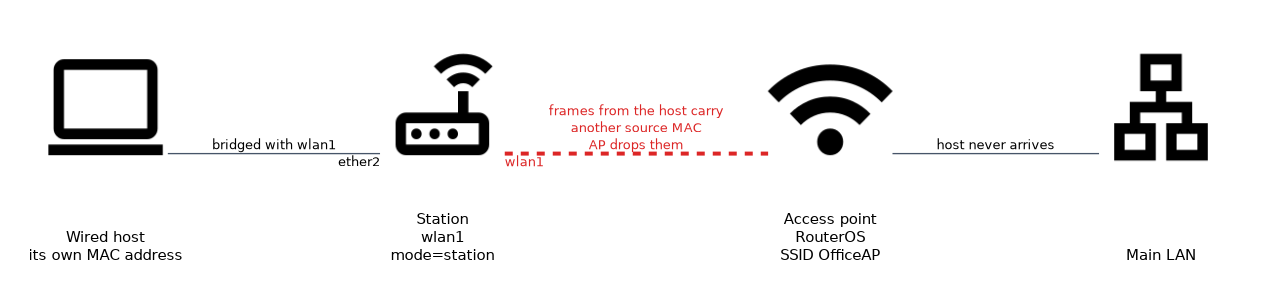 In the standard wireless mode a station sends frames using its own wireless MAC address only. An access point accepts frames from the associated station address, and it drops frames with other source addresses.
If you bridge the station interface with an Ethernet port, frames from hosts behind the station carry their own MAC addresses. The access point does not accept them, so those hosts cannot communicate.
This is a limit of how wireless links identify their clients. It is not specific to RouterOS.
The wireless menu described here belongs to the RouterOS wireless package of version 6. On version 7 the menu and the available modes depend on which wireless package and hardware the device uses, so check the documentation for the device.
The station modes compared
RouterOS offers several ways to make a station carry other hosts.
| Mode | How it works | Limitation |
|---|---|---|
station | Normal client, one MAC address | Cannot be bridged with other ports |
station-bridge | The station can be bridged, with Layer 2 transparency | The access point must be a RouterOS device that allows it |
station-pseudobridge | Translates MAC addresses so the station works with any access point | Not fully transparent |
station-wds | Uses WDS to carry the extra MAC addresses | The access point must be set up for WDS |
Station bridge is the cleanest choice when both ends are RouterOS devices. The station is fully transparent, so the hosts behind it appear on the main LAN with their own MAC addresses.
Pseudobridge is the choice when the access point is not a RouterOS device. The station rewrites some of the MAC addresses, so the result is not fully transparent.
Configuring a station bridge
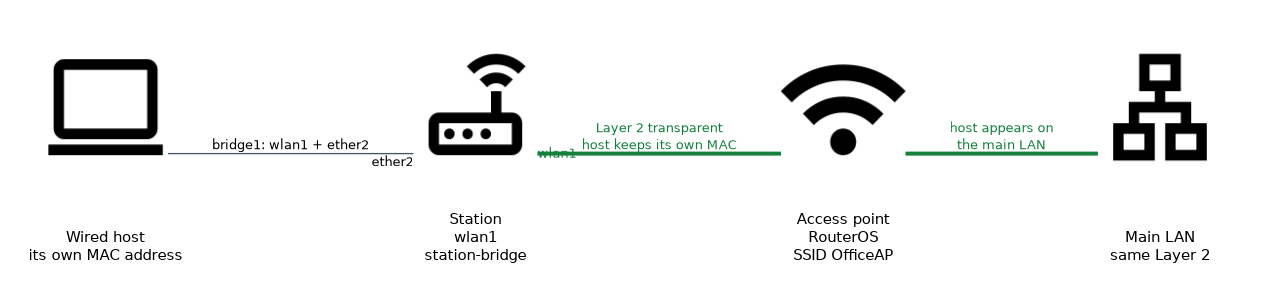 On the station, set the mode and the SSID of the access point.
/interface wireless set wlan1 mode=station-bridge ssid=OfficeAP
/interface bridge add name=bridge1
/interface bridge port add bridge=bridge1 interface=wlan1
/interface bridge port add bridge=bridge1 interface=ether2
The first command puts the wireless interface in station bridge mode and tells it which network to join. The next commands create a bridge and add the wireless and wired interfaces to it.
The security settings must match the access point. The wireless security chapter explains the security profile that carries them.
On the access point side, the wireless interface is in AP mode, and the access point must accept station bridge clients. The AP must be a RouterOS device for this mode to work.
Checking the link
Check the connection from the station and from the access point.
/interface wireless print
/interface wireless registration-table print
On the station, the interface should show that it is running and connected. On the access point, the registration table lists the station as a client.
A host connected to the station Ethernet port should now get an address from the DHCP server on the main LAN, if one exists there. This shows that the link is transparent.
When to use it
Station bridge is useful when you need to bring a remote wired device onto the main LAN over a wireless link. Examples are a printer or a camera that has only an Ethernet port, or a small remote office switch.
If you only need a client to reach the network, plain station mode is enough. The bridge mode is needed only when other devices sit behind the station.
What to remember for the exam
Six facts cover this topic.
- A standard station uses one MAC address, so it cannot be bridged with other ports.
station-bridgemakes the station transparent at Layer 2 for the hosts behind it.- Station bridge needs a RouterOS access point that allows it.
station-pseudobridgeworks with other access points but is not fully transparent.- The wireless interface and the Ethernet port are both added to a bridge.
- The registration table on the access point shows connected stations.
Do not bridge a plain station mode interface, because the access point drops frames from other MAC addresses.
Common mistakes
These four mistakes are typical.
Bridging a normal station. The access point drops frames with extra MAC addresses, so hosts behind it fail.
Using station bridge against a non RouterOS access point. The mode needs a RouterOS access point, so use pseudobridge instead.
Forgetting to add the wireless port to the bridge. The wired hosts then never reach the wireless link.
Mismatching the security settings. The station cannot join the access point if the security profile differs.
Check yourself
Work through these three questions.
Why can a normal wireless station not be bridged?
It sends all frames with its own MAC address, so the access point drops frames from hosts behind it that carry other addresses.
When do you choose station bridge and when pseudobridge?
Use
station-bridgewhen both ends are RouterOS devices, because it is fully transparent. Usestation-pseudobridgewhen the access point is not RouterOS, accepting that it is not fully transparent.How do you check that a station has joined the access point?
Run
/interface wireless registration-table printon the access point. The station is listed there as a client.
Topic 2 of 2 in Bridging
Test yourself on Bridging
The full MikroTik MTCNA question bank has 558 questions, with timed practice exams and an explanation for every answer.
This study guide is independent and is not affiliated with, endorsed by, or sponsored by MikroTik. Vendor names, certification names and exam codes are trademarks of their respective owners and are used for identification only.