Bridging · Topic 1 of 2
Bridging Concepts, Creating Bridges and Adding Ports
Learn what a RouterOS bridge is, how to create one, how to add ports, and how bridge settings such as protocol mode and the host table affect a LAN.
- 5 min
- Includes a diagram
- A bridge joins interfaces into one Layer 2 network with one broadcast domain.
- A bridge is created with
/interface bridge add, and ports are added with/interface bridge port add. - The IP address belongs on the bridge interface, not on the member ports.
What it is
A bridge joins several interfaces into one Layer 2 network, so that they behave like ports on a switch.
Hosts on different ports of the bridge share one broadcast domain and one IP subnet. Frames are forwarded by MAC address, with no routing between the ports.
A RouterOS bridge is a virtual interface of its own. You add ports to it, and you put the IP address on the bridge, not on the member ports.
How it works
You create the bridge, add ports to it, and then address the bridge itself.
Bridge concepts
A bridge learns which MAC address lives behind which port. It records each source address it sees, and it uses that table to send later frames only to the right port.
Frames for an unknown destination, and broadcasts, are flooded out of every port of the bridge except the one they came from. This is the normal behaviour of a switch.
The learned addresses are kept in the host table of the bridge.
/interface bridge host printBridging works at Layer 2, while routing works at Layer 3. Interfaces in one bridge need no routes between them, and they share one subnet. Interfaces that are not bridged are separate networks that need routing between them.
Creating a bridge and adding ports
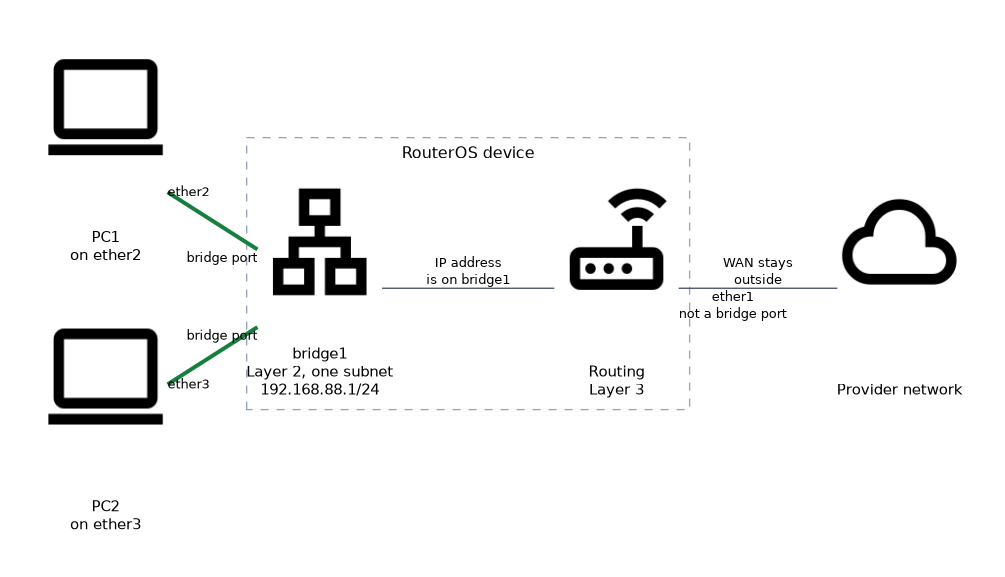
/interface bridge add name=bridge1
/interface bridge port add bridge=bridge1 interface=ether2
/interface bridge port add bridge=bridge1 interface=ether3
/ip address add address=192.168.88.1/24 interface=bridge1
The first command creates the bridge. The next two make ether2 and ether3 members. The last command puts the IP address on the bridge itself.
An interface can belong to only one bridge at a time. Once an interface is a bridge port, an IP address on that port stops being useful, because the bridge handles its traffic. Move the address to the bridge.
Moving the port you are connected through into a bridge can drop your session, so add the address to the bridge before you move the port.
To check the result, print the bridge and its ports.
/interface bridge print
/interface bridge port print
Bridge settings
A few settings of the bridge are worth knowing.
| Setting | What it controls |
|---|---|
protocol-mode | Which loop prevention protocol runs, such as STP or RSTP, or none |
admin-mac and auto-mac | The MAC address that the bridge uses |
arp | The ARP mode of the bridge interface |
vlan-filtering | Whether the bridge filters traffic by VLAN |
The protocol mode matters when the network has loops. A loop makes frames circulate forever, so the bridge can run a spanning tree protocol that blocks redundant paths. RSTP is the usual choice on current versions, and it reacts faster than the older STP.
By default the bridge takes its MAC address from one of its ports. The admin-mac setting fixes it to a chosen address, which keeps the bridge address stable when ports change. Version 6 and version 7 differ in how bridge VLAN filtering is configured, so a VLAN design needs to follow the documentation for the installed version.
Bridge ports and the firewall
Each bridge port has its own settings, such as a path cost and priority for spanning tree. You will rarely need them for a simple LAN.
Traffic that is only switched between bridge ports does not go through the IP firewall by default. A bridge setting can send bridged traffic through the IP firewall as well, which is needed when you want filter rules to see it.
/interface bridge settings set use-ip-firewall=yesA typical LAN bridge
A typical small office router bridges its LAN ports and any wireless interface into one bridge. The WAN port stays outside the bridge, because it is a separate network facing the provider.
The IP address, the DHCP server and the firewall rules for the LAN are then attached to the bridge interface. Adding a new LAN port later means only adding a bridge port.
Keep the WAN interface out of the LAN bridge, and attach the LAN address and DHCP server to the bridge.
What to remember for the exam
Seven facts cover this topic.
- A bridge joins interfaces into one Layer 2 network with one broadcast domain.
- A bridge is created with
/interface bridge add, and ports are added with/interface bridge port add. - The IP address belongs on the bridge interface, not on the member ports.
- An interface can be a member of only one bridge.
- The bridge learns MAC addresses and shows them in
/interface bridge host print. - RSTP or STP stops loops by blocking redundant paths.
- The WAN port normally stays outside the LAN bridge.
Common mistakes
These four mistakes appear often.
Leaving the IP address on a bridge port. The address should be on the bridge, so move it before or right after adding the port.
Bridging the WAN port. The provider network and the LAN then become one broadcast domain, which exposes the LAN.
Creating a loop with protocol mode off. A loop with no spanning tree floods the network with endless frames.
Putting one interface in two bridges. A port can belong to a single bridge only.
Check yourself
Work through these three questions.
Where does the IP address go when ports are bridged?
It goes on the bridge interface, for example
/ip address add address=192.168.88.1/24 interface=bridge1. Member ports do not carry the address.What is the difference between bridging and routing?
Bridging forwards frames by MAC address inside one Layer 2 network. Routing forwards packets by IP address between different networks.
Why would you leave the protocol mode on a bridge enabled?
Spanning tree, such as RSTP, blocks redundant paths and stops frames from looping. Without it a loop floods the network.
Topic 1 of 2 in Bridging
Test yourself on Bridging
The full MikroTik MTCNA question bank has 558 questions, with timed practice exams and an explanation for every answer.
This study guide is independent and is not affiliated with, endorsed by, or sponsored by MikroTik. Vendor names, certification names and exam codes are trademarks of their respective owners and are used for identification only.