IPv6 Security · Topic 3 of 4
IPv6 Firewall on RouterOS
Learn how the RouterOS IPv6 firewall works, including filter chains, connection states, ICMPv6 and DHCPv6 rules, address lists and a safe baseline ruleset.
- 5 min
- Includes a diagram
- IPv6 has its own firewall in
/ipv6 firewall, separate from/ip firewall. - The chains are
input,forwardandoutput. - Use
protocol=icmpv6for ICMPv6 rules.
What it is
The IPv6 firewall is a separate rule set that protects the router and the networks behind it.
IPv4 and IPv6 have their own firewalls on RouterOS. The IPv4 rules in /ip firewall never touch IPv6 traffic. If you secure only IPv4, your IPv6 hosts are open to the Internet.
This matters more in IPv6, because every host has a global address. There is no NAT in front of them that hides the network by accident.
How it works
The IPv6 firewall uses the same ideas as the IPv4 firewall, in the /ipv6 firewall menu.
Menus and chains
The /ipv6 firewall menu has the same tables as the IPv4 one, such as filter, mangle, raw and address-list. The filter table has three built in chains:
| Chain | Traffic it sees |
|---|---|
input | Packets addressed to the router itself |
output | Packets sent by the router |
forward | Packets passing through the router |
Rules are checked from top to bottom. The first rule that matches decides what happens. A packet that matches no rule is accepted, so you end the chain with a drop rule.
Connection tracking
The firewall is stateful. It tracks each connection and gives it a state. You match the state with the connection-state setting.
| State | Meaning |
|---|---|
new | First packet of a new connection |
established | Packets of a connection seen in both directions |
related | A new connection linked to an existing one, such as an ICMPv6 error |
invalid | Does not belong to any known connection |
untracked | Skipped by connection tracking, set in the raw table |
The normal pattern is to accept established and related traffic first, drop invalid traffic, and then handle new connections.
What IPv6 needs to allow
Some traffic must be allowed or IPv6 breaks. These are the main cases:
- ICMPv6: needed for Neighbor Discovery, Path MTU Discovery and ping.
- DHCPv6 replies: a client on UDP port 546 must receive answers from link local servers.
- Routing protocols: if you run them, they use link local addresses and multicast.
- IPsec: if the router terminates tunnels, allow ESP and the key exchange.
A baseline ruleset
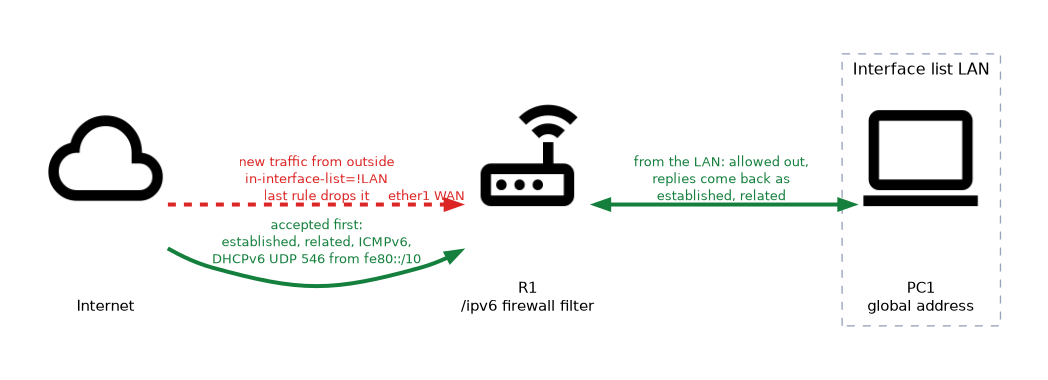 The ruleset below protects the router and the LAN, and is a good starting point.
/ipv6 firewall filter
add chain=input connection-state=established,related action=accept
add chain=input connection-state=invalid action=drop
add chain=input protocol=icmpv6 action=accept
add chain=input protocol=udp dst-port=546 src-address=fe80::/10 action=accept
add chain=input in-interface-list=!LAN action=drop
add chain=forward connection-state=established,related action=accept
add chain=forward connection-state=invalid action=drop
add chain=forward protocol=icmpv6 action=accept
add chain=forward in-interface-list=!LAN action=drop
The input rules protect the router. The forward rules protect the hosts behind it.
The last rule in each chain drops everything that did not come from the LAN. The LAN interface list must exist, and it holds the inside interfaces.
Without the DHCPv6 rule, a router that gets its prefix from an ISP can lose its lease.
Address lists, logging and counters
An address list groups prefixes under one name, so one rule can match many networks. You can add entries by hand, or let a rule add them with the add-src-to-address-list action.
/ipv6 firewall address-list add list=admin address=2001:db8:ff::/64
/ipv6 firewall filter add chain=input src-address-list=admin protocol=tcp dst-port=22 action=accept
Set log=yes and a log-prefix on a rule to record matches. Each rule also keeps packet and byte counters that you read with /ipv6 firewall filter print stats. These help you confirm which rule a flow is hitting.
Differences from the IPv4 firewall
| Point | IPv4 | IPv6 |
|---|---|---|
| Menu | /ip firewall | /ipv6 firewall |
| Address match | IPv4 prefixes | IPv6 prefixes |
| Protocol name for ping | icmp | icmpv6 |
| Hidden hosts behind NAT | Common | Not the default, hosts are reachable |
| Header matches | TTL and similar | Hop limit and extension headers |
Build the IPv6 rule set in the same order as the IPv4 one, then test it from outside. Hosts with global addresses can be reached directly if a rule is missing.
What to remember for the exam
Eight facts cover most questions on this topic.
- IPv6 has its own firewall in
/ipv6 firewall, separate from/ip firewall. - The chains are
input,forwardandoutput. - Use
protocol=icmpv6for ICMPv6 rules. - Accept established and related, drop invalid, then handle new traffic.
- Allow ICMPv6, or Neighbor Discovery and Path MTU Discovery break.
- Allow DHCPv6 replies on UDP port 546 from
fe80::/10if the router is a DHCPv6 client. - Rules are read from top to bottom, and the first match wins.
- End the chain with a drop for traffic that did not come from the LAN.
Securing only IPv4 leaves IPv6 open. Check /ipv6 firewall filter print on every router that has IPv6 enabled.
Common mistakes
These four mistakes appear often.
Protecting only IPv4. The /ip firewall rules do not apply to IPv6.
Dropping ICMPv6. This breaks address resolution and Path MTU Discovery.
Putting the drop rule too high. Rules below it never match, so accepts must come first.
Missing the DHCPv6 rule. The client can no longer renew its address or prefix.
Check yourself
Work through these three questions.
Do rules in
/ip firewallfilter IPv6 traffic?No, IPv6 has its own firewall in
/ipv6 firewall.Which protocol name matches ping and Neighbor Discovery in an IPv6 rule?
icmpv6.Why must the chain end with a drop rule for outside traffic?
A packet that matches no rule is accepted, so a final drop rule closes the router and the LAN to unwanted traffic.
Topic 3 of 4 in IPv6 Security
Test yourself on IPv6 Security
The full MikroTik MTCIPv6E question bank has 486 questions, with timed practice exams and an explanation for every answer.
This study guide is independent and is not affiliated with, endorsed by, or sponsored by MikroTik. Vendor names, certification names and exam codes are trademarks of their respective owners and are used for identification only.